M2-M Operating Manual | Mounting and Connecting
M2-M_Operating_Manual_2.0.0
3.2 CONNECTING
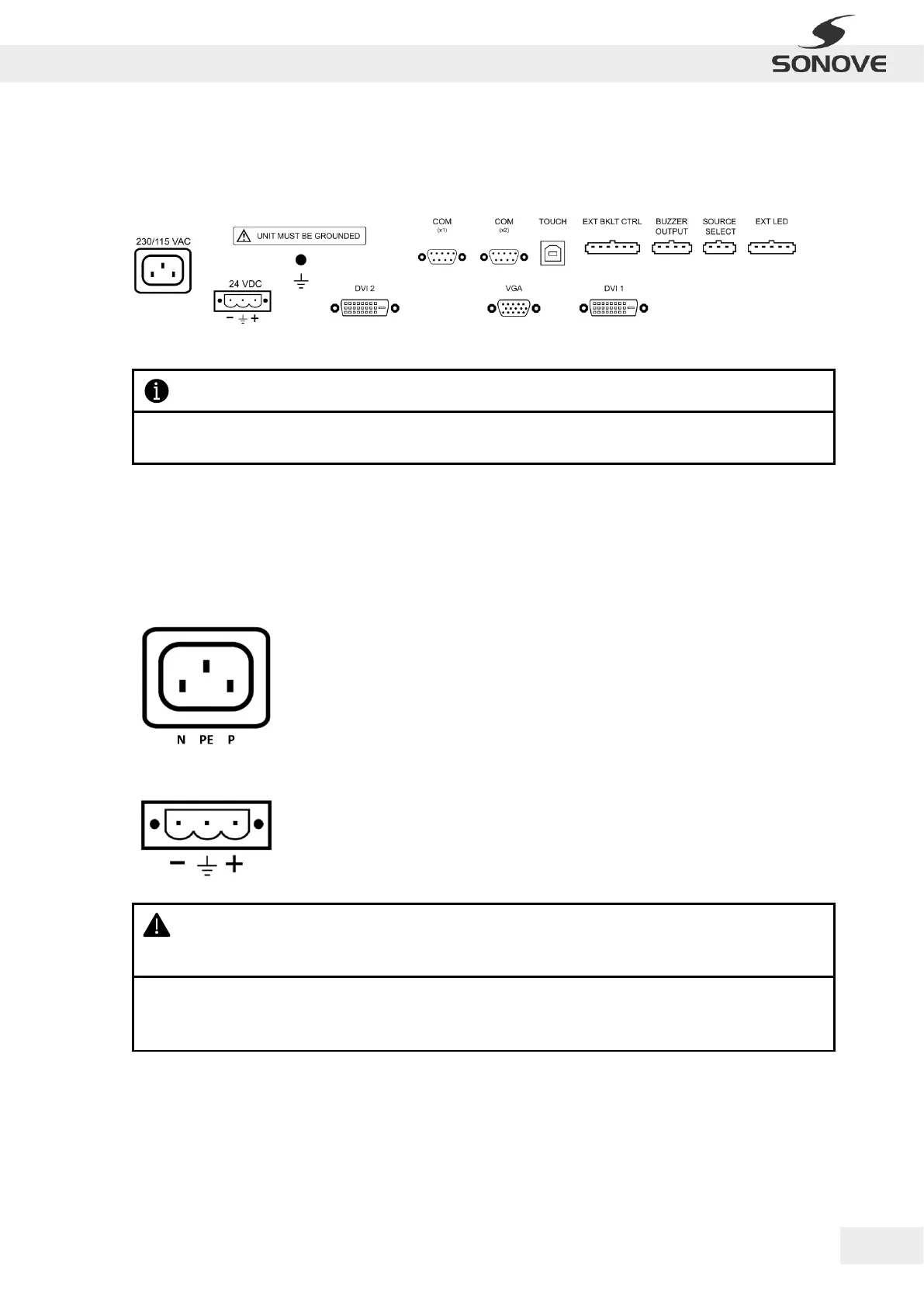
The interfaces of the monitor are located on the back of the product. The following graphic shows an example
of a M2-M-24 slot bracket:
Figure 7: Slot Bracket M2-M-24 DCAC
Please notice that the interfaces of the monitor depend on the product type (article no.) and may therefore
differ from the figure above.
The interfaces and their port assignments are described in the following subsections.
3.2.1 POWER INPUT
Depending on the product configuration, the monitor can be supplied with 230/115 VAC and/or 24 VDC. The
following table shows the port assignments of the different power supply sockets:
Figure 8: Power supply socket for 230/115 VAC
Figure 9: Power supply socket for 24 VDC
WARNING: Proper grounding is crucial for the electrical system! Inadequate or no grounding may
cause overvoltage at the housing, electric shock or hazard, product damage, malfunctions during
operations and/or severe and fatal injuries.
· The grounding conductor must be connected to the earth ground!
· Disconnect product from power source immediately if grounding conductor is not connected to the
earth ground!


 To Next Page