EasyManua.ls Logo

SONOVE M2-M - DVI-D

SONOVE M2-M
50 pages
Print Icon
To Next Page IconTo Next Page
To Previous Page IconTo Previous Page
Loading...
M2-M Operating Manual | Mounting and Connecting
M2-M_Operating_Manual_2.0.0
16
INFORMATION
The type of supported power supply depends on the configuration of the monitor.
INFORMATION
The monitor is connected to AC voltage by a standard AC power cable.
For AC systems a AC power cable is included in the delivery scope.
The monitor is connected to DC voltage by a DC power plug.
For DC systems a DC power plug is included in the delivery scope.
Wires included in the delivery scope are suitable for up to 8 A.
INFORMATION
The monitor will not be damaged by reversed polarity, may it occur.
3.2.2 DVI-D
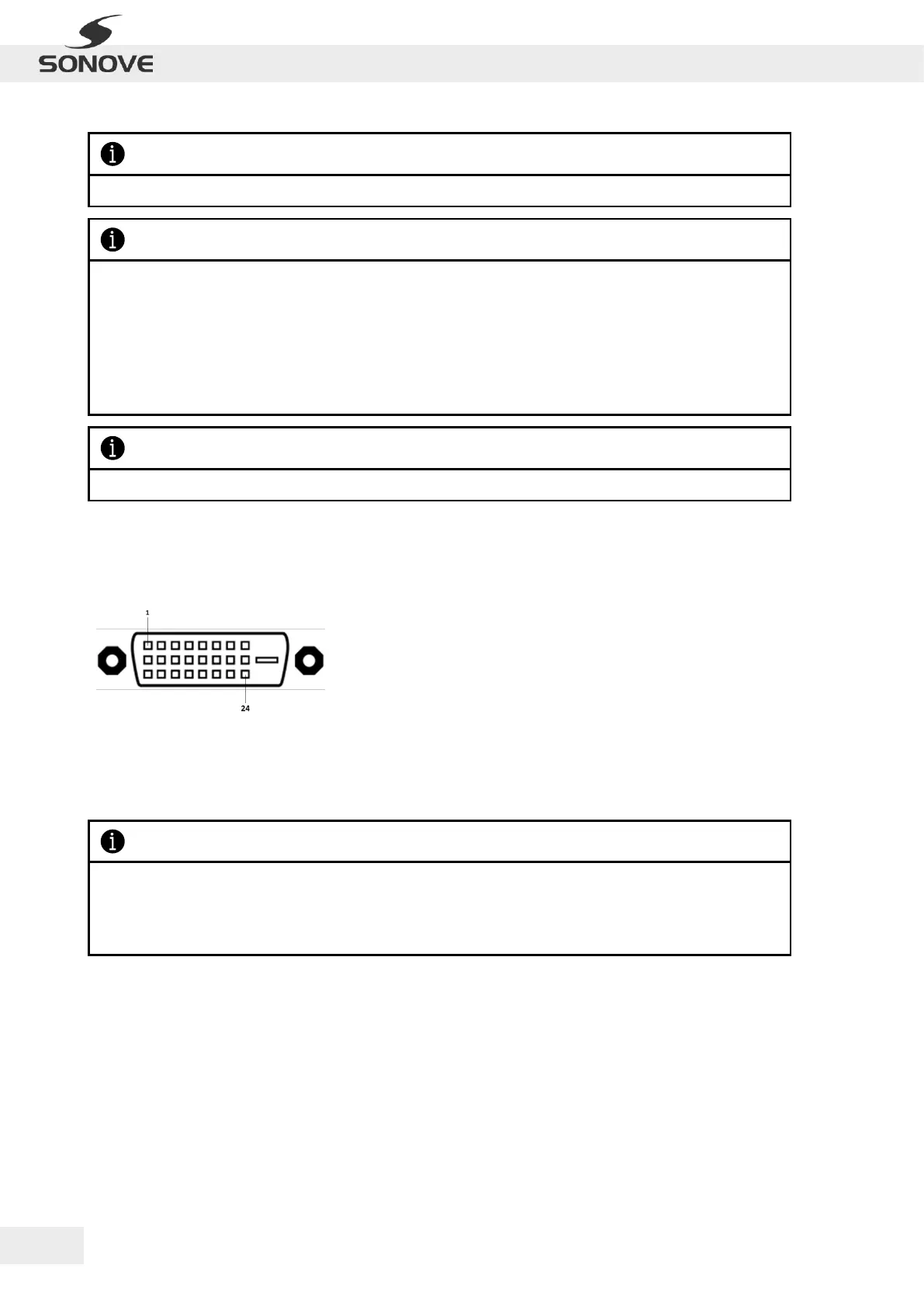
The monitor is equipped with two DVI-D sockets. The following table lists the port assignments:
Pin Assignment
Pin
Signal/ Description
Pin
Signal/ Description
Figure 10: DVI-D socket
Pin 1
TMDS data 2-
Pin 16
Hot plug detect
Pin 2
TMDS data 2+
Pin 17
TMDS data 0-
Pin 3
TMDS data 2/4 shield
Pin 18
TMDS data 0+
Pin 4
TMDS data 4-
Pin 19
TMDS Data 0/5 Shield
Pin 5
TMDS data 4+
Pin 20
TMDS data 5-
Pin 6
DDC clock
Pin 21
TMDS data 5+
Pin 7
DDC data
Pin 22
TMDS clock shield
Pin 8
Analog vertical sync
Pin 23
TMDS clock +
Pin 9
TMDS data 1-
Pin 24
TMDS clock -
Pin 10
TMDS data 1+
C1
Not connected
Pin 11
TMDS data 1/3 shield
C2
Not connected
Pin 12
TMDS data 3-
C3
Not connected
Pin 13
TMDS data 3+
C4
Not connected
Pin 14
+5V power
C5
Not connected
Pin 15
GND (for +5V)
INFORMATION
Fasten the DVI cable’s fixing screws for adequate connection!
Ensure high quality of DVI cable and correct termination of shield!
The DVI Cable and a DVI DP adapter cable are included in the delivery scope.