K850
1203-2528 rev. 1
TROUBLESHOOTING
TROUBLESHOOTING
STEP 1:
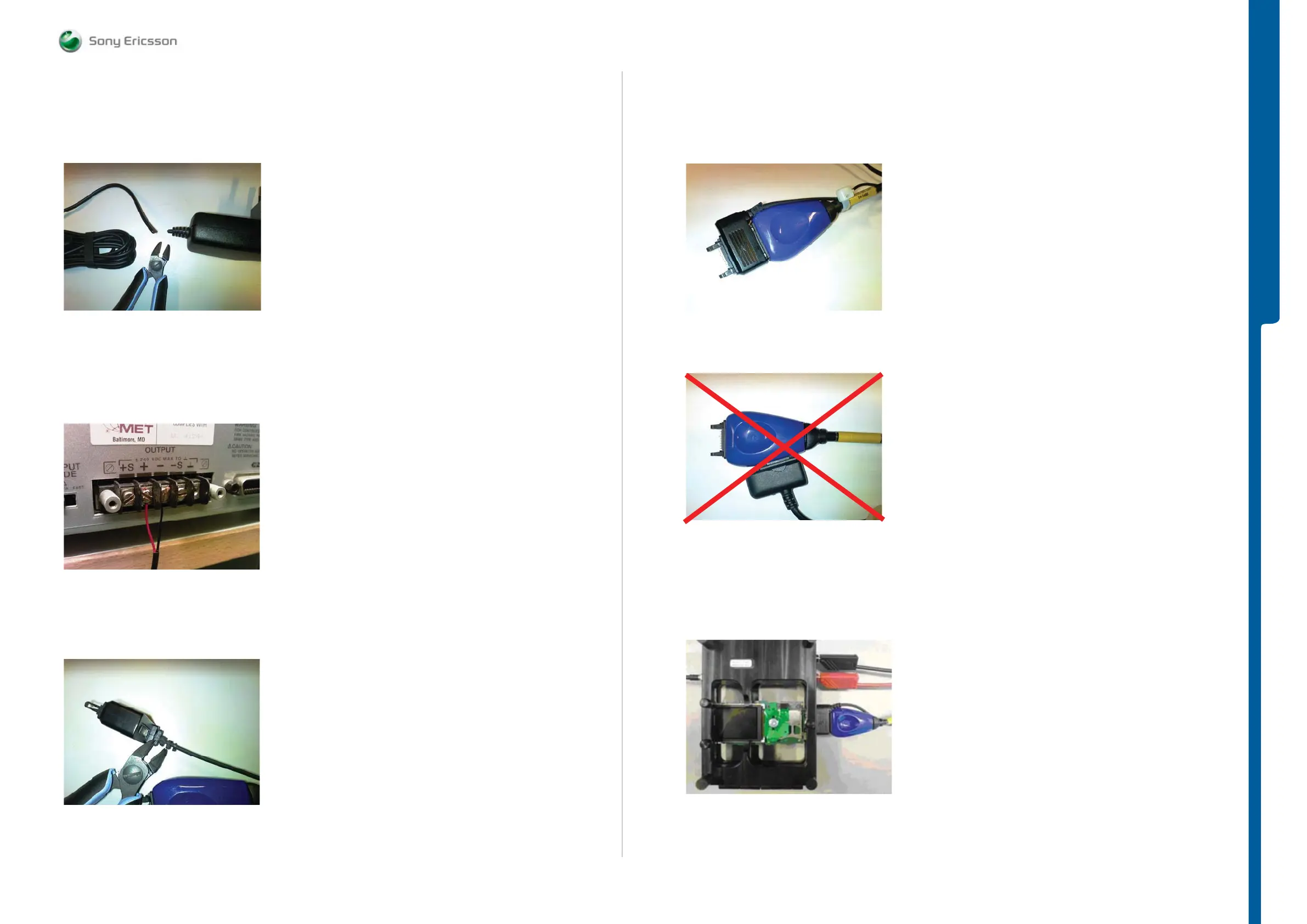
Take the CST-75 battery charger and cut of the charger according to Picture 6.
Picture 6
Note: Cable length must be exact 1.3m.
STEP 2:
Connect the CST-75 charger Red or White wire to the Plus Output and the Black wire to the
Minus (GND) Output at Power Supply Channel 2 DCIO/SEPI according to Picture 7.
Picture 7
STEP 3:
Trim the flex protection material from inside of the charger plug according to Picture 8.
Picture 8
STEP 4:
Connect DCIO and SEPI Interface Cable – A1 cables according to Picture 9.
Picture 9
The setup in Picture 10 is WRONG!
Picture 10
Power Supply Channel 2 DCIO/SEPI Cable Connection Setups
Correct DCIO/SEPI Cable setup when TRS Fixture is used.
Picture 11
Note: Example of DCIO/SEPI and K750 TRS Fixture Setup.
Equipment List
SEMC Troubleshooting Manual
5 (101)













 To Next Page