Help Guide
Interchangeable Lens Digital Camera
ILCE-7CM2 α7CII
Still/Movie/S&Q dial and mode dial
You can use the Still/Movie/S&Q dial and mode dial to select a shooting mode according to the subject and purpose of
shooting.
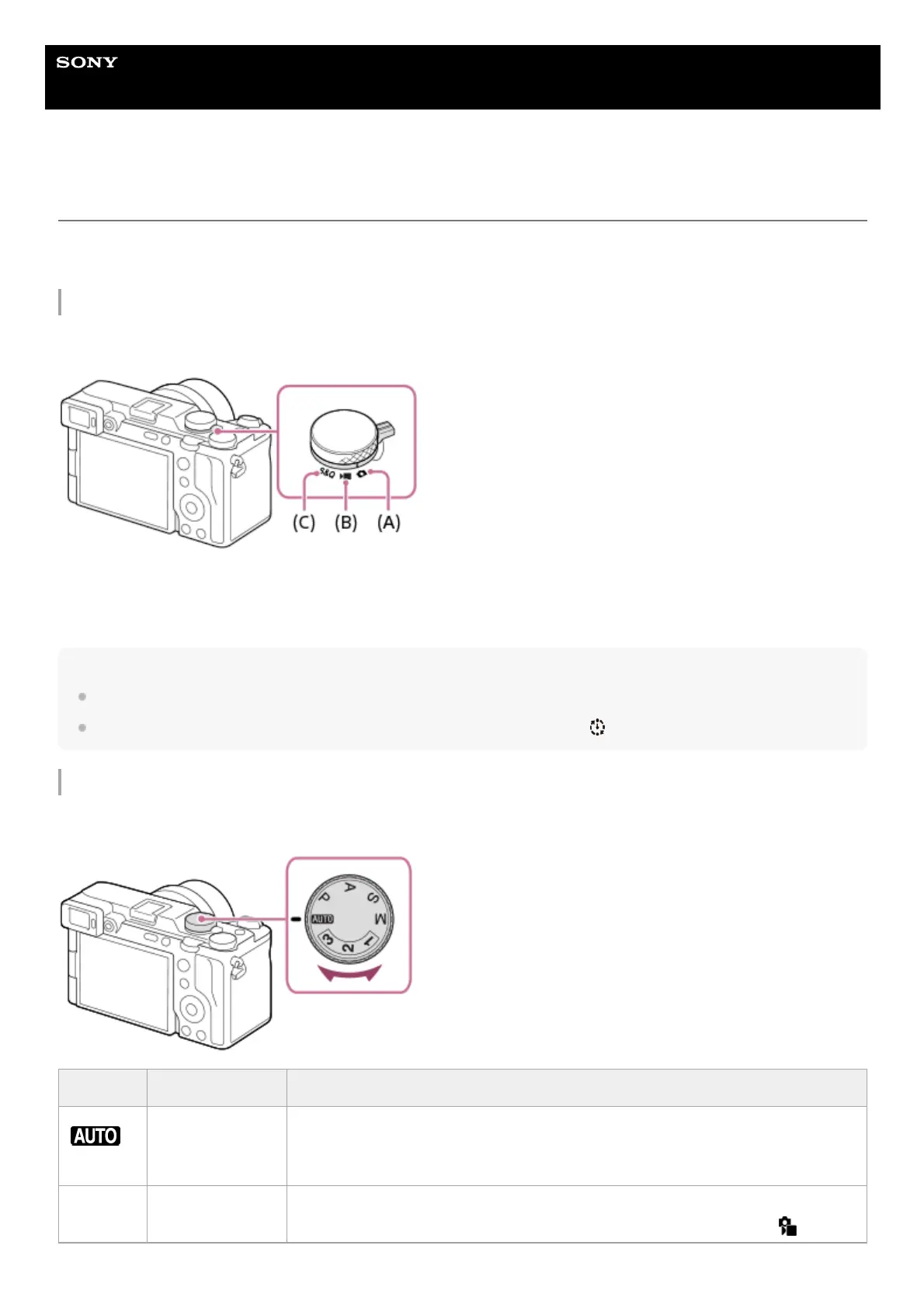
Still/Movie/S&Q dial
Use the Still/Movie/S&Q dial to select a shooting mode.
(A) Still image shooting mode
(B) Movie recording mode
(C) Slow-motion/quick-motion shooting mode
Hint
The displayed menu items vary depending on the Still/Movie/S&Q dial position.
When shooting a time-lapse movie, set the Still/Movie/S&Q dial to S&Q, and select [
Time-lapse].
Mode dial
The exposure mode you select determines how the aperture (F value) and shutter speed are adjusted.
Mode dial Exposure mode Description
(Auto)
Intelligent Auto
/Scene Selection
The camera shoots with automatic scene recognition ( Intelligent Auto ).
You can specify the shooting scene and shoot with the settings automatically set by
the camera (Scene Selection).
P Program Auto
Allows you to shoot with the exposure adjusted automatically (both the shutter
speed and the aperture value). You can set shooting functions such as [
ISO] .



 To Next Page
 Loading...








