Custom menu
119
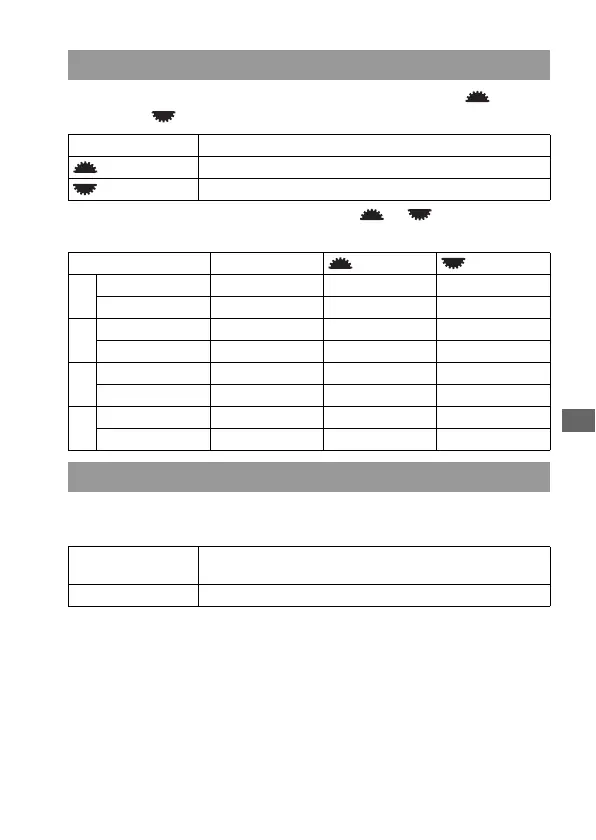
You can compensate the exposure with the front control dial ( ) or rear
control dial ( ).
For example, when [Ctrl dial setup] is set to [ SS F/no.], the
functions of the front and rear control dials are as follows:
When the exposure value is not displayed, you can lock the front and rear
control dials to deactivate them.
Dial exp.comp
Off Does not compensate the exposure with the dials.
Front dial Compensates the exposure with the front control dial.
Rear dial Compensates the exposure with the rear control dial.
Exposure Mode Off Front dial Rear dial
P
Front control dial P
S
shift Exp. comp P
S
shift
Rear control dial P
A
shift P
A
shift Exp. comp
A
Front control dial Aperture Exp. comp Aperture
Rear control dial Aperture Aperture Exp. comp
S
Front control dial Shutter speed Exp. comp Shutter speed
Rear control dial Shutter speed Shutter speed Exp. comp
M
Front control dial Shutter speed Shutter speed Shutter speed
Rear control dial Aperture Aperture Aperture
Ctrl dial lock
On The front and rear control dial function only when the shutter
speed and the aperture are displayed.
Off The front and rear control dial function at all times.



 To Next Page