Viewing images on a computer
143
The image files recorded with your camera are grouped as folders on the
memory card.
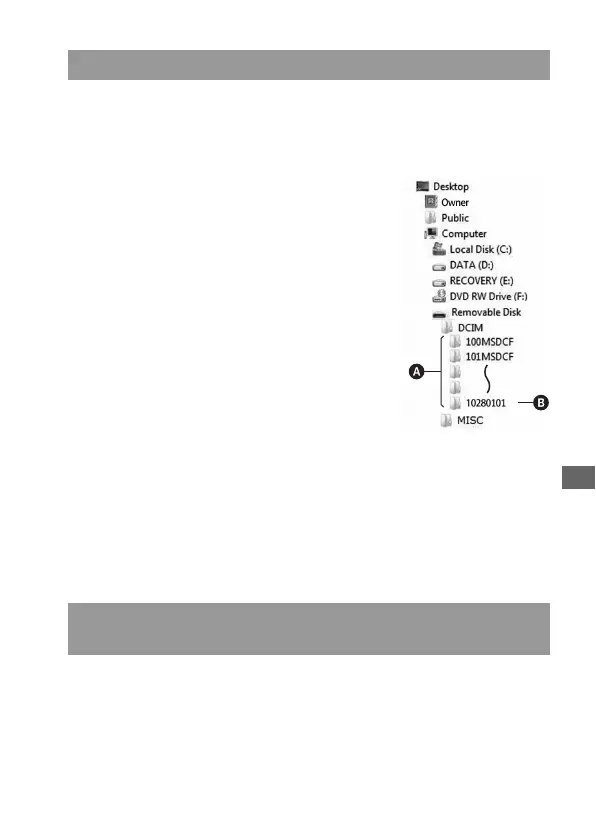
Example: viewing folders on Windows Vista
This section describes the process using a Windows computer as an
example. Step 1 is not necessary if the file name has not been changed.
Image file storage destinations and file names
AFolders containing image data recorded
using this camera. (The first three digits
show the folder number.)
BYou can create a folder by date form
(page 129).
• You cannot record/play back any images in
the “MISC” folder.
• Image files are named as follows. ssss
(file number) stands for any number within
the range from 0001 to 9999. The numerical
portions of the name of a RAW data file and
its corresponding JPEG image file are the
same.
– JPEG files: DSC0ssss.JPG
– JPEG files (Adobe RGB):
_DSCssss.JPG
– RAW data file (other than Adobe RGB):
DSC0ssss.ARW
– RAW data file (Adobe RGB):
_DSCssss.ARW
• The extension may not be displayed
depending on the computer.
Copying images stored on a computer to a memory card
and viewing the images



 To Next Page