Shooting images
55
You can manually adjust the shutter speed and aperture values.
This mode is useful when you maintain the setting of the shutter speed and
the aperture value or when you use an exposure meter.
Notes
• The (Camera shake warning) indicator is not indicated in manual exposure
mode.
• When the mode dial is set to M, the ISO setting [AUTO] is set to [200]. In M mode,
the ISO setting [AUTO] is not available. Set the ISO sensitivity as necessary.
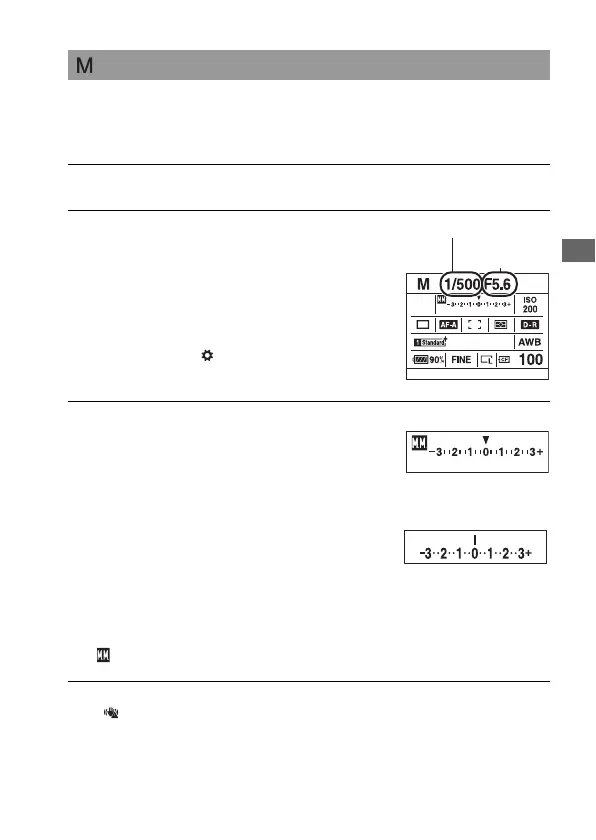
Shooting with Manual exposure
1 Set the mode dial to M.
2 Rotate the front control dial to
adjust the shutter speed, and
rotate the rear control dial to
adjust the aperture.
• You can switch the functions of the
front and rear control dial with [Ctrl
dial setup] in the Custom menu
(page 118).
Shutter speed
3 Shoot the image after the
exposure is set.
• Check the exposure value on the EV
scale.
Toward +: Images become brighter.
Toward –: Images become darker.
The b B arrow appears if the set
exposure is beyond the range of the EV
scale. The arrow starts flashing if the
difference becomes greater. When the
exposure is compensated, the standard
value contains the compensated value.
: Metered Manual
LCD monitor (Detailed display)
Standard value
Viewfinder
Standard value
Aperture
(F-number)



 To Next Page