52
Program Shift
You can temporarily change the shutter speed and aperture value
combination with the correct exposure determined by the camera
maintained.
Notes
• If you turn the camera off and on or a certain period of time is passed, Program Shift
“P
S
” or “P
A
” is canceled and returned to “P.”
• When Program Shift “P
S
” is selected, the (Camera shake warning) indicator is
not displayed.
• When a flash (not supplied) attached to the camera is turned on, Program Shift does
not operate.
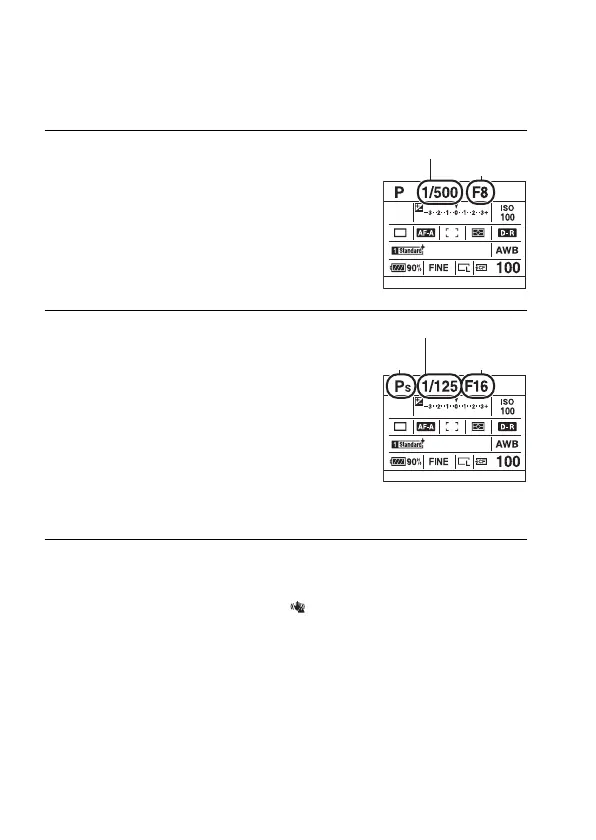
1 Press the shutter button halfway
down to adjust the focus.
The shutter speed and aperture value are
indicated.
Shutter speed
2 Rotate the front or rear control
dial to select your desired
combination while the focus is
achieved.
Rotating the front control dial sets the
exposure mode indicator to “P
S
” (Shutter
speed priority Program Shift) and
rotating the rear control dial sets the
exposure mode indicator to “P
A
”
(Aperture priority Program Shift).
Shutter speed
Aperture value
Aperture
value
P
S



 To Next Page