EasyManua.ls Logo

Sony CDP-C910 - Locating Selections and Points; Finding Specific Tracks; Navigating Within Tracks

Sony CDP-C910
26 pages
Print Icon
To Next Page IconTo Next Page
To Previous Page IconTo Previous Page
Loading...
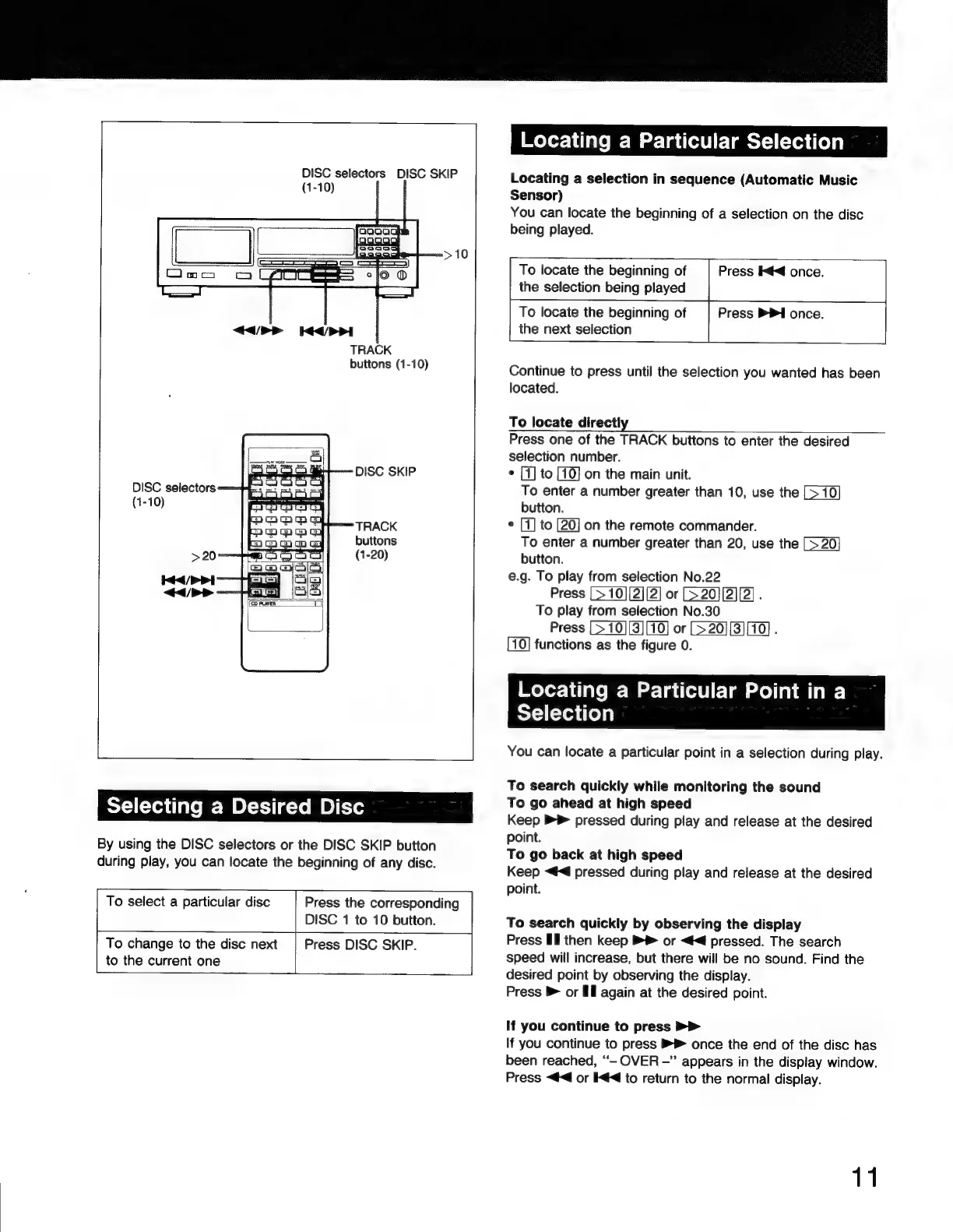
DISC
selectors
DISC
SKIP
0)
TRACK
buttons
(1-10)
Selecting
a
Desired
Disc
By
using
the
DISC
selectors
or
the
DISC
SKIP
button
during
play,
you
can
locate
the
beginning
of
any
disc.
To
select
a particular
disc
Press
the
corresponding
DISC
1
to
10
button.
To
change
to
the
disc
next
|
Press
DISC
SKIP.
to
the
current
one
Locating
a
Particular
Selection
Locating
a
selection
in
sequence
(Automatic
Music
Sensor)
You
can
locate
the
beginning
of
a
selection
on the
disc
being
played.
To
locate
the
beginning
of
Press
I««
once.
the
selection
being
played
To
locate
the
beginning
of
Press
PP»
once.
the
next
selection
Continue
to
press
until
the
selection
you
wanted
has
been
located.
To
locate
directly
Press
one
of
the
TRACK
buttons
to
enter
the
desired
selection
number.
e
[1]
to
on
the
main
unit.
To
enter
a
number
greater
than
10,
use
the
button.
*
[1]
to
on
the
remote
commander.
To
enter
a
number
greater
than
20,
use
the
button.
e.g.
To
play
from
selection
No.22
Press
or
[7
20][2][2]
.
To
play
from
selection
No.30
Press
[>
10][3][10]
or
l
functions
as
the
figure
0.
Locating
a
Particular
Point
in
a
Selection
You
can
locate
a
particular
point
in
a
selection
during
play.
To
search
quickly
while
monitoring
the
sound
To
go
ahead
at
high
speed
Keep
P9
pressed
during
play
and
release
at
the
desired
point.
To
go
back
at
high
speed
Keep
«€
pressed
during
play
and
release
at
the
desired
point.
To
search
quickly
by
observing
the
display
Press
Il
then
keep
or
<4
pressed.
The
search
speed
will
increase,
but
there
will
be
no
sound.
Find
the
desired
point
by
observing
the
display.
Press
»
or
Ell
again
at
the
desired
point.
If
you
continue
to
press
If
you
continue
to
press
once
the
end
of
the
disc
has
been
reached,
''-
OVER
-"
appears
in
the
display
window.
Press
<<
or
I««
to
return
to
the
normal
display.
11

Related product manuals