EasyManua.ls Logo

Sony CDP-C910 - Disc Magazine Management; Loading and Unloading Discs; Disc Handling and Care

Sony CDP-C910
26 pages
Print Icon
To Next Page IconTo Next Page
To Previous Page IconTo Previous Page
Loading...
Setting
Up
the
Disc
Magazine
Inserting
Discs
into
the
Disc
Magazine
(up
to
10
discs,
one
in
each
slot)
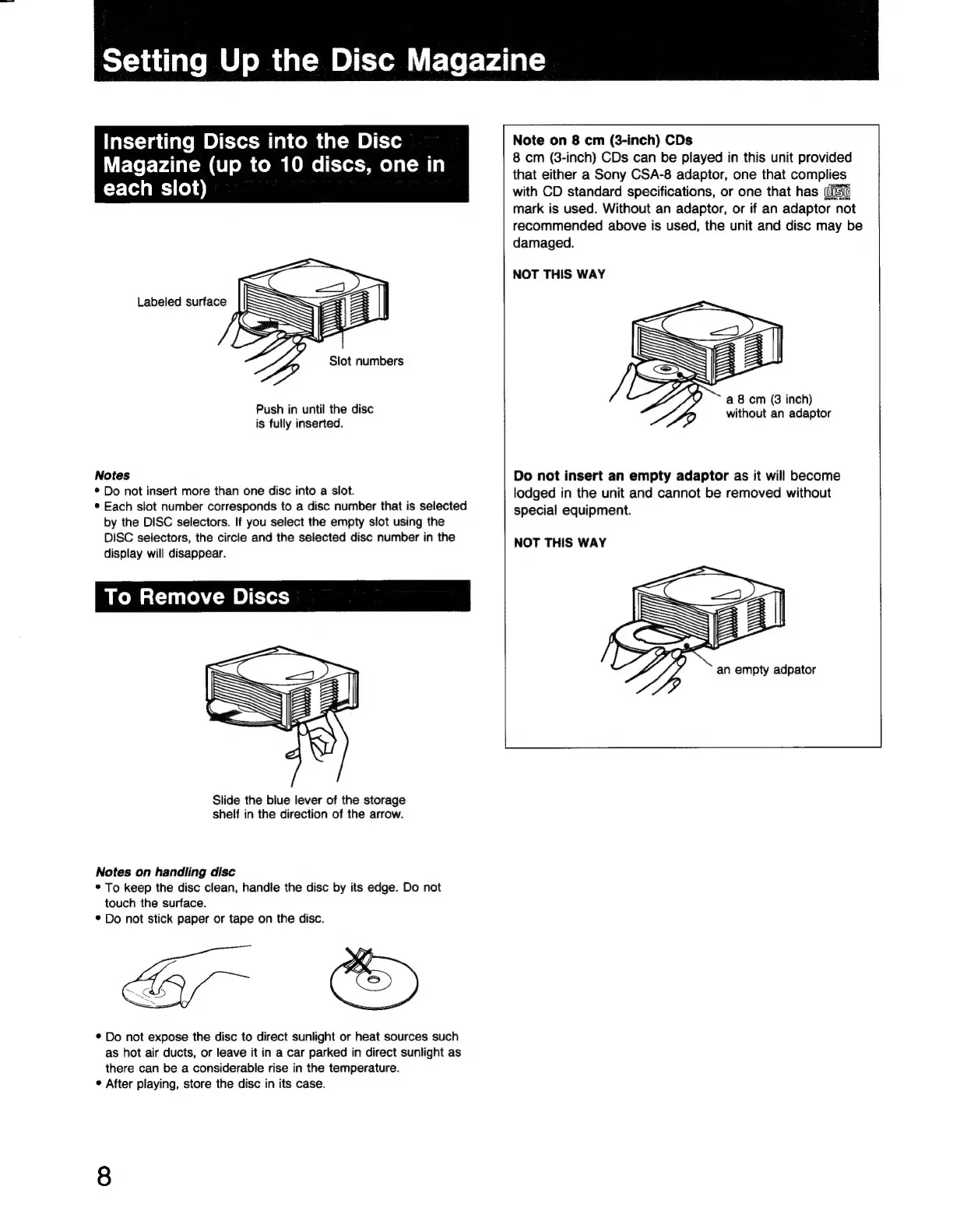
Labeled
surface
Slot
numbers
Push
in
until
the
disc
is
fully
inserted.
Notes
*
Do
not
insert
more
than
one
disc
into
a
slot.
*
Each
slot
number
corresponds
to
a
disc
number
that
is
selected
by
the
DISC
selectors.
If
you
select
the
empty
slot
using
the
DISC
selectors,
the
circle
and
the
selected
disc
number
in
the
display
will
disappear.
To
Remove
Discs
Slide
the
blue
lever
of
the
storage
shelf
in
the
direction
of
the
arrow.
Notes
on
handling
disc
*
To
keep
the
disc
clean,
handle
the
disc
by
its
edge.
Do
not
touch
the
surface.
*
Do
not
stick
paper
or
tape
on
the
disc.
*
Do
not
expose
the
disc
to
direct
sunlight
or
heat
sources
such
as
hot
air
ducts,
or
leave
it
in
a
car
parked
in
direct
sunlight
as
there
can
be
a
considerable
rise
in
the
temperature.
*
After
playing,
store
the
disc
in
its
case.
Note
on
8
cm
(3-inch)
CDs
8
cm
(3-inch)
CDs
can
be
played
in
this unit
provided
that
either
a
Sony
CSA-8
adaptor,
one
that
complies
with
CD
standard
specifications,
or
one
that
has
(IET:
mark
is
used.
Without
an
adaptor,
or
if
an
adaptor
not
recommended
above
is
used,
the
unit
and
disc
may
be
damaged.
NOT
THIS
WAY
~
a
8
cm
(3
inch)
without
an
adaptor
Do
not
insert
an
empty
adaptor
as
it
will
become
lodged
in
the
unit
and
cannot
be
removed
without
special
equipment.
NOT
THIS
WAY

Related product manuals