EasyManua.ls Logo

Sony CDP-C910 - Remote Commander Operation; Remote Setup and Batteries

Sony CDP-C910
26 pages
Print Icon
To Next Page IconTo Next Page
To Previous Page IconTo Previous Page
Loading...
Remote
Commander
poppa
P
Q
R S
F
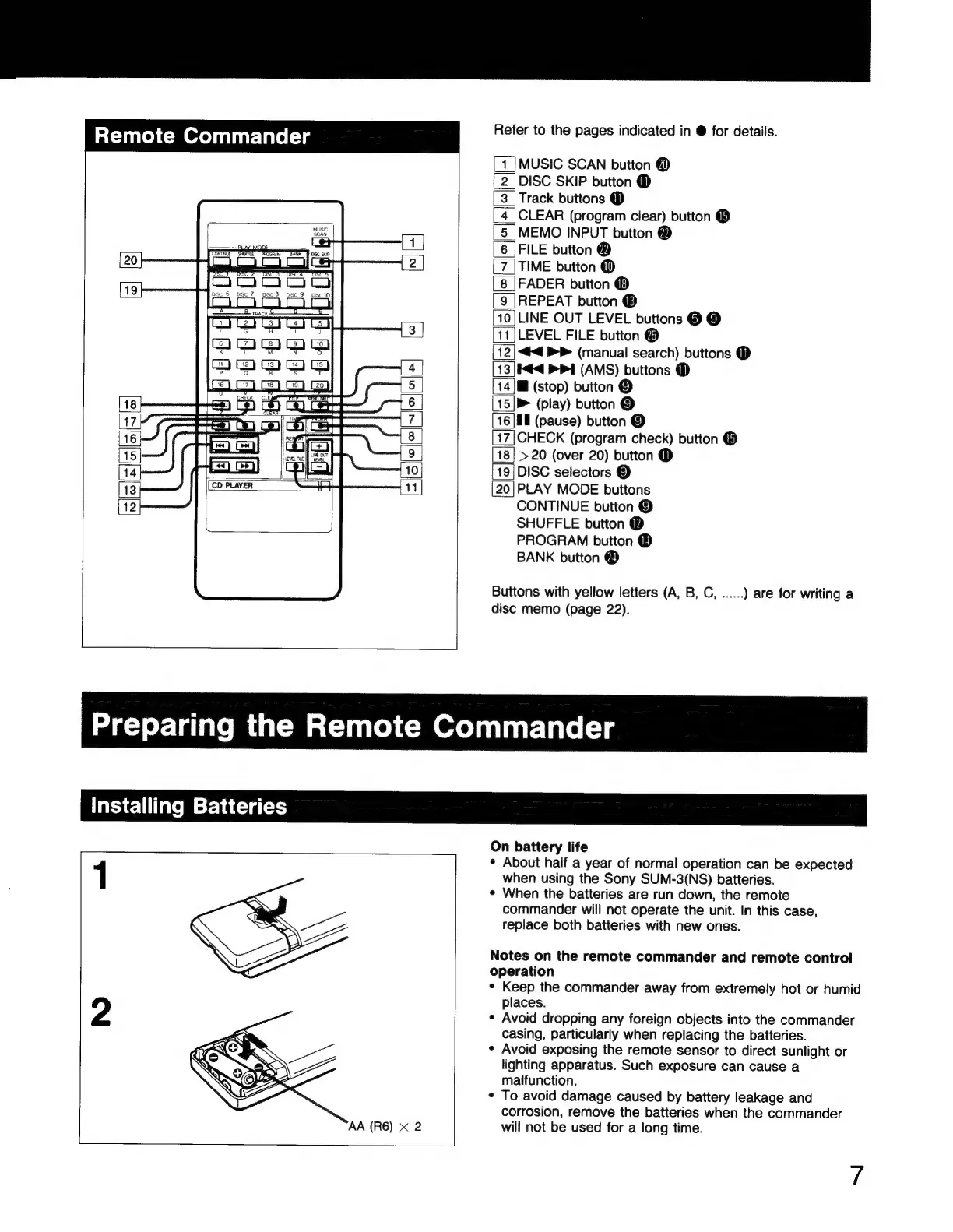
Refer
to
the
pages
indicated
in
@
for
details.
MUSIC
SCAN
button
@
DISC
SKIP
button
@
Track
buttons
(D
CLEAR
(program
clear)
button
(B
MEMO
INPUT
button
@
FILE
button
@
TIME
button
@
FADER
button
(B
REPEAT
button
(B
10|
LINE
OUT
LEVEL
buttons
@
©
LEVEL
FILE
button
(9
««
>
(manual
search)
buttons
@
taa
PI
(AMS)
buttons
@
E
(stop)
button
©
»
(play)
button
©
Il
(pause)
button
©
CHECK
(program
check)
button
®
>20
(over
20)
button
(D
DISC
selectors
©
PLAY
MODE
buttons
CONTINUE
button
©
SHUFFLE
button
@
PROGRAM
button
(D
BANK
button
(B
lehele-
||
t
ml
Beke]
E
N
=
œ
|
mm
o
Buttons
with
yellow
letters
(A,
B,
C,
......
)
are
for
writing
a
disc
memo
(page
22).
Preparing
the
Remote
Commander
Installing
Batteries
1
On
battery
life
*
About
half
a
year
of
normal
operation
can
be
expected
when
using
the
Sony
SUM-3(NS)
batteries.
*
When
the
batteries
are
run
down,
the
remote
commander
will
not
operate
the
unit.
In
this
case,
replace
both
batteries
with
new
ones.
Notes
on
the
remote
commander
and
remote
control
operation
Keep
the
commander
away
from
extremely
hot
or
humid
places.
Avoid
dropping
any
foreign
objects
into
the
commander
casing,
particularly
when
replacing
the
batteries.
Avoid
exposing
the
remote
sensor
to
direct
sunlight
or
lighting
apparatus.
Such
exposure
can
cause
a
malfunction.
To
avoid
damage
caused
by
battery
leakage
and
corrosion,
remove
the
batteries
when
the
commander
will
not
be
used
for
a
long
time.

Related product manuals