EasyManua.ls Logo

Sony CDP-C910 - Continuous Disc Playback; Playback Controls and Volume; Headphone Listening; Playback Notes and Displays

Sony CDP-C910
26 pages
Print Icon
To Next Page IconTo Next Page
To Previous Page IconTo Previous Page
Loading...
Playing
a
Disc
-
Continuous
Play
PHONE
LEVEL
Disc
magazine
=
CONTINUE
s
O®DOOODDO®O
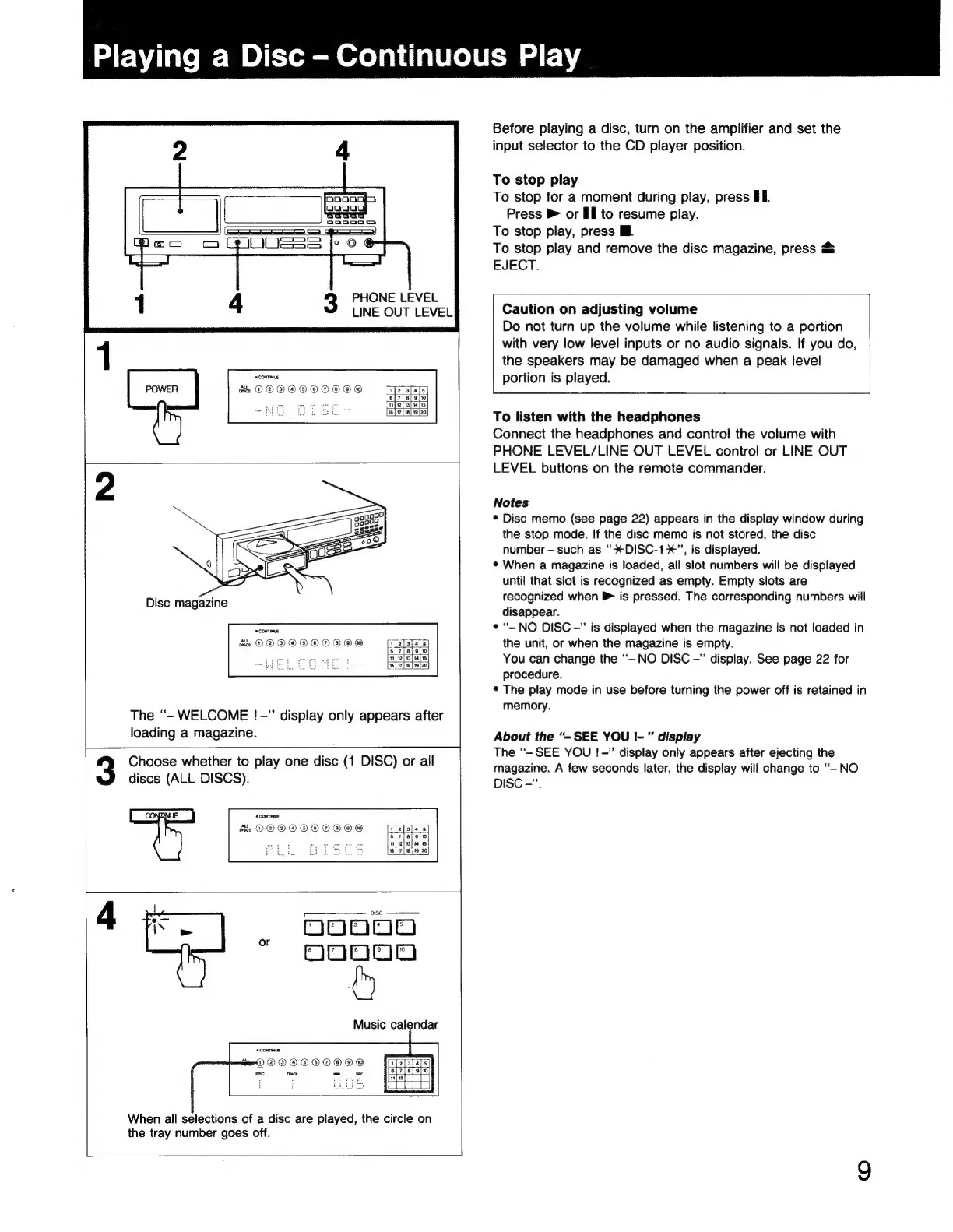
The
“-
WELCOME
!
-"
display
only
appears
after
loading
a
magazine.
Choose
whether
to
play
one
disc
(1
DISC)
or
all
discs
(ALL
DISCS).
a
CONTINUE
ots
DODOOOE
442]
aunnaa
"^A
gaaaadg
è
Music
calendar
0000000000
bec
TRACK
om
sec
When
all
selections
of
a
disc
are
played,
the
circle
on
the
tray
number
goes
off.
Before
playing
a
disc,
turn
on
the
amplifier
and
set
the
input
selector
to
the
CD
player
position.
To
stop
play
To
stop
for
a
moment
during
play,
press
I.
Press
»
or
Ill
to
resume
play.
To
stop
play,
press
Bl.
To
stop
play
and
remove
the
disc
magazine,
press
&
EJECT.
Caution
on
adjusting
volume
Do
not
turn
up
the
volume
while
listening
to
a
portion
with
very
low
level
inputs
or
no
audio
signals.
If
you
do,
the
speakers
may
be
damaged
when
a
peak
level
portion
is
played.
To
listen
with
the
headphones
Connect
the
headphones
and
control
the
volume
with
PHONE
LEVEL/LINE
OUT
LEVEL
control
or
LINE
OUT
LEVEL
buttons
on
the
remote
commander.
Notes
*
Disc
memo
(see
page
22)
appears
in
the
display
window
during
the
stop
mode.
If
the
disc
memo
is
not
stored,
the
disc
number
-
such
as
''XDISC-19*",
is
displayed.
*
When
a
magazine
is
loaded,
all
slot
numbers
will
be
displayed
until
that
slot
is
recognized
as
empty.
Empty
slots
are
recognized
when
is
pressed.
The
corresponding
numbers
will
disappear.
*
"-
NO
DISC
-"
is
displayed
when
the
magazine
is
not
loaded
in
the
unit,
or
when
the
magazine
is
empty.
You
can
change
the
“-
NO
DISC
-"
display.
See
page
22
for
procedure.
*
The
play
mode
in
use
before
turning
the
power
off
is
retained
in
memory.
About
the
“-
SEE
YOU
|-”
display
The
“-
SEE
YOU
!
-"
display
only
appears
after
ejecting
the
magazine.
A
few
seconds
later,
the
display
will
change
to
“-
NO
DISC
-".

Related product manuals