~
t
(+)/.
(-)
buttons
To control CDIUSB, the same as
CD/CD
(ALBUM
-/+)
on the unit.
Setup, sound setting, etc., can be operated by
t •.
fB
SeRl
(scroll) button
To
scroll the display item.
PI;]
Number buttons
To
receive stored stations (press); store
stations (press and hold).
*I When the SAT tuner is connected.
*2
In
the case
of
a CO changer;
Ho
Radio tuner
or
SAT tuner being connected; when
(SOURCE)
is
pressed, the connected device ("Ho,"
'XM"
or
"SR")
will appear in the display, depending on which
device
is
connected. Furthermore,
if
(
MODE)
is
pressed, you can switch the changer;
Ho
Radio
tuner band
or
SAT tuner band.
Note
If the unit is turned
off
and
the display disappears, it
cannot be operated with the card remote commander
unless
(SOURCE)
on the unit is pressed,
or
a disc is
inserted to activate the unit first.
MODE button page 12, 16
Press to: Select the radio band (FM/AM)*2/
select the play mode
of
iPod.
Press and hold to: Enter/cancel the passenger
control.
~
I
I _
~
""")'~;
':-/
"".-+--
....
~DSPL
--"
...
'
..
__
..
_
..
-.
SCRL'"''
i
<ill)
..
~
I
I-+-"'~;:
l~"~
I
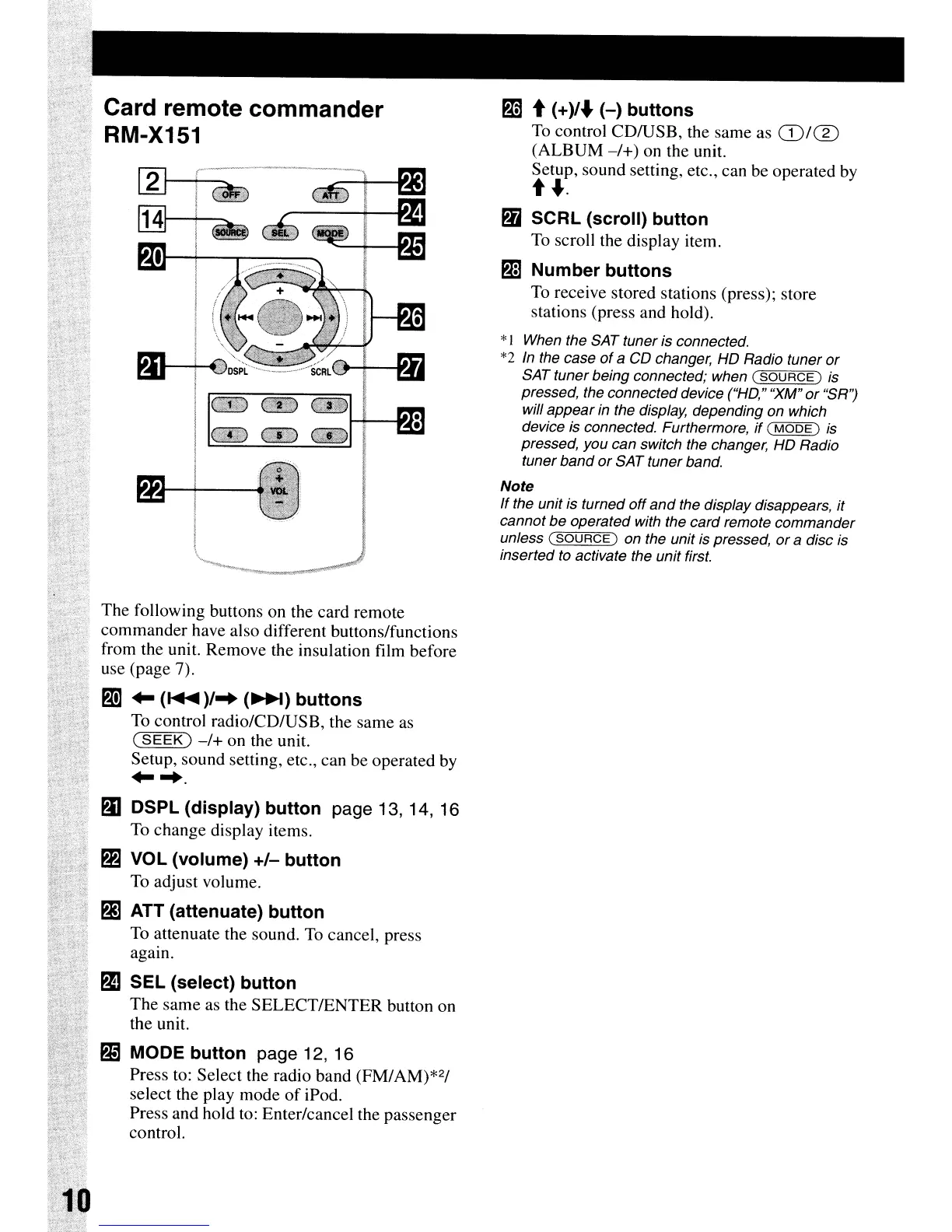
The following buttons on the card remote
commander have also different buttons/functions
from the unit. Remove the insulation film before
use (page 7).
PI
..
(~)/
..
(~)
buttons
To
control radio/CD/USB, the same as
(SEEK)
-/+
on the unit.
Setup, sound setting, etc., can be operated by
.....
f)J
DSPl
(display) button page 13, 14, 16
To
change display items.
Pi
VOL (volume)
+/-
button
To adjust volume.
All
(attenuate) button
To attenuate the sound.
To
cancel, press
agam.
g)
SEl
(select) button
The same as the SELECTIENTER button on
the unit.
Card remote commander
RM-X151


 To Next Page