Shootingmenu For detai/s on the operation _ page 26
The default settings are marked with 8.
Select the slill image camera mode. _ step 5 in "Read This First"
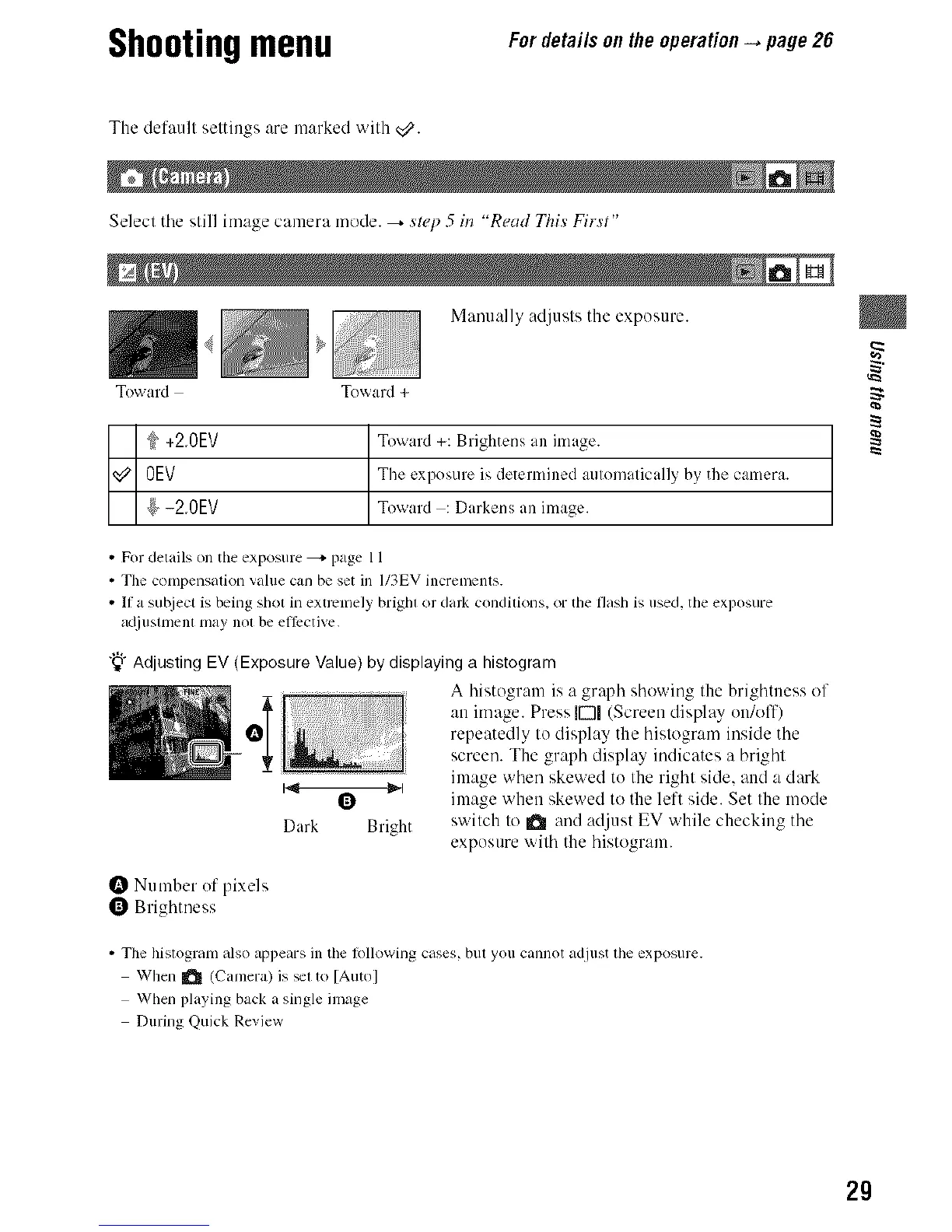
Manually adjusts the expesure.
Toward Toward +
+20EV Toward +: Brightens an image.
OEV The exposure is determined aulomalically b)' the camera.
_/-20EV Toward : Darkens an image.
• For details on the exposure _ page 11
• Tim compensation value can be set in I/3EV incremcms.
• If a subject is being shot in extrcnlely brighl or dark condilkms, or the flash is used, the exposure
atliuslnlenl may nol be e//Pctive,
"_"Adjusting EV (Exposure Value)by displayinga histogram
........... A histogram is a gr@h showing the brightness of
an image. Press JDI (Screen displ W en/olT)
repeatedly to display the histogram inside the
screen. The graph display indicates a bright
image when skewed to the right side, and a dark
image when skewed to the left side. Set Ille mode
Dark Bright switch to a and adjust EV while checking the
exposure with the histogram.
Number of pixels
0 Brighmess
• The histogram also appears in tim tbllowing cases, but you cannot adjust tim exposure.
When _ (Camera) is _l to [Auto]
When playing back a single image
During Quick Review
29



 To Next Page
 Loading...







