5-26
2. D range Adjustment (PD-101 board)
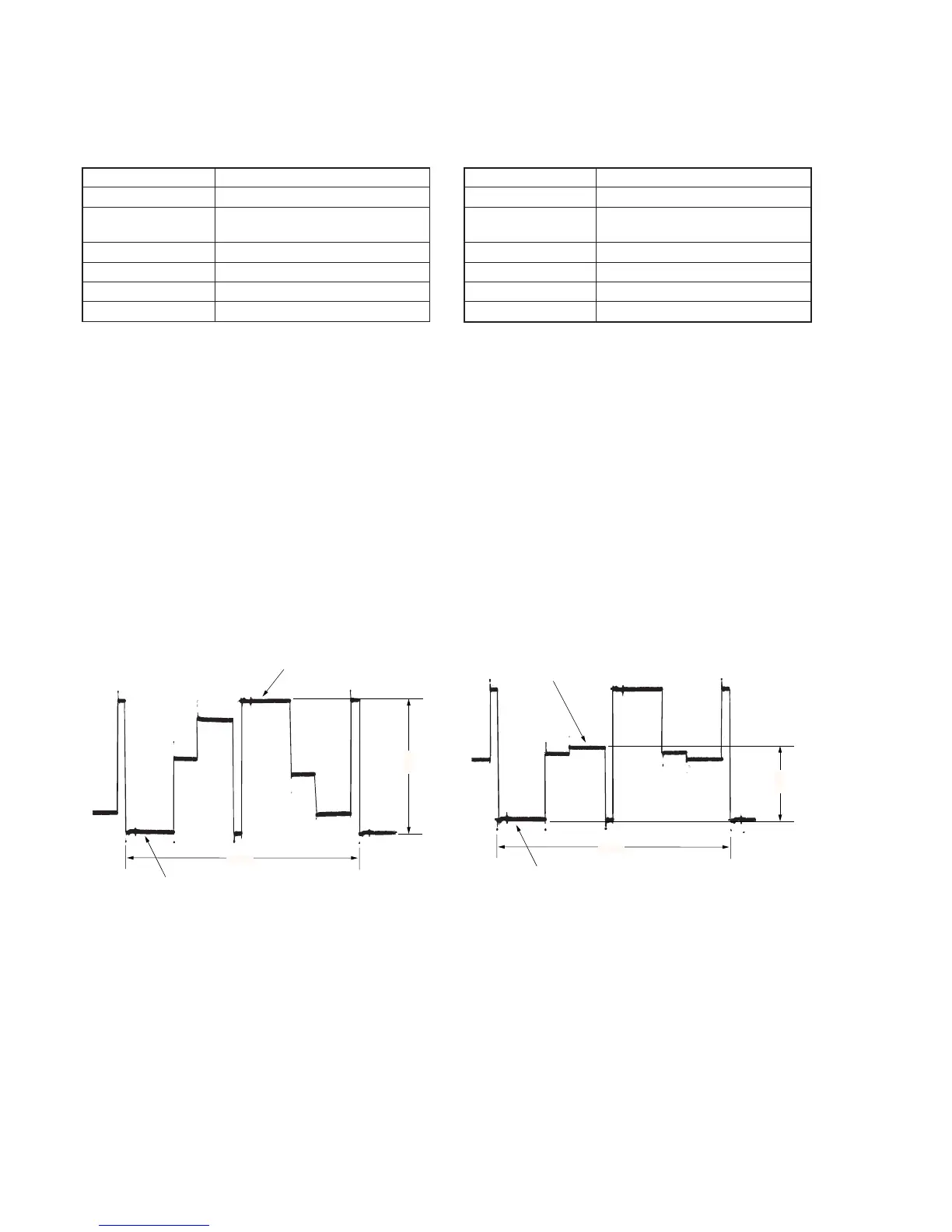
Set the D range of the RGB decoder used to drive the LCD to the
specified value. If deviated, the LCD screen will become blackish
or saturated (whitish).
Mode Camera
Subject Arbitrary
Measurement Point Pin 7 of CN2904 (PD VG) on
VI-151 board
Measuring Instrument Oscilloscope
Adjustment Page D
Adjustment Address 82
Specified Value A = 3.56 ± 0.05V
Adjusting method:
1) Select page: 0, address: 01, and set data: 01.
2) Select page: 3, address: 0C, set data: 20, and press the PAUSE
button of the adjustment remote commander.
3) Select page: 3, address: 22, set data: 02, and press the PAUSE
button of the adjustment remote commander.
4) Select page: D, address: 82, change the data and set the voltage
(A) between the reversed waveform pedestal and non-reversed
waveform pedestal to the specified value.
5) Press the PAUSE button of the adjustment remote commander.
6) Select page: 3, address: 22, set data: 00, and press the PAUSE
button of the adjustment remote commander.
7) Select page: 3, address: 0C, set data: 00, and press the PAUSE
button of the adjustment remote commander.
8) Select page: 0, address: 01, and set data: 00.
3. Bright Adjustment (PD-101 board)
Set the level of the VIDEO signal for driving the LCD to the specified
value. If deviated, the screen image will be blackish or saturated
(whitish).
Mode Camera
Subject Arbitrary
Measurement Point Pin 7 of CN2904 (PD VG) on
VI-151 board
Measuring Instrument Oscilloscope
Adjustment Page D
Adjustment Address 8A
Specified Value A = 1.94 ± 0.05V
Adjusting method:
1) Select page: 0, address: 01, and set data: 01.
2) Select page: 3, address: 0C, set data: 20, and press the PAUSE
button of the adjustment remote commander.
3) Select page: 3, address: 22, set data: 02, and press the PAUSE
button of the adjustment remote commander.
4) Select page: 2, address: 0E, and set data: 40.
5) Select page: D, address: 8A, change the data and set the voltage
(A) between the pedestal and GAMMA1 limiter level to the
specified value. (The data of address: 8A should be “1E” to
“A0”.)
6) Press the PAUSE button of the adjustment remote commander.
7) Select page: 2, address: 0E, and set data: 00.
8) Select page: 3, address: 22, set data: 00, and press the PAUSE
button of the adjustment remote commander.
9) Select page: 3, address: 0C, set data: 00, and press the PAUSE
button of the adjustment remote commander.
10) Select page: 0, address: 01, and set data: 00.
Pedestal
A
2H
Pedestal
Pedestal
A
2H
GAMMA 1 limiter level
Fig. 5-1-21 Fig. 5-1-22




 To Next Page