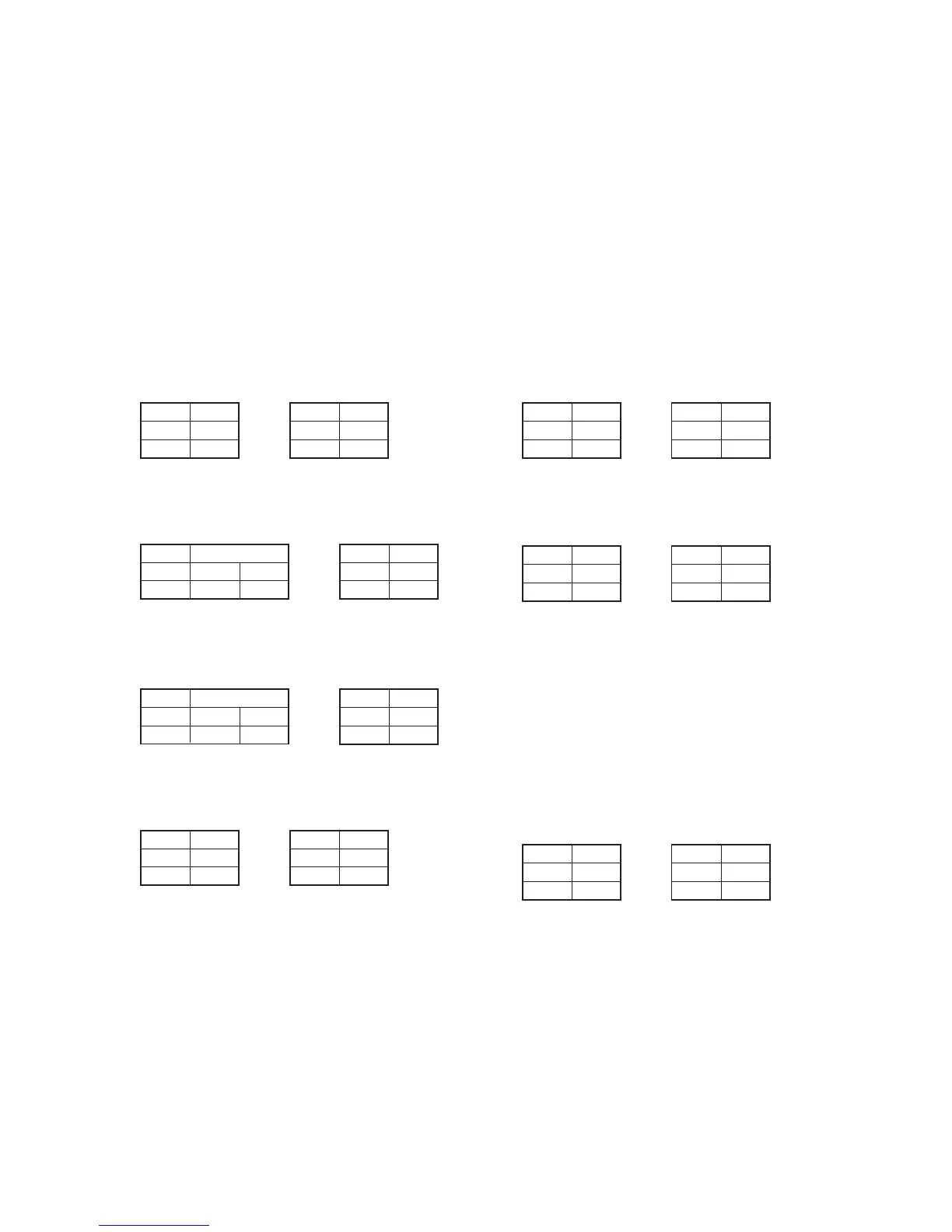
5-49
Address
16
17
Data
9A
13
Address
14
15
Data
12
43
Address
16
17
Data
FB
F4
1-4. IC1600(SFD) BIST(PB) Check
1) Select page: 0, address: 01, and set data: 01.
2) Select page: C, address: AC, set data: 21, and press the PAUSE
button.
3) Select page: C, address: AD, set data: 01, and press the PAUSE
button.
4) Select page: 3, address: 11, set data: 04, and press the PAUSE
button.
5) Select page: 3, address: 12, set data: 08, and press the PAUSE
button.
6) Select page: 3, address: 12, set data: 00, and press the PAUSE
button.
7) Select page: 3, address: 13, set data: 03, and press the PAUSE
button.
8) When the playback system from IC1600(SFD) to
IC2002(ADC&DAC) is normal, the display data (combination
data) of page: 3, address: 14 and 15 agrees with any combination
as shown below.
NTSC model PAL model
9) When the playback system from IC1600(SFD) to IC1602(LIP)
is normal, the display data (combination data) of page: 3,
address: 16 and 17 agrees with any combination as shown
below.
NTSC model PAL model
10) When the playback system from IC1600(SFD) to IC1601(TDF)
is normal, the display data (combination data) of page: 3,
address: 18 and 19 agrees with any combination as shown
below.
NTSC model PAL model
11) When the playback system from IC1600(SFD) to IC1501(VFD)
is normal, the display data (combination data) of page: 3,
address: 1A and 1B agrees with any combination as shown
below.
NTSC model PAL model
12) Select page: C, address: AC, set data: 20, and press the PAUSE
button.
13) Select page: C, address: AD, set data: 00, and press the PAUSE
button.
14) Select page: 0, address: 01, and set data: 00.
Address
14
15
Data
41
81
1E
B4
F0
31
Data
Address
16
17
72
F8
16
5C
Data
Address
18
19
Address
1A
1B
Data
12
43
Address
14
15
Data
2D
7C
Address
16
17
Data
1C
A6
Address
18
19
Data
A7
CC
Address
1A
1B
Data
90
CE
1-5. IC1501(VFD) BIST(PB) Check
1) Select page: 0, address: 01, and set data: 01.
2) Select page: C, address: 60, set data: 06, and press the PAUSE
button.
• VBUS/EX BIST(PB) Check
3) Select page: 3, address: 10, set data: 00, and press the PAUSE
button.
4) Select page: 3, address: 12, set data: 10, and press the PAUSE
button.
5) Select page: 3, address: 12, set data: 00, and press the PAUSE
button.
6) Select page: 3, address: 13, set data: 04, and press the PAUSE
button.
7) When the playback system from IC1600(SFD) to IC1501(VFD)
is normal, the display data (combination data) of page: 3,
address: 14 and 15 agrees with any combination as shown
below.
NTSC model PAL model
8) When the playback system from IC1501(VFD) to
IC756(HONEY) is normal, the display data (combination data)
of page: 3, address: 16 and 17 agrees with any combination as
shown below.
NTSC model PAL model
• UPY Y BIST(PB) Check
9) Select page: 3, address: 10, set data: 88, and press the PAUSE
button.
10) Select page: 3, address: 12, set data: 10, and press the PAUSE
button.
11) Select page: 3, address: 12, set data: 00, and press the PAUSE
button.
12) Select page: 3, address: 13, set data: 04, and press the PAUSE
button.
13) When the playback system from IC1501(VFD) to IC5001,5502
(LCD DRIVER) is normal, the display data (combination data)
of page: 3, address: 16 and 17 agrees with any combination as
shown below.
NTSC model PAL model
Address
14
15
Data
90
CE
Address
16
17
Data
54
ED
Address
16
17
Data
03
C9




 To Next Page