104
EASY DUBBING
START
TITLE SEL
MODE SEL
SET UP
00:00:0
EASY DUBBING
START
TITLE SEL
MODE SEL
SET UP
00:00:0
NORMAL
NORMAL
NORMAL
NORMAL
PREVIEW
[
EASY DUB
]:
END
[
EASY DUB
]:
END
1
Note
You can put a title only into the tape of the VCR.
Title setting
•The title color changes as follows:
WHITE y YELLOW y VIOLET y RED y CYAN y GREEN y BLUE
•The title size changes as follows:
SMALL y LARGE
•The background color changes as follows:
FADE y WHITE y YELLOW y VIOLET y RED y CYAN y GREEN y
BLUE y BLACK
Step 4: Selecting the dubbing mode
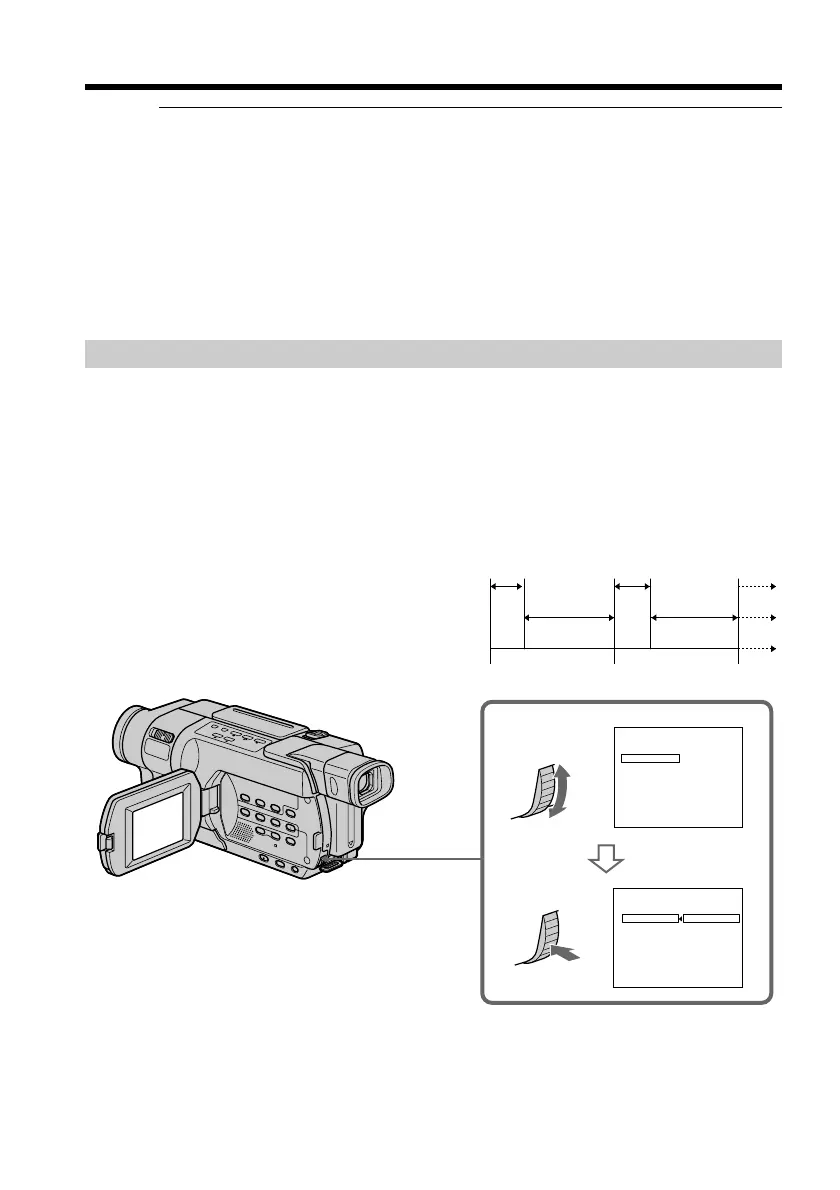
You can choose either normal recording (NORMAL) or interval recording (PREVIEW).
(1) Turn the SEL/PUSH EXEC dial to select MODE SEL, then press the dial.
(2) Turn the SEL/PUSH EXEC dial to select NORMAL or PREVIEW, then press
the dial.
– NORMAL: You can record into the VCR normally.
– PREVIEW: You can make a time-lapse dubbing by setting the VCR to
automatically repeat five seconds’ recording and 25 seconds’
standby.
25 s
30 s 30 s
25 s
5 s
5 s
[a]
[b]
[c]
Dubbing a tape easily – Easy Dubbing
CCD-TRV418
[a]: Recording time (VCR)
[b]: Waiting time (VCR)
[c]: Playback time (camcorder)



 To Next Page