204
Viewing images recorded on a “Memory Stick” on your computer
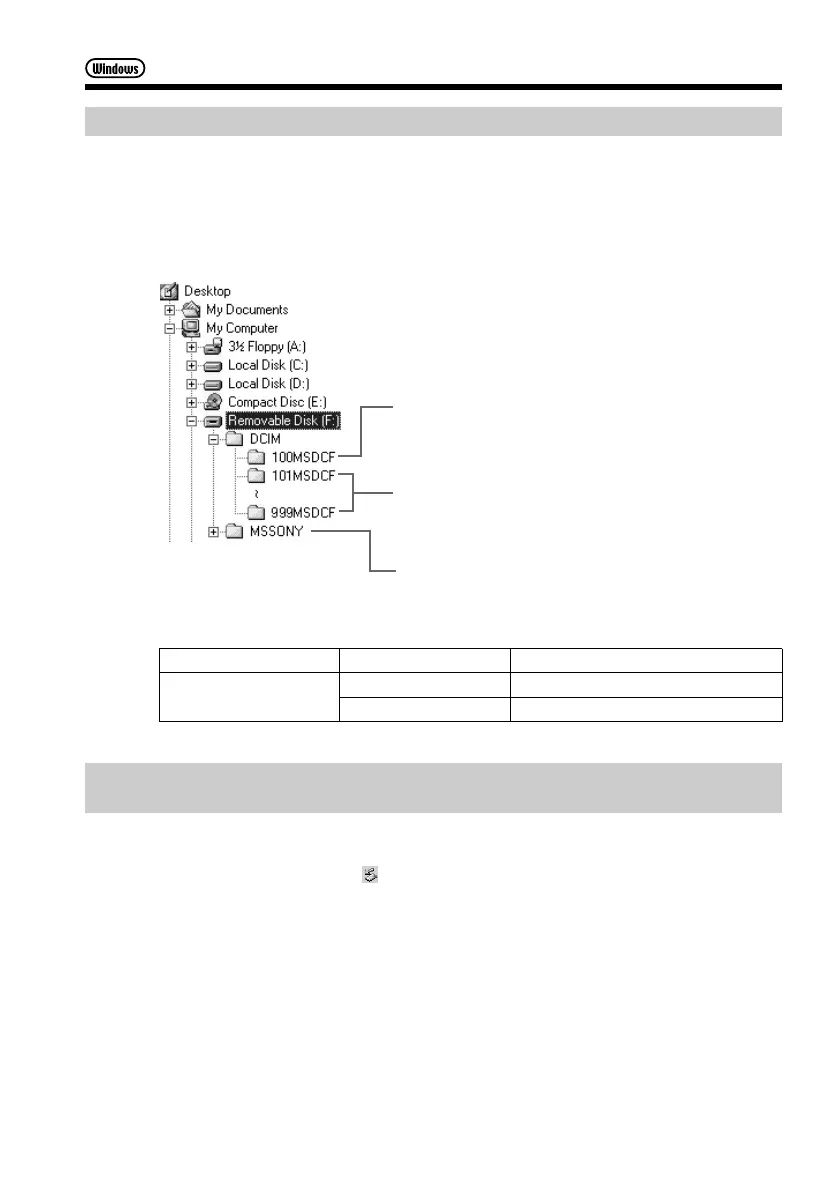
Image file storage destinations and image files
Image files recorded with your camcorder are grouped in folders described below.
The meanings of the file names are as follows. ssss stands for any number within
the range from 0001 to 9999.
Example: For Windows Me users
(The drive recognizing your camcorder is [F:].)
Folder File Meaning
101MSDCF DSC0ssss.JPG Still image file
(up to 999MSDCF) MOV0ssss.MPG Moving picture file
Disconnect the USB cable and remove the “Memory Stick” or set
the POWER switch to OFF (CHG)
For Windows 2000, Windows Me, Windows XP users
(1) Move the cursor to the “Unplug or Eject Hardware” on the Task Tray and
click to cancel the applicable drive.
(2) After the “Safe to remove” message appears, disconnect the USB cable and
eject the “Memory Stick” or set the POWER switch to OFF (CHG).
Folder containing image files recorded using
other camcorders without the folder creation
function (for playback only)
Folder containing image files recorded with your
camcorder
When no new folders have been created, this is
only “101MSDCF”
Folder containing moving picture data recorded
using other camcorders without the folder
creation function (for playback only)



 To Next Page