55
Advanced Recording Operations
Recording still images on a “Memory Stick” while recording on a
tape
Self-timer recording
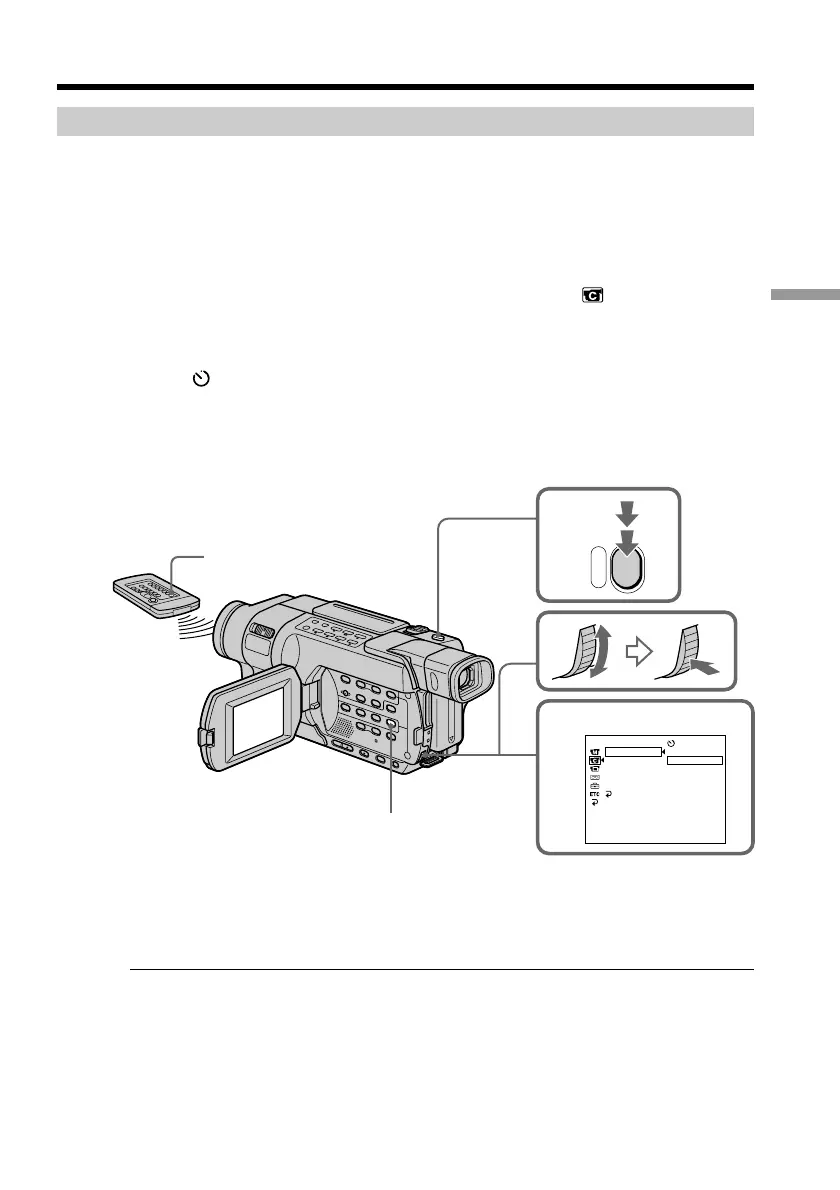
You can record still images on a “Memory Stick” with the self-timer. You can also use
the Remote Commander for this operation.
Before operation
Insert a “Memory Stick” into your camcorder (p. 127).
(1) In the standby mode, press MENU to display the menu settings.
(2) Turn the SEL/PUSH EXEC dial to select SELFTIMER in
, then press the
dial.
(3) Turn the SEL/PUSH EXEC dial to select ON, then press the dial.
(4) Press MENU to make the menu settings disappear.
The
(self-timer) indicator appears on the screen.
(5) Press PHOTO deeper.
Self-timer starts counting down from 10 with a beep. In the last two seconds of
the countdown, the beep gets faster, then recording starts automatically.
To cancel self-timer
Set SELFTIMER to OFF in the menu settings in the standby mode.
You cannot cancel self-timer using the Remote Commander.
Note
The self-timer is automatically canceled when:
– self-timer recording is finished.
– the POWER switch is set to OFF (CHG) or VCR.
Taking photos with the self-timer
The self-timer can only be operated when in the standby mode.
5
PHOTO
3
CAMERA SET
SELFTIMER
D ZOOM
16:9WIDE
STEADYSHOT
N.S.LIGHT
RETURN
[
MENU
]
:
END
OFF
ON
PHOTO
MENU



 To Next Page