59
Advanced Recording Operations
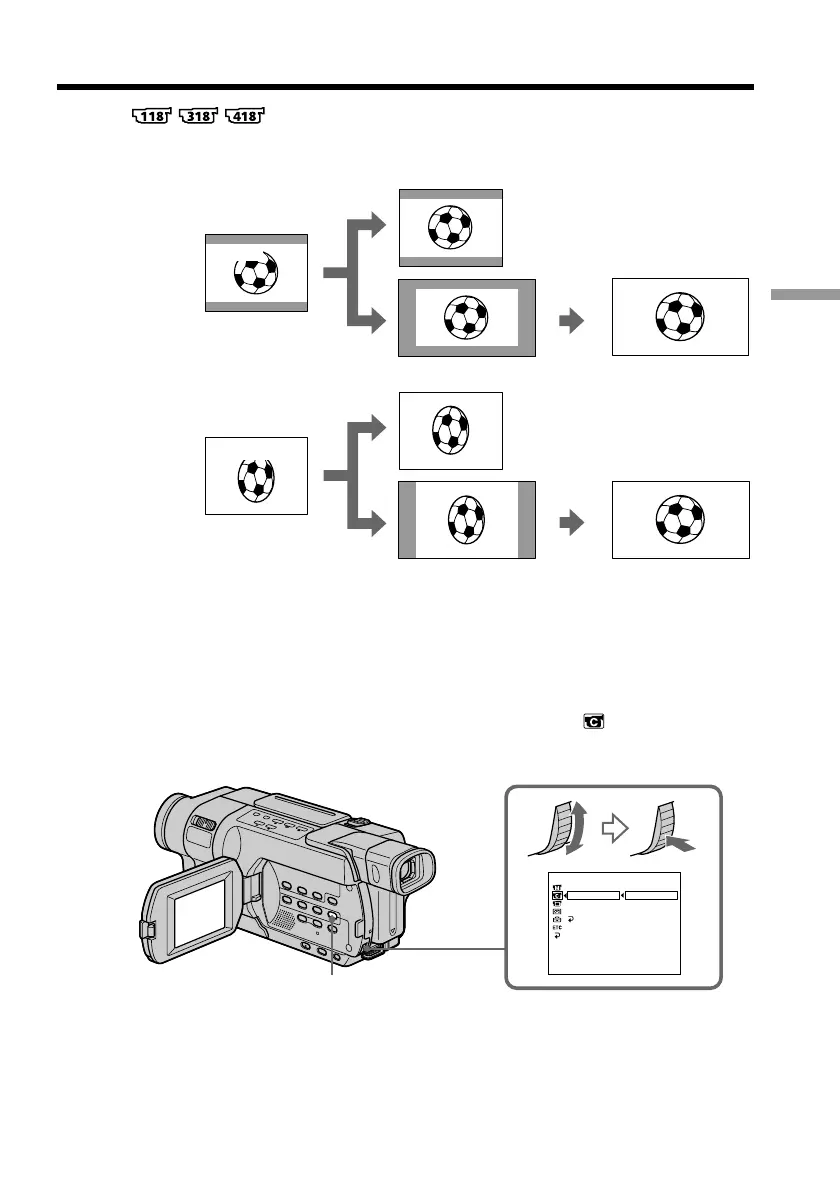
Using the wide mode
You can record a cinema-like picture (CINEMA) or a 16:9 wide picture (16:9FULL) to
watch on the 16:9 wide-screen TV. Refer to the operating instructions of your TV.
[a]: Recording in the CINEMA mode
[b]: Playback on a normal TV
[c]: Playback on a wide TV in the normal screen mode
[d]: Zoom mode on a wide TV
[e]: Recording in the 16:9FULL mode
[f]: Full mode on a wide TV
In the standby mode, set 16:9WIDE to CINEMA or 16:9FULL in in the menu
settings (p. 212).
[b]
[c]
16:9FULL
16:9FULL
[e]
[f]
CAMERA SET
[
MENU
]
:
END
D ZOOM
16:9W
I
DE
STEADYSHOT
N.S.LIGHT
RETURN
OFF
CINEMA
16:9FULL
MENU
[b]
CINEMA
[a]
[c]
CINEMA
[d]
CCD-TRV418



 To Next Page