12
GB
1Press v/V to select [First day of the
week] and press ENTER.
2Press v/V to select
[Sunday] or
[Monday]
and press ENTER.
8
Select the time display.
1Press
v
/V to select [12hr/24hr display]
and press ENTER.
2Press
v
/V to select [12 hours] or
[24 hours] and press ENTER.
9 Press MENU.
The menu screen is closed.
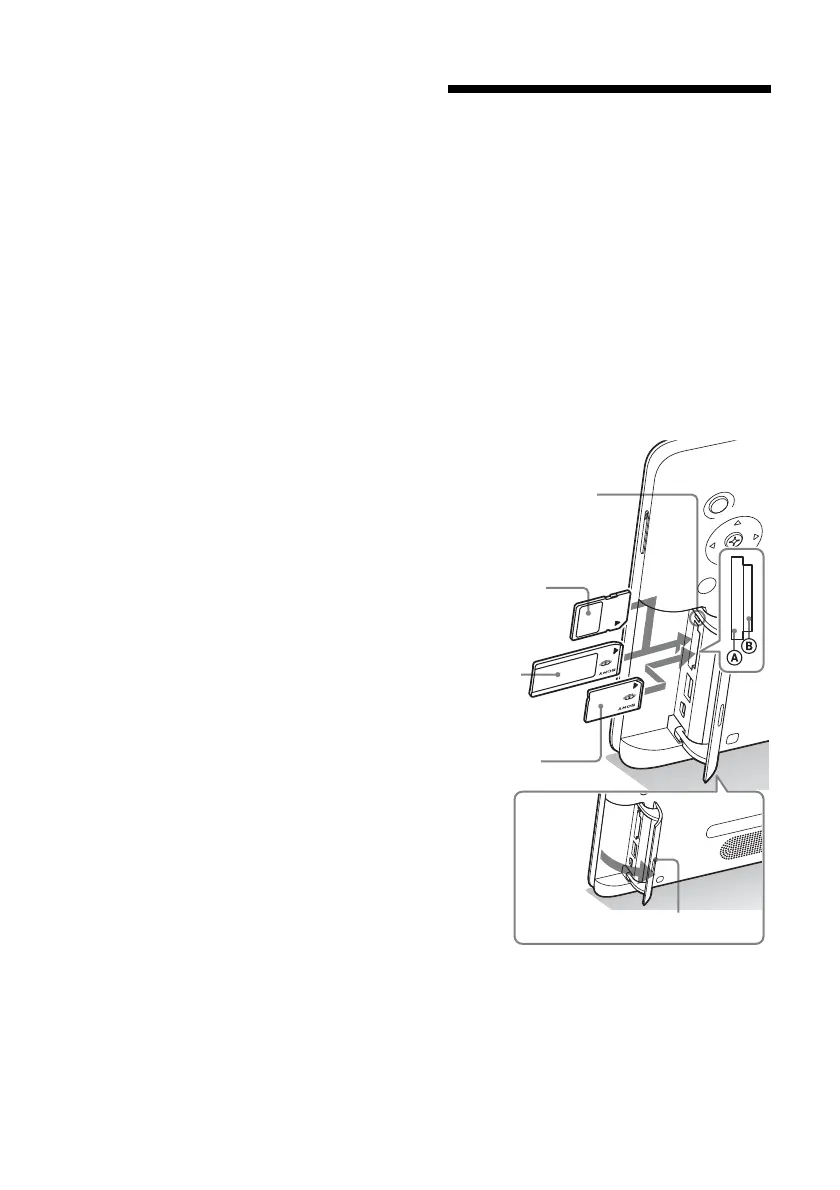
Inserting a memory card
1 Open the I/O cover.
2 Insert the memory card firmly into
the corresponding slot with its label
side facing toward you (when you
are facing the back side of the photo
frame).
The access lamp flashes when the memory
card is inserted correctly. Reinsert the
memory card after checking the label side
of the memory card if the access lamp
does not flash.
Access lamp
SD memory
Card
(Slot A)
“Memory
Stick”
(Slot A)
“Memory
Stick Duo”
(Slot B)
I/O cover



 To Next Page