19
GB
Basic operations
About the information displayed
on the LCD screen
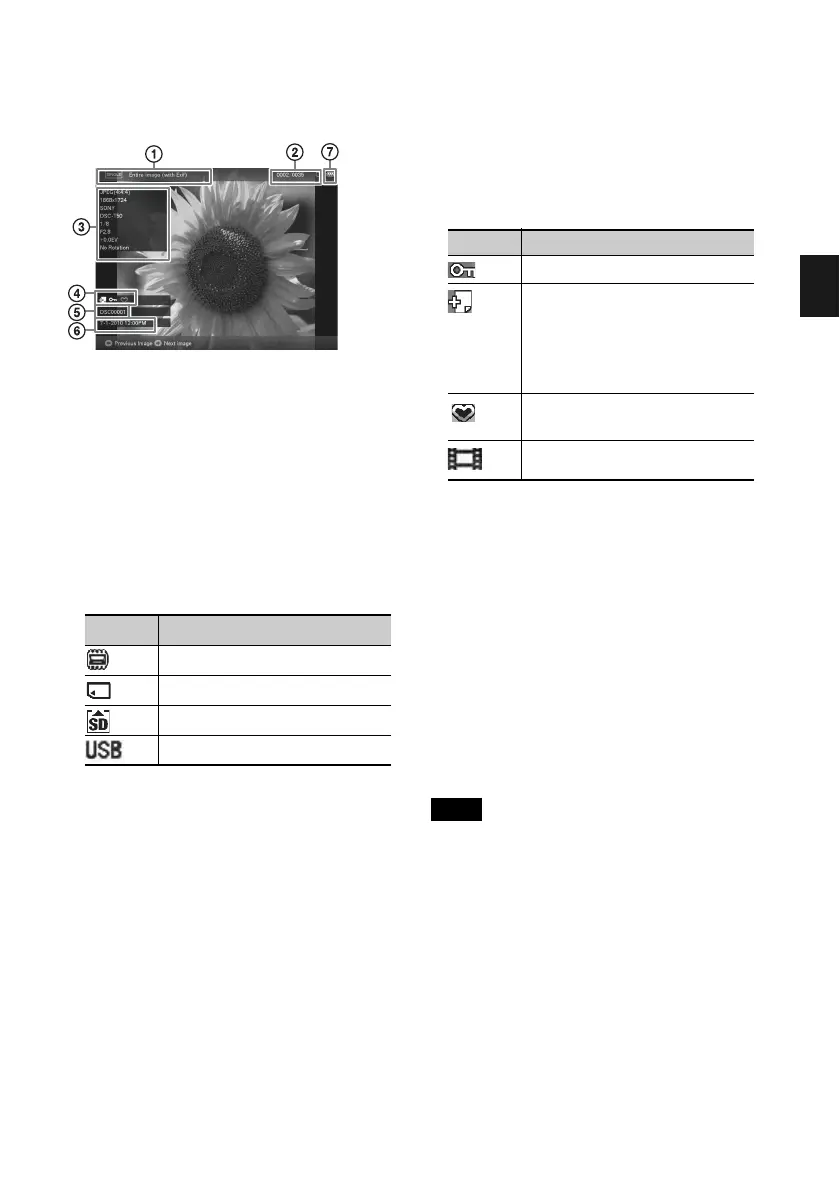
The following information is displayed.
1Display type (In the Single view mode)
– Entire image
– Fit to screen
– Entire image (with Exif)
– Fit to screen (with Exif)
2Ordinal number of the displayed
image/Total number of images
Input media indication for the displayed
image is shown as follows:.
3Image details
x When the photo is displayed
– File format (JPEG(4:4:4), JPEG(4:2:2),
JPEG(4:2:0), BMP, TIFF, RAW)
– Number of pixels (width × height)
– Manufacturer name of image input device
– Model name of image input device
– Shutter speed (e.g.: 1/8)
– Aperture value (e.g.: F2.8)
– Exposure value (e.g.: +0.0EV)
– Rotation information
x When the video file is played
– File format (AVI, MOV)
– Number of pixels (width × height)
– Playback duration
– Video file size
4Setting information
5Image number (folder-file number)
This is displayed if the image is DCF
compliant.
If the image does not comply with DCF, its
file name is displayed.
If you named or renamed the file on your
computer and the file name includes
characters other than alphanumeric
characters, the file name may not be
displayed properly on the photo frame. Also,
for a file created on a computer or other
device, a maximum of 10 characters from the
beginning of the file name can be displayed.
Note
Only alphanumeric characters can be displayed.
6
Shooting date/time
7Battery remaining indicator
The remaining battery level is indicated.
If the battery indicator is not displayed on
the screen, press MENU. It will be displayed
on the upper right of the menu screen.
Icons Meaning
Internal memory
“Memory Stick” input
SD Memory Card input
USB External device input
Icons Meaning
Protect indication
Associated file indication
(Displayed when there is an
associated file such as a motion
file or a miniature e-mail image
file.)
Displays when you have
registered a mark.
Displays a video file.



 To Next Page