9
GB
Basic operations
Basic operations
Preparing the remote
control
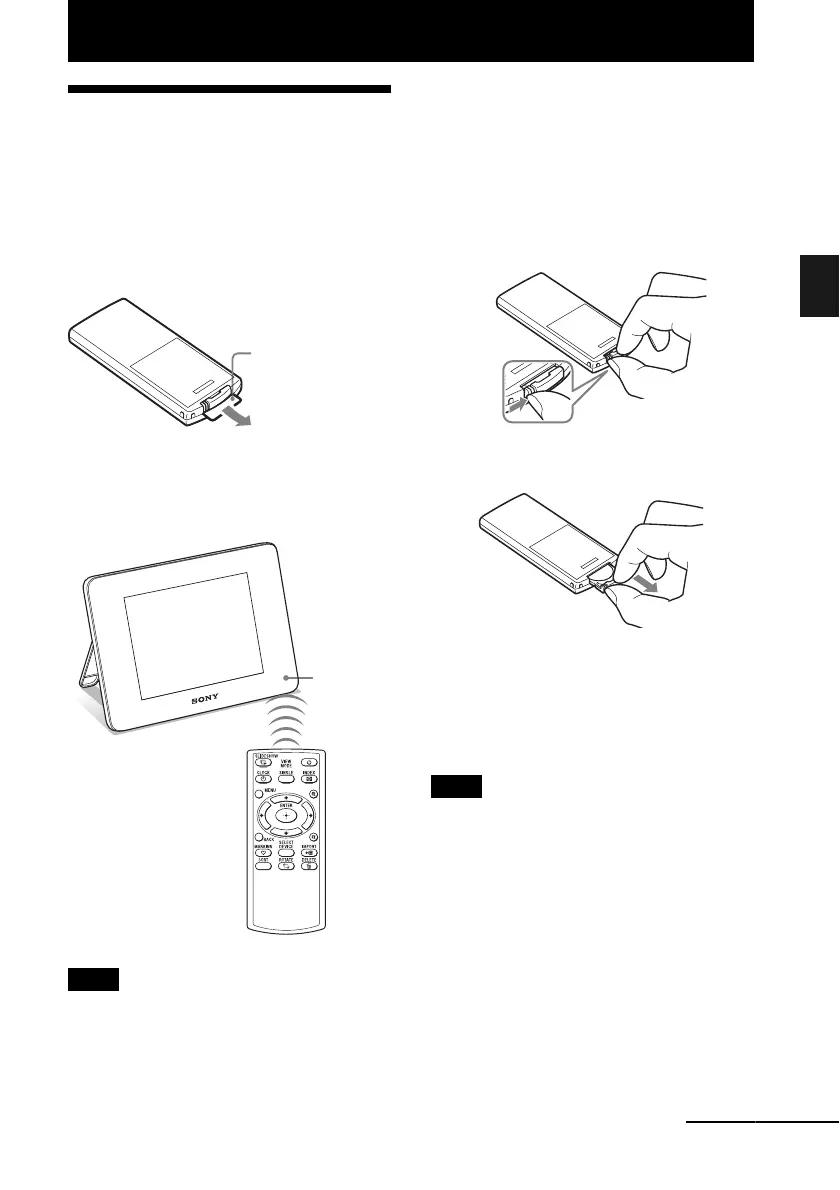
The supplied lithium battery (CR2025) has
already been inserted into the remote control.
Pull out the protective sheet before use as
shown in the figure.
Using the remote control
Point the top end of the remote control towards
the remote sensor on the photo frame.
Note
The 1 (standby) button on the remote control cannot
be used when the photo frame is powered only by the
built-in battery pack. Use the 1 (standby) button on
the photo frame.
Replacing the battery of the
remote control
If the remote control does not operate, replace
the battery (CR2025 lithium battery) with a
new one.
1 Press the tab in.
2 Pull the battery holder out.
3 Insert a new battery and slide the
battery holder back into the remote
control.
Insert the battery so that “+” is facing
upwards.
Notes
• Using a battery other than the specified one may
result in the battery rupturing.
• Dispose of used batteries as specified by the local
authorities.
• Do not leave the remote control in a very hot and
humid place.
• Take care that no foreign objects get inside the
remote control when you, for example, replace the
battery.
• Incorrect use of the battery may cause leaking and
corrosion.
– Do not recharge the battery.
Protective sheet
Remote
sensor
Continued



 To Next Page