41
GB
Advanced operations
Displaying an image
stored in a USB memory
device
You can display images stored in a USB
memory device on the screen of the photo
frame.
Notes
• We cannot guarantee connection with all types of
USB memory devices.
• The playback device will be switched to the USB
external device if you connect the USB memory to
the USB A connector during playback of the image
in the internal memory.
1 Connect the AC power adaptor to
the photo frame and connect the AC
power adaptor to an AC outlet.
(supplied Operating instructions –
“Turning the photo frame on”).
2 Turn on the photo frame (page 10).
3 Open the I/O cover.
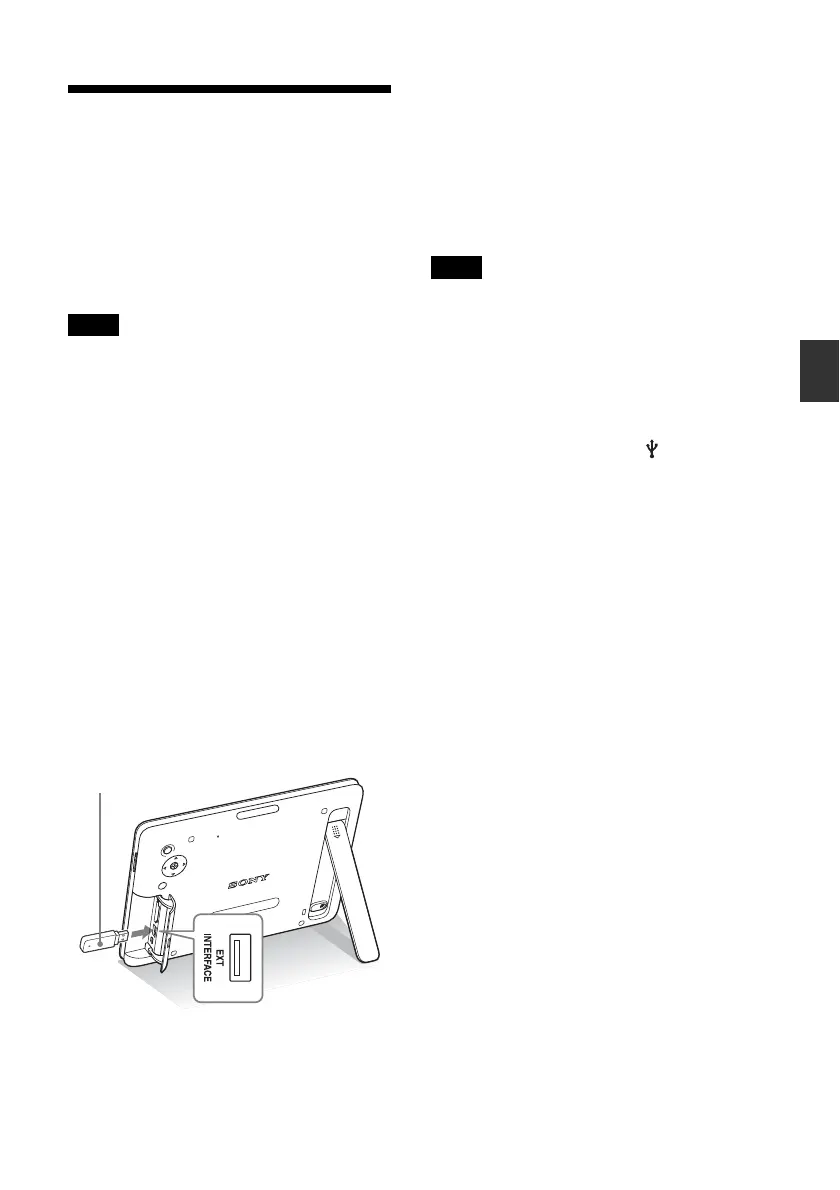
4 Connect the USB memory device to
the EXT INTERFACE (USB A)
connector on the photo frame.
5 Select the [USB] External Device in
Select device (page 28).
An image in the USB memory device is
displayed on the screen.
For details on the slideshow, see page 21.
For details on adding images to the
internal memory, see page 26.
Notes
• Do not disconnect the USB memory, or turn off the
photo frame while the access lamp on the photo
frame is flashing. Doing so may damage the data
stored in the USB memory.
Sony assumes no
responsibility for any damage or loss of data.
• The photo frame cannot use USB memory data that
has been encrypted or compressed using, for
instance, fingerprint authentication or a password.
• Do not connect a computer to the USB mini B
connector on the photo frame simultaneously when
a USB memory is connected to the EXT
INTERFACE (USB A) connector.
• The photo frame may not be able to access files
normally from a USB hub or USB device with a
built-in USB hub may not operate properly.
• The I/O cover cannot be closed with a USB memory
device inserted.
USB memory



 To Next Page