40
GB
General
Settings
Image import
size
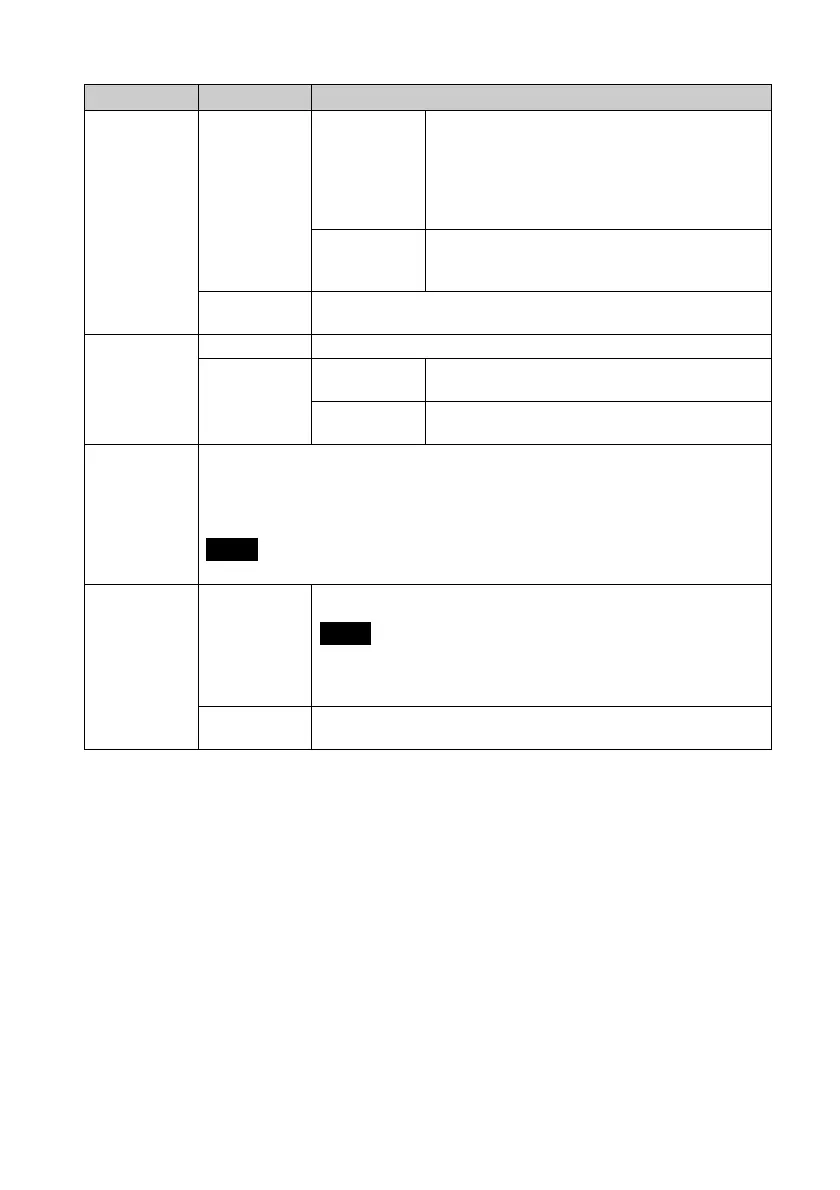
Resize* Resizes the images and saves them to internal memory
when importing images from a memory card. You can
save more images. However, when the images are
displayed on a large monitor via a computer, etc.,
image quality is deteriorated compared with the
original.
Original Saves images to the internal memory without
compressing them. There is no deterioration, but you
can save fewer images.
Sony logo ON/
OFF
ON*/OFF: You can set whether the photo frame’s Sony logo lights or not.
System
Information
Version Displays the version of the firmware of the photo frame.
Internal
memory
Memory
capacity
Indicates the maximum amount of space available in
internal memory in the initial state.
Remaining
capacity
Indicates the amount of free space currently available
in internal memory.
Language
Setting
Sets the display language on the LCD screen.
Japanese, English*, French, Spanish, German, Italian, Russian, Korean, Simplified Chinese,
Traditional Chinese, Dutch, Portuguese, Arabic, Persian, Hungarian, Polish, Czech, Thai,
Greek, Turkish, Malay, Swedish, Norwegian, Danish, Finnish
Note
Default language setting may vary in some regions.
Initialize Format internal
memory
You can format the internal memory.
Notes
• All the images added to the internal memory will be deleted.
• Do not format the internal memory by using a connection to a
computer.
Initialize
settings
Returns all settings to their factory defaults except for the current date and
time setting of [Date/time Settings].
*: Factory default settings
Item Setting Description



 To Next Page