Before
you
g
et
s
tarted
• First make s
ure
that the power to each piece of equipment is
huned
off.
• Use connecting cables suitable for the equipment to be
connected.
• The cable cOlU\ectors should be fully inserted into the jacks.
A loose connection
ma
y cause
hum
and
other noise.
• To disconnect the cabl
e,
pull out by grasping the plug.
Never pull the cable itself.
•
Rea
d the instruction manual of the equipment to be
connect
ed
.
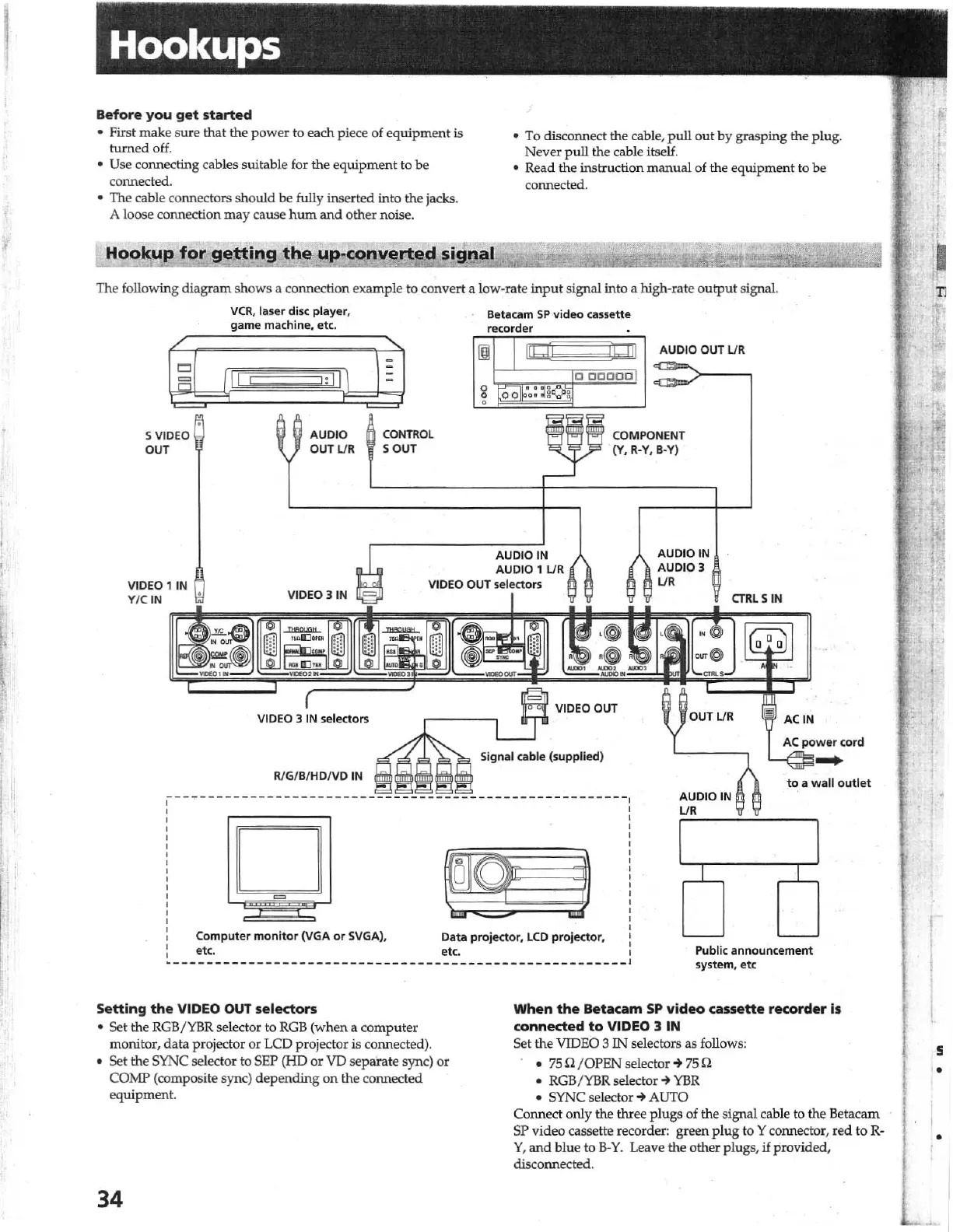
com,erted
signal
The
fo
llowing diagram shows a connection example to convert a low-rate
input
signal into a high-rate output signal
5
VI
D
EO
OUT
V
CR
, laser disc
pla
y
er
,
game machine, et c.
!;
II
\
AUDIO
O
UTU
R
C
ONTR
OL
SOUT
Be
tacam
SP
video
cas
s
ette
recor
der
Ig
ll
o
OCCOO
A
UDIOOUT
U R
COMPONENT
' (
Y.
R-Y.
B-
Y)
VIDEO
li
N
Y/ C IN
AUDIO IN
AUDIO
1
UR
VIDEO OUT selectors
AUDIO
IN
AUDIO 3
L/R
VIDEO 3 IN
VIDEO OUT
VIDEO
3 IN sele
cto
rs
RlG/D/
HD
IV
D
IN
D
=
CTRL
SIN
OUTUR
AUDIO
IN
L/R
ACiN
AC
po
w
er
cord
-
to
a wall
outlet
Computer
mo
ni
t
or
(VGA
or SVGA),
e
tc
.
Data
projector
,
LCD
projecto
r,
etc.
Public
announcement
sys
tem
, e
tc
Setting
the
VIDEO
OUT
selectors
•
Se
t the RGB/YBR selector to
RGB
(when a com
pu
ter
monitor,
data
projector or
LCD
projector
is
connected).
• Set the SYNC selector to SEP (HO
or
VD separate sync) or
CO
MP (composite sync) depending on the connect
ed
equipment.
34
When
the
Betacam
SP
video
cassette
recorder
is
connected
to
VIDEO
3
IN
Set
th
e VIDEO 3
IN
selectors as
fo
llows:
•
7511
/
0PEN
seledor-+
7511
•
RGB
/
YBR
selector
~
YBR
• SYNC selector
~
AUTO
Co
nn
ect only
th
e three
plu
gs of the signal cable to the Betac
am
SP video cassette recorder: green
pl
ug to Y co
nn
ector, r
ed
to R-
Y,
and
blue to
B-Y.
Leave the other plugs,
if
provided,
disconnected.
Ti
:t
j\
5
•
•



 To Next Page