EasyManua.ls Logo

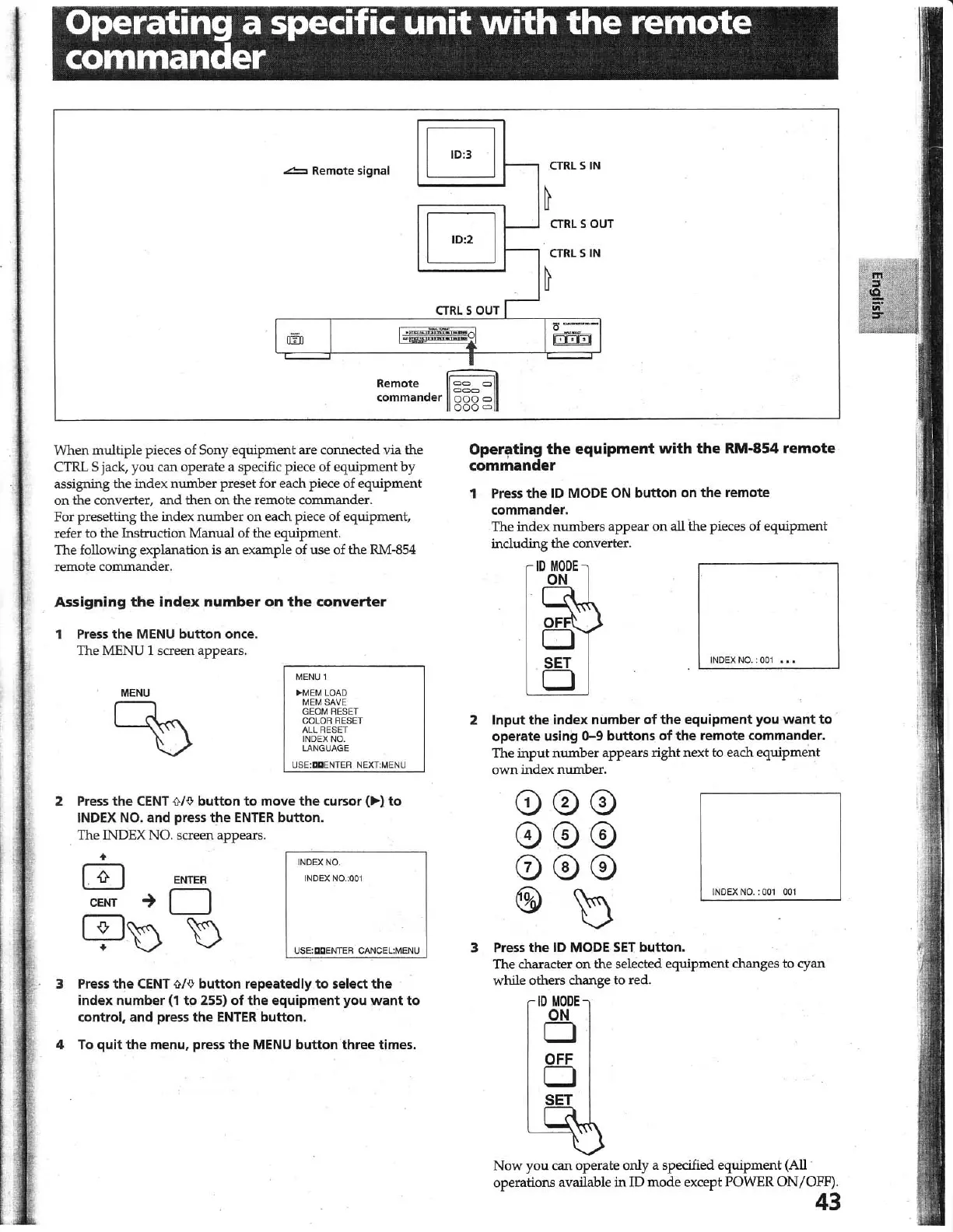
Sony DSC-1024HD - Operating a Specific Unit with the Remote Commander

Sony DSC-1024HD
23 pages
Print Icon
To Next Page IconTo Next Page
To Previous Page IconTo Previous Page
Loading...
Operating
a specific
unit
with
the
remote
commander
~
Remote signal
G
f--
CTRL 5
IN
~
G
f--
CTRL
5
OUT
f--
CTRL
5 IN
~
CTRLSOUTI
I""
1
-
I~-
I
.!
Re
m
ote
~
commander
000
0
ooo<=>
When
multip
le pieces
of
Sony e
qui
p
men
t
ar
e c
onn
ec
t
ed
via
th
e
CTRL 5 jack,
yo
u
can
o
per
ate
a specific piece of
eq
ui
pment by
assigning the index n
um
be
r
pr
eset for each piece
of
eq
ui
p
ment
on
the converter,
and
then
on
the
remote co
mm
an
der.
For presetting the index n
umbe
r on each piece of
eq
uipm
ent,
refer to the Ins
tru
ction
Man
ual of the eq
ui
pment.
The
fo
ll
owing
explanati
on
is
an
examp
le of use of
the
RM·854
remote co
mm
an
de
r.
Assign
i
ng
the
index
number
on
the
converter
1 Press
the
MENU
button
once.
Th
e ME
NU
1 screen appears.
MENU
00
MENU 1
~
MEM LOAD
MEM SAVE
GEOM RESET
COLOR RESET
ALL RESET
INDEX NO.
LANGUAGE
USE:
I:II:I
ENTER NEXT:MENU
2 Pr
ess
the
CENT
{}If)
button
to
move
the
cursor
(.".)
to
INDE
X
NO
. and press
the
ENTER
button
.
The
INDEX
NO. scr
een
ap
pears.
+
o
ENTER
CENT
~
0
cp
t) t)
INDEX NO.
INDEX NO.:001
USE:
IXI
ENTER CANCEL:MENU
3 Pr
ess
the
CENT
{)/f)
button
repeatedly
to
select
the
index number (1
to
255)
of
the
equipment you
want
to
control, and press
the
ENTER
button
.
4
To
quit
the
menu, press
the
MENU
button
three times.
Operating
the
equipment
with
the
RM-854
remote
commander
1
Press
the
10 MODE
ON
button
on
the
remote
commander.
The in
de
x n
um
b
er
s a
pp
e
ar
on all
the
pieces
of
e
qui
pm
en
t
includin
g
th
e con
ve
rter.
ID
MODE
ON
INDEX
NO.:
001
••
2
Input
the
index number
of
the
equipment you
want
to
.
operate using
0-9
buttons
of
the
remote commander.
Th
e
input
nwnbe
r
appears
rig
ht
ne
xt
to ea
ch
e
quipm
e
nt
ow
n
ind
ex
nwnb
er.
INDEX NO. :
001 001
3
Press
the
10
MODE
SET
button
.
The
character on
th
e selec
ted
equipment
changes to
cyan
while o
th
ers ch
an
ge to
re
d.
ID
MODE
ON
o
OFF
o
No
w
yo
u
can
operate o
nl
y a specified
equipment
(All .
operations available
in
ID
mode
except POWER O
N/
OFF
).
43

Other manuals for Sony DSC-1024HD

Related product manuals