Watching
the
converted
picture
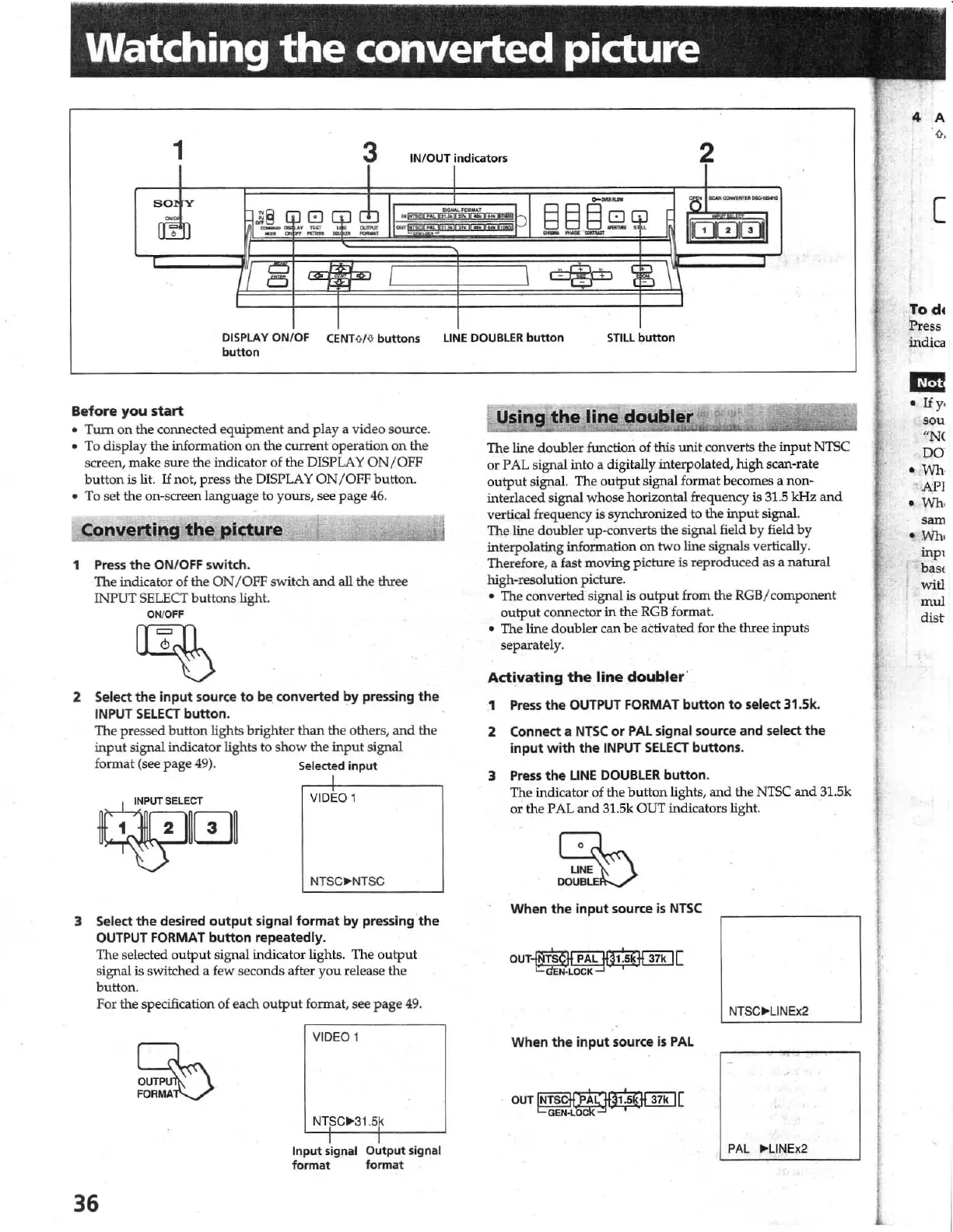
1
3 INIOUT
indicators
DISPLAY
ON
/
OF
CENT
M o buttons
button
Before
you
start
Tum
on
the connected
equipment
and
playa
video source.
To display
the
information
on
the
current
operation
on
the
screen,
make
sure
the
indicator of the
DISPLAY
ON
JOFF
button is lit.
If
not, press the DISPLAY
ON/OFF
button.
To set the on-screen language to
yours, see page
46.
Convertin
ure
1 Press
the
ON
/
OFF
switch
.
The indicator
of
the
ON
/ OFF switch
and
all
the
three
INPUT SELECT buttons light.
ON/OFF
2 Select the input source to be, converted by pressing
the
INPUT
SELECT
button
.
The pressed button lights brighter than the other
s,
and
the
input
signal indicator lights to
show
the
input
signal
format
(see
page
49). Selected
input
I
VI
DEO i
NTSC
II-NT
SC
3 Select
the
desired
output
signal
format
by
pressing
the
OUTPUT FORMAT
button
repeatedly.
The selected
ou
tput
si
gna
l indicator lights. The
outp
ut
signal is switched a few secon
ds
after
you
release
the
button.
For
the specification
of
each
output
format. see
page
49
.
~
~ci:U
36
VIDEO 1
NTSC~31.5k
I
Input signal
format
I
Output
signal
format
LINE
DOUBLER
button
STILL
button
Using
the
line
doubler
The line
doub
l
er
function
of
this
unit
converts the
input
N1SC
or
PAL signal into a digitally interpolated,
high
scan-rate
output
signal. The
output
signal f
or
mat
becomes a non-
interlaced signal whose horizontal frequency is 31.5
kHz
and
vertical frequency is synchronized to the
input
Signal.
The line doubler up-converts the signal field by field
by
int
erpo
lating information
on
two line signals vertically.
Therefore, a fast moving picture
is
reproduced
as
a natural
high-resolution picture.
• The converted signal is
output
from the
RGB
/ component
output
connector
in
the
RGB
format.
• The line
do
ubler can
be
activated for the three
inputs
separatel
y.
Activating
the
line
doubler
'
1
Press
the
OUTPUT
FORMAT
button
to
select 31.Sk.
2
Connect a NlSC
or
PAL
signal source and select
the
input
with
the
INPUT
SELECT
buttons.
3
Press
the
LINE
DOUBLER
button.
The indicator of the
button
lights,
and
the NTSC
and
31.5k
or
the PAL
and
31.5k OUT indicators light.
~
UNE
DOU.
When
the
input
source
is
NTSC
OUT~[
~~~~
When
the
input
source
is
PAL
OUT~[
~L~~~
PAL
..
LlNEx2
[
Tod.
Pres
s
indica
1m!
•
Ify
,
sou
"N
(
DO
•
Who
•
API
•
Who
sam
•
Who
inpt
bas,
witl
mul
dist



 To Next Page