EasyManua.ls Logo

Sony DSC-1024HD - Using the Remote Commander

Sony DSC-1024HD
23 pages
Print Icon
To Next Page IconTo Next Page
To Previous Page IconTo Previous Page
Loading...
I
,
Using
the
remote
commander
SONY
-
rn
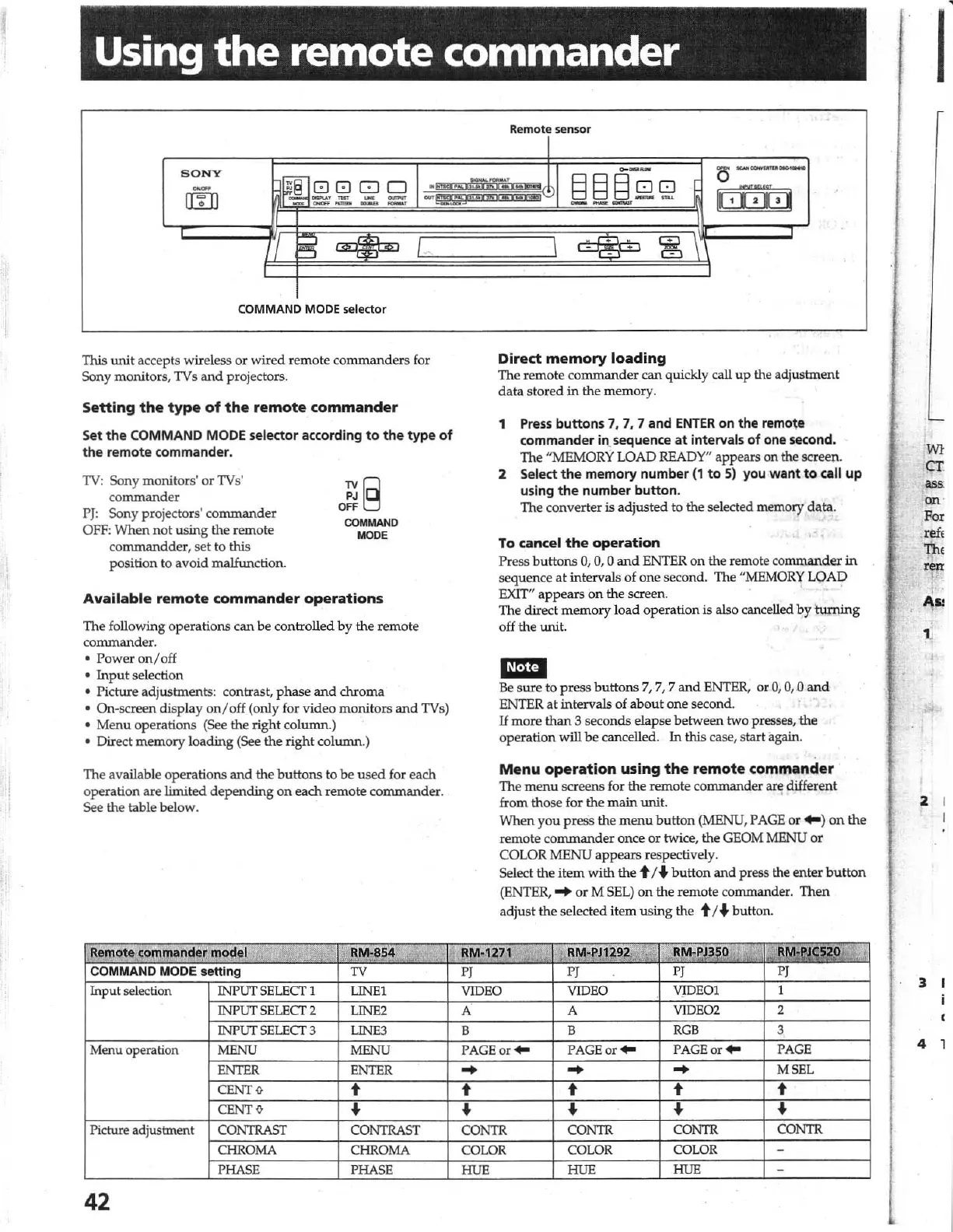
COMMAND MODE selector
This
tmit
accepts wireless
or
wired
remote
comm
an
ders
for
Sony monitors, TVs
and
projectors.
Setting
the
type
of
the
remote
commander
Set
the
COMMAND MODE selector according
to
the
type
of
the
remote commander.
TV: Sony
monitors
' or TVs'
commande
r
PJ:
Sony projectors'
commander
OFF: When
not
using the remote
corrunandder, set to
this
position to avoid malfunction.
aE§
COMMAND
MODE
Available
remote
commander
operations
The foll
owing
operations
can
be
controll
ed
by
the r
emote
co
mmander
.
Power
on/
off
Input
selection
Picture adjusbnents: contrast, p
ha
se
and
chroma
On-screen display on
/off
(only for video monitors
and
TVs)
Menu
ope
rations (See the
righ
t column.)
Direct
memory
loading
(See
the
right
coIUDUl.)
The available operations
and
the
buttons
to
be
used for
each
operation are limited
depending
on
each
remote commander.
See the table below.
Input selection
operation
Picture adjustment
42
Direct
memory
loading
The remote
commander
can
quickly call
up
the adjus
tment
data
s
tored
in
th
e
memor
y.
1
Press
buttons
7. 7,
7 and
ENTER
on the remote
commander illsequence
at
intervals of one second.
The
"MEM
ORY
WAD
READY"
appears
on
the screen.
2 Select
the
memory number
(1
to
5)
you
want
to
call up
using
the
number
button
.
The converter is
adjusted
to
the
se
lected memory
da~.
To
cancel
the
operation
Press b
utt
ons
0,
0, 0
and
ENTER
on
the remote comm
ander
in
sequence
at
inte
rvals
of
one
second.
The
"MEMORY
LOAD
EXIT"
appears
on
the
screen. '
The direct
memory
load
operation is also cancell
ed
by
turning
off
the
Wlit.
m.tlI
Be
s
ure
to
press
buttons
7, 7, 7
and
ENTER, or
0,
0, 0
and
ENTER
at
int
ervals
of
aoout
one second.
If
more
than
3 seco
nds
elapse
between
two presses,
the
operation will
be
cancelled.
In
this case, start again.
Menu
operation
using
the
remote
commander
Th
e
menu
screens for the remote commander are different
from those for
th
e
main
Wlit.
When you
pr
ess the
menu
b
utt
on
(MENU, PAGE or
...
)
on
the
remote co
mmander
once
or
twice,
the
GEOM MENU
or
CO
L
OR
MENU
appears
respectively.
Select
the
item
wi
th
th
e t /
..
butt
on
and
press the enter
button
(ENTER,
...
or
M SEL)
on
the remote commander.
Then
ad
ju
st
the
se
lected
it
em using
th
e t I. b
utt
on.
r
r
'WI
cr
ass
on
For
rei<
ti"
,
ren
I
r
1\"'
2
3
4

Other manuals for Sony DSC-1024HD

Related product manuals