Zooming
and
resizing
the
picture
3
SONY
-
lIT]
You
can
zoom
up
the picture
making
it
2,3
or
4 times l
arger
than the
orig
ina1 size.
You can also shift the position of the pic
ture
so
that
it
fits
in
the
screen,
or
adj
ust
the vertical
and
horizontal size
of
the
picture
separately.
The adjustments c
an
be carri
ed
out
for
the
three
inputs
separately.
Zooming
up
the
picture
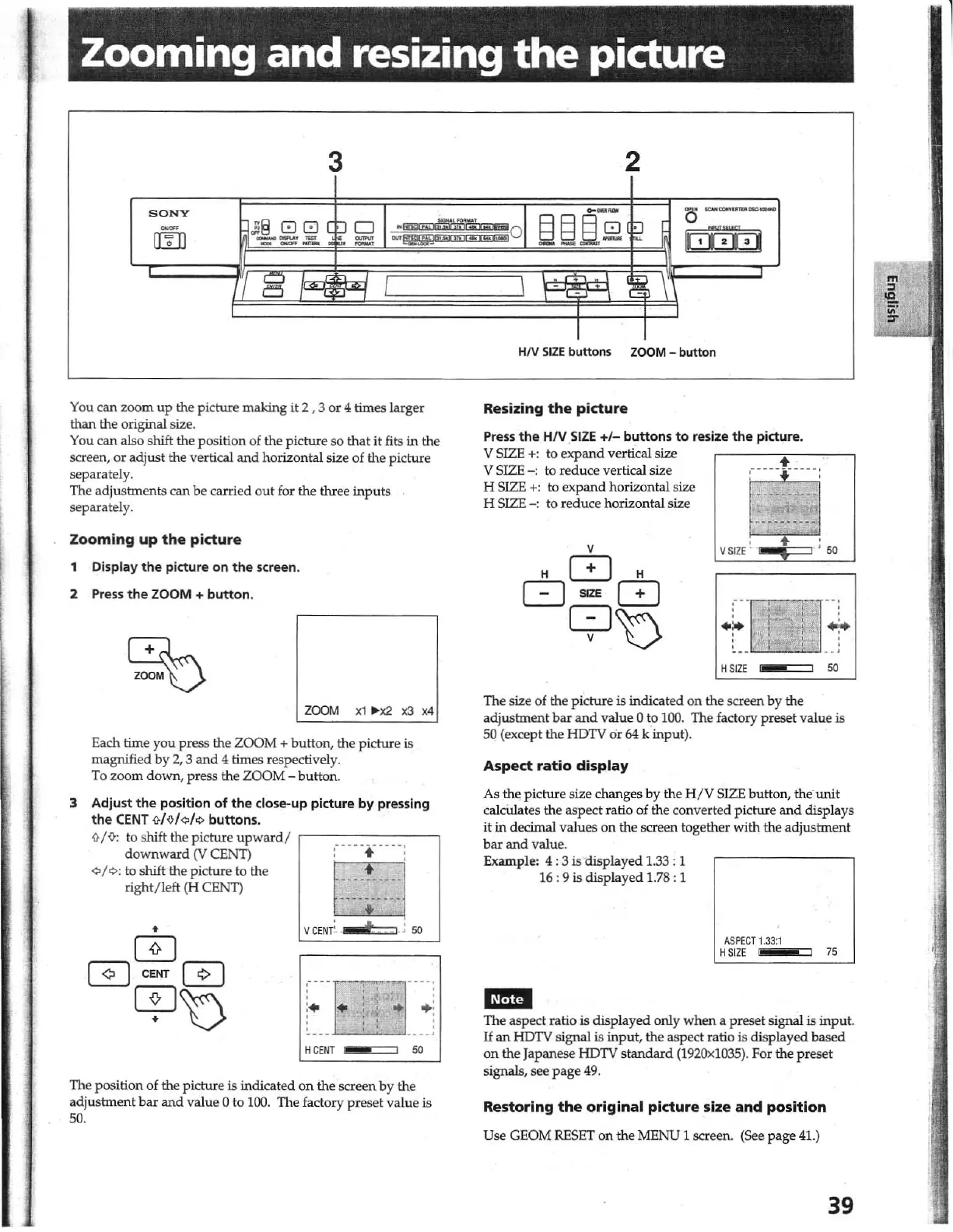
1 Display
the
picture
on
the
screen.
2
Press
the
ZOOM +
button.
ZOOM
x1 "
)(2
x3
x4
Each
time
you press the ZOOM +
bu
tton, the pi
cture
is
magnified by 2, 3
and
4 times respectively.
To
zoom
down,
press the ZOOM -
bu
tt
on.
3 Adjust
the
position
of
the
dose-up
picture
by
pressing
the
CENT
MoI"
/,, buttons.
i}
/
-&:
to shift the picture
upward
/
,------
-
-,
-----------,
dow
n
ward
01
CENT) : + '
"/"
to shift the picture
'0
the t
--
-
:
~
-:
:-1
right/ left (H CENT) _ _ _ _
____
_
VCEN(- t
i.50
HCENT
so
The
pos
ition
of
the picture is indicated
on
the screen by the
a
djustment
bar
and
va
lu
e 0 to 1
00.
The factory
pr
eset
va
lu
e is
50.
2
HN
SIZE
buttons
ZOOM
- button
Resizing
the
picture
Press
the
HIV
SIZE
+/-
buttons
to
resize
the
picture.
V
SIZE
+:
to
expand
vertical size
V
SIZE
-:
to r
educe
vertical size
H
SIZE
+:
to exp
and
horizo
nt
al size
H
SIZE
-:
to
reduce horizontal size
r+J
~
vsrZE
~
;
50
r -
--:
t
-
I.
•
••
1
.'.
, ! .;'
e.
:
. ' ,
H
SIZE
50
The
size of the picture is indicated on the screen by the
adjustment
bar
and
value 0 t.o
100.
The factory preset value is
50 (except
th
e
HDTV
or
64 k
input
).
Aspect
ratio
display
As
the;
picture size changes
by
the H
jV
SIZE
button,
th
e
unit
calcUlates the aspect ratio of
th
e converted picture
and
displays
it
in decimal valu
es
on
th
e screen toge
th
er
with
the
adjustment
bar
and
valu
e.
Example: 4 : 3 is
displayed
1.33: 1
16
,9
;g
displayed 1.78 , 1
ASP
ECT
1.33:1
HSIZE
i
75
em
The
aspect ratio is
disp
la
yed
only
when
a preset signal is input.
If
an
HDTV signal is
input
, the aspect ratio is
displayed
based
on
th
e Japanese HDTV s
tandard
(1
92Ox
1
035).
For
the
preset
signals,
see
pag
e
49.
Restoring
the
original
picture
size
and
position
Use
GEOM
RESET
on
the MENU 1 screen. (See
page
41.)
39
1



 To Next Page