Adjusting
the
picture
S
ONY
While
watching
the
picture
, y
ou
c
an
a
djust
co
ntrast
,
phase,
chroma
and
aperture
to
suit
your
ta
st
e. The
adjustments
can
be carried
out
for
the
three
inputs
separatel
y. The
adjusted
levels are stored
in
memory.
Adjusting
the
contrast,
phase
,
and
chr
oma
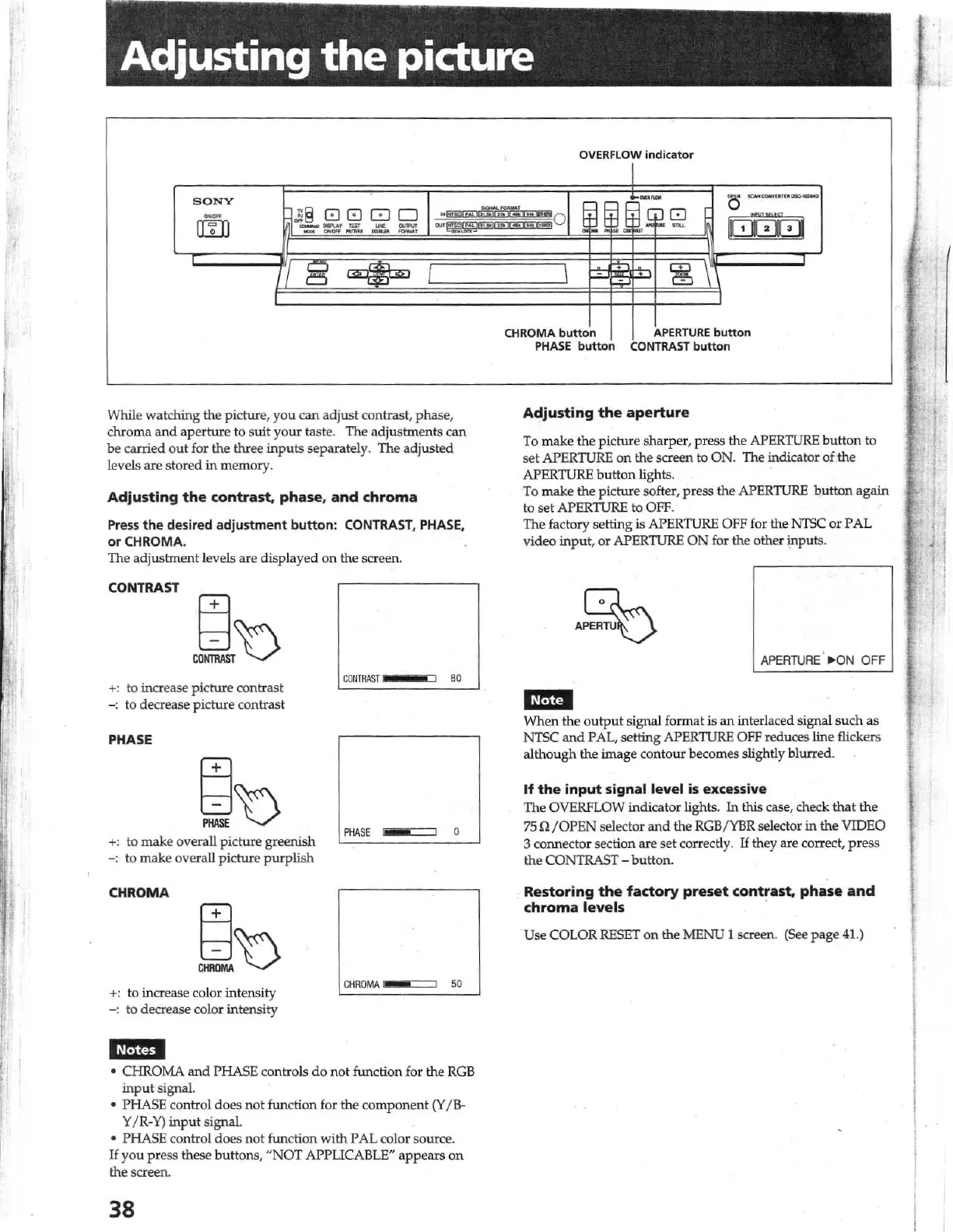
Press t he
desired
adjustment
button
: CONTRAST, PHASE.
or
CH
ROM
A.
The
adjustment
levels are
displayed
on
the screen.
CONTRAST
+:
to increase
picture
contrast
- : to decrease
picture
contrast
PHASE
+:
to
make
overall
picture
greenish
-:
to
mak
e overall
picture
purplish
CHROMA
+: to increase color
in
tensity
-:
to decrease color intensity
CONTRAS
T
PHASE
C
HROMA
80
o
• CHROMA
and
PHASE controls
do
not function for the
RCB
inp
ut signal.
• PHASE control
does
not
function for
the
compone
nt
(Y
l
B·
Y / R-
Y)
input s;gnal.
• PHASE control does not function with PAL color so
ur
ce.
II you press these buttons,
"NOT
APPUCABLE"
appears
on
the screen.
38
OVERFLOW
indicat
or
CHROMA
PHASE
butt
on
Adjusting
the
aperture
To
make
the pic
tur
e sharper, press the APERTURE
bu
tton
to
set
APERTURE
on
the screen to ON. The indicator of
the
APERTURE button lights.
To
make
the
picture
softer, press the
APERTURE
bu
tton
again
to set
APERTURE
to
OFF.
The factory setting is APERTURE
OFF
for the NTSC
or
PAL
video
input,
or
APERTURE ON for the
other
i:np
uts.
A~
APERTURE
·
~
ON
OFF
When
the ou
tput
si
gna
l format
is
an
interlaced Si
gnal
su
ch
as
NTSC
and
PAL, setting
APERTURE
OFF
reduces line flickers
alth
o
ugh
th
e image
contour
becomes slightly blurred.
If
the
input
signal level is excessive
The OVERFWW indicator lights. In this case, check
that
th
e
75
U/OPEN
selector
and
the
RGB
/
YBR
selector in the VIDEO
3 connector section are
set
correctly.
If
they are co
rr
ect,
press
the CONTRAST -
button.
Restoring
the
factory
preset
contrast,
phase
and
chroma
levels
.
Use COLOR
RESET
on
the MENU 1 screen. (See
page
41.)
1



 To Next Page