EasyManua.ls Logo

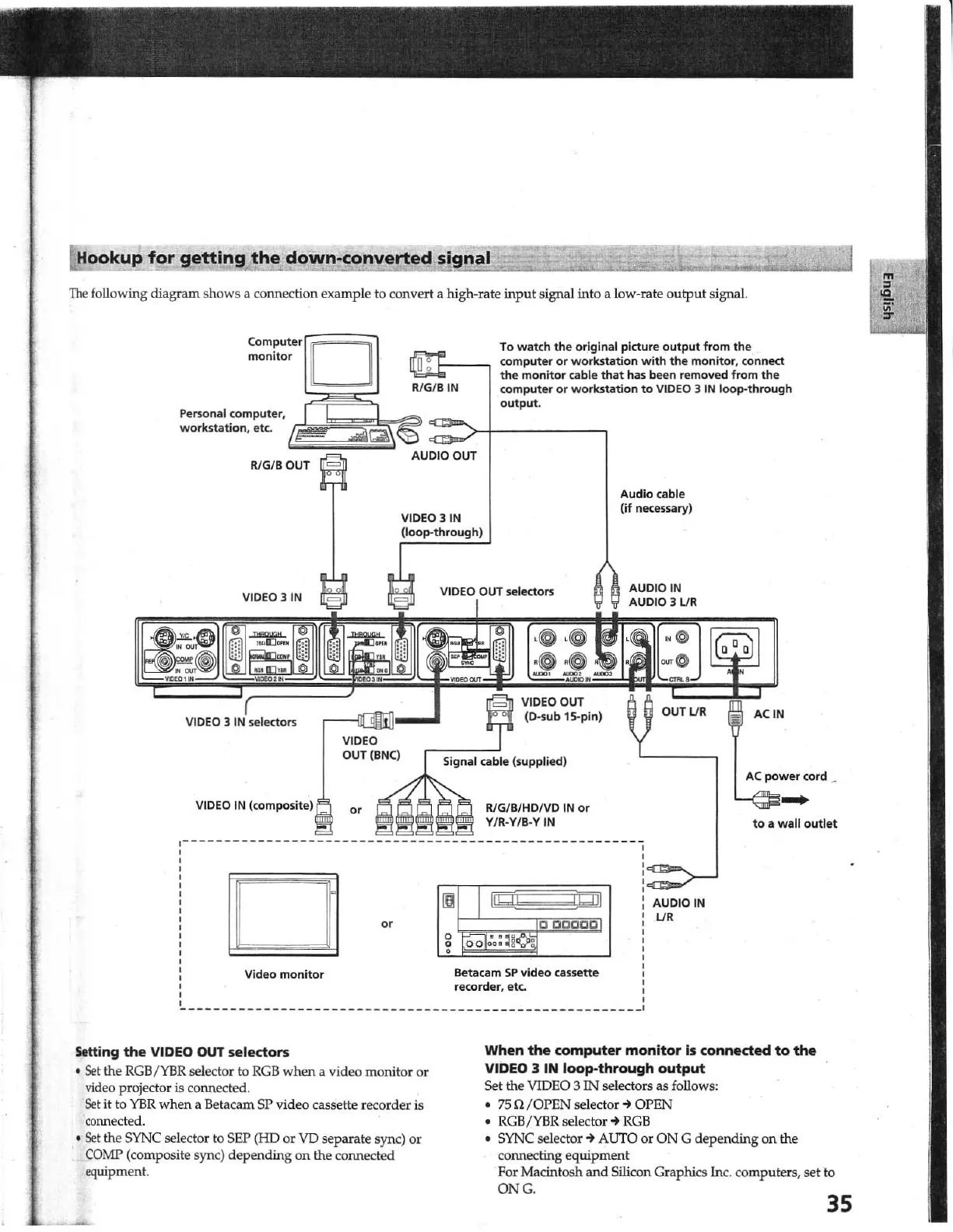
Sony DSC-1024HD - Hookup for Getting the Down-Converted Signal

Sony DSC-1024HD
23 pages
Print Icon
To Next Page IconTo Next Page
To Previous Page IconTo Previous Page
Loading...
Hooku()
for
getting
the
down-converted
signal
1
The
following diagram shows a connection example to conve
rt
a high.rate
input
signal into a low-rate ou
tput
signal.
computer
monitor
Personal computer,
workstation. etc.
VIDEO 31N
To
watch
the
original picture
output
from
the
computer
or
workstation
with
the
monitor, connect
the
monitor cable
that
has
been
removed from
the
computer
or
workstation
to
VIDEO 3 IN loop-through
output.
a:
D
kRlG/
BIN
=
>+----,
VIDEO
OUT (BNe)
VIDEO 3 IN
(loop-through)
VIDEO OUT selectors
Signal cable (supplied)
Audio
cable
(if
necessary)
AUDIO IN
AUDIO 3LJR
CUTUR ACtN
AC
power
cord
~
VIDEO
IN
(<O'"PO,;'.)
El
Video
monitor
R/G/B/HOIVD
IN or
V/R-Y/B-Y IN
'gil
Beta cam
SP
video cassette
recorder, etc.
,
,
,
,
,
,
,
,
,
,
AUDIO
IN
UR
to
a wall outlet
_________
______
_______________
___
______________________
I
Setting
the
VIDEO OUT
selectors
Se
t the
RGB
/
YBR
selector to
RGB
when a video monitor or
video projector
is co
nn
ected.
Set
it
to
YBR
when a Betacam SP video cassette record
er
is
connected .
Se
t the SYNC selector to SEP (HD or
VD
separate sync)
or
.
COMP
(co
mposite sync) depending
on
the c
onn
ected
eq
uipment.
When
the
computer
monitor
is
connected
to
the
VIDED 3 IN
loop-through
output
Set the VIDEO 3
Il".J
selectors as follows:
7Sn
/O
PEN
se
lector~
OPEN
RGB/YBR selector
~
RGB
SYNC selector
-+
AUTO or
ON
G depending on the
connecting equipment
For Macintosh
and
Silicon Graphics In
c.
computers, set to
ONG
.
35
1

Other manuals for Sony DSC-1024HD

Related product manuals