Location and function
of
parts and controls
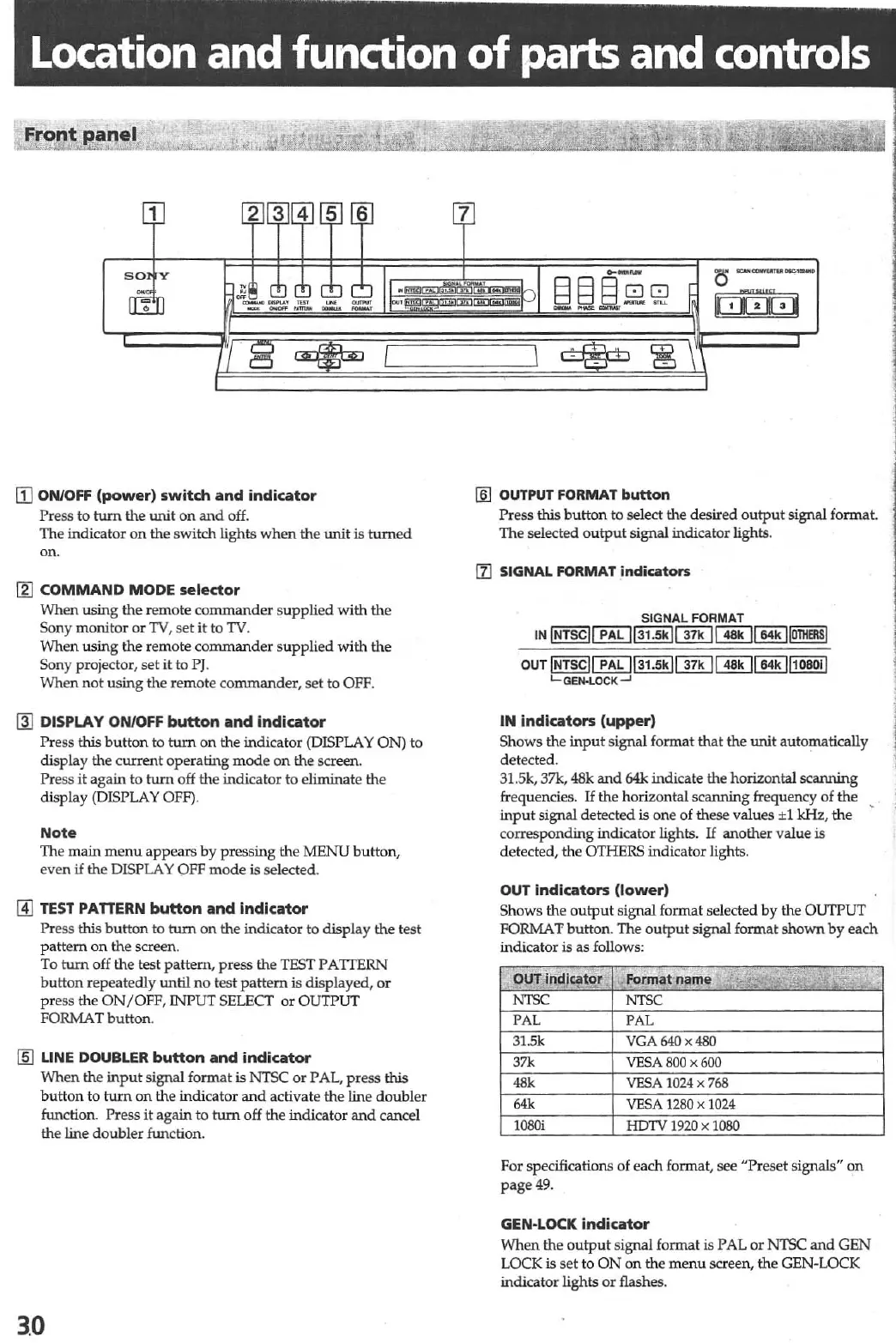
[1J
ON/OFF
(power)
switch
and
indicator
Press
to
tum
the W'lit
on
and
off.
The indicator
on
the switch lights
when
the
unit
is
turned
on.
III
COMMAND
MODE
selector
When
using
the
remote
commander
s
upplied
with
the
Sony monitor
or
lV,
se
t
it
to
TV.
When using
the
remote
commander
s
upplied
with
the
Sony projector,
set
it
to
pJ.
When
not
using
th
e remote commander, set to OFF.
@I
DISPLAY
ON/OFF
button
and
indicator
Pr
ess this
button
to
tum
on
the indicator (DISPLAY ON)
to
display the
current
operating
mode
on
th
e screen.
Pr
ess it again to
tum
off
th
e indicator to eliminate the
display (DISPLAY
OFF).
Note
The main
menu
appears by pressing
the
MENU button,
even
if
th
e DlSPLA Y
OFF
mode
is
se
lected.
L4J
TEST
PA
nERN
button
and
indicator
Press this
button
to
tum
on
the
indicator to display the t
es
t
patt
e
rn
on
the screen.
To
tum
off the test pattern, press the TEST
PA
ITERN
button repeatedly until
no
test pattern is displayed,
or
press the
ON/OFF,
rNPUT SELECT
or
OUTPUT
FORMAT button.
lID
LINE DOUBLER
button
and
indicator
When
th
e
input
signal format
is
NTSC
or
PAL, press this
button
to
turn
on
the indicator
and
activate
the
line
doubler
function. Press
it
again to
turn
off the indicator
and
cancel
the line
doubler
function.
3.0
c::Jc::J
-
.
~
[§]
OUTPUT
FORMAT
button
Press this
button
to select the desired
output
signal format.
The selected
output
signal indicator lights.
[1]
SIGNAL
FORMAT
indicators
SIGNAL FORMAT
IN
iii!§£JCillJIillE]ClliJ
~I]ill~
OUT
JNTScll
PAL
113'
.
5kJ~1I
48.
1164.
1I,080l!
L-GEN-lOCK ...J
IN
indicators
(upper)
Shows
the
input
signal
fonnat
that the
unit
automatically
detected.
31.5k, 37k, 48k
and
64k indicate the horizontal
sc
aruUng
frequencies.
If
the horizontal scaruting frequency of the
input
signal detected is one of
th
ese values
±1
kHz,
the
corresponding indicator lights.
If
another value
is
detected, the OTHERS indicator lights.
OUT
indicators
(lower)
Shows
th
e
output
signal format
se
lected
by
the
OUTPUT
FORMAT
button
. The
output
signal format
shown
by
each
indicator
is as follows:
OUT
Ind'~to!
"Format
np{M
,;
i.i',
."iii
.
·A
,
m~
.
NTSC
NTSC
PAL PAL
31.5k VGA640x480
37k
VESA
BOO
x
600
48k
VESA
1024
x
768
64k
VESA
1280
x
1024
10
80i
HDTV
1920
x
1080
For specifications of each format, see "Preset signals"
on
page
49
.
GEN·LOCK
indicator
When
the
output
signal format is PAL
or
NTSC
and
GEN
LOCK
is
set to
ON
on
the
menu
screen, the GEN-LOCK
indicator lights
Of flashes.



 To Next Page