SONY
-
rn
00
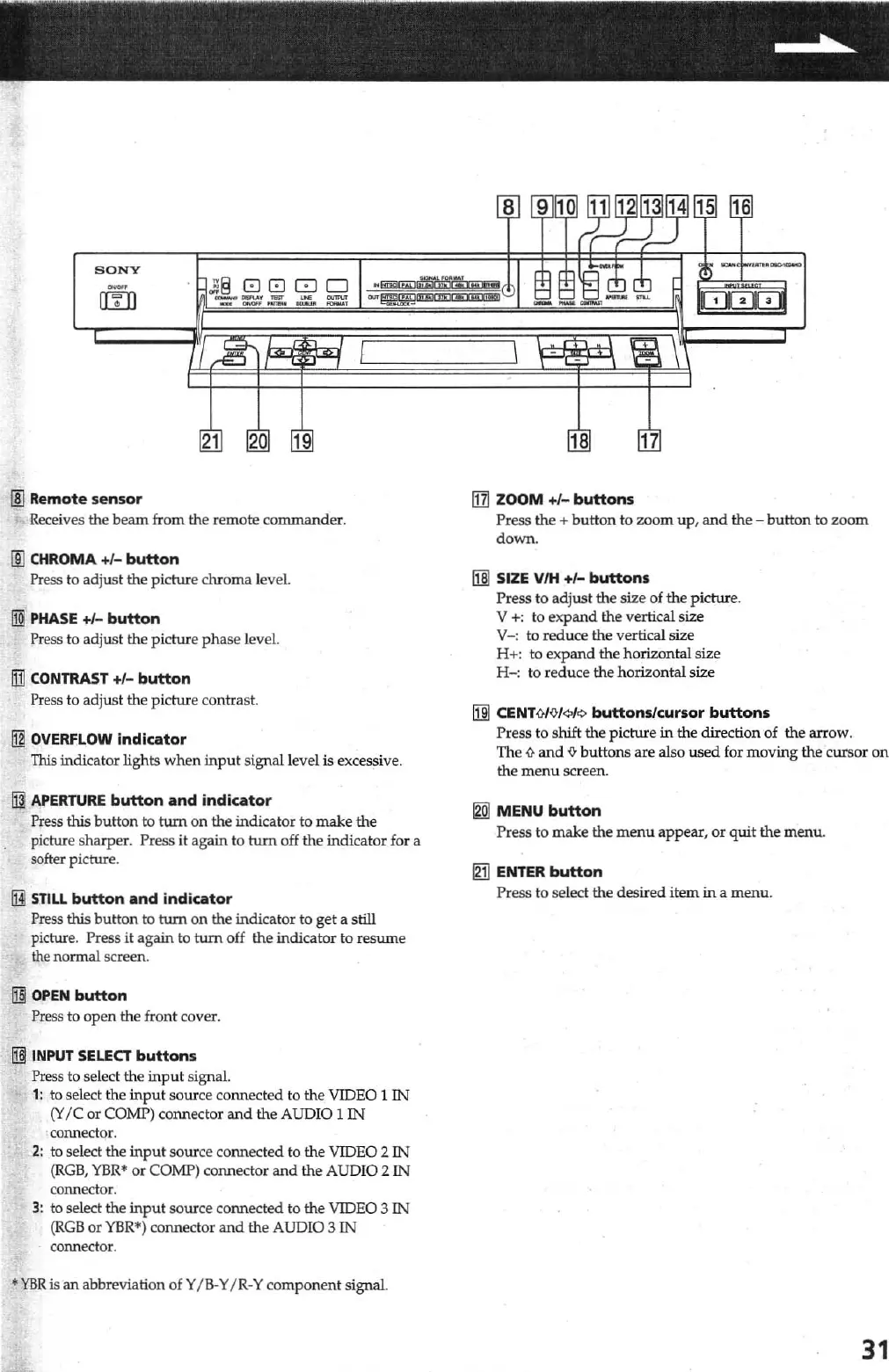
Remote sensor
Receives the
beam
from the remote commander.
lID
CHROMA
+/-
button
Press to adjust the picture chroma level.
@
PHASE
+/-
button
Press to adjust the picture
phase
level.
lIil
CONTRAST
+/-
button
Press to adjust the picture contrast.
Ii]
OVERFLOW
indicator
This
inrucatOJ' lights
when
input
signal level
is
excessive.
H1I
APERTURE
button
and
indicator
Press this button
to
turn on the indicator to make the
picture sharper. Press
it
again
to
tum
off
the
indicator for a
softer picture.
lHl
STILL
button
and
i
ndicator
Press this
button
to
tum
on
the indicator to
get
a still
picture. Press
it
again to
tum
off the indicator to
resume
the normal screen.
~
OPEN
button
Press to
open
the front cover.
UlJ
INPUT
SELECT
buttons
Press to select the
input
signal.
1:
to select
th
e
input
source connect
ed
to
the
VIDEO 1 IN
(Y
Ie
or
COMP) connector
and
the AUDIO 1
IN
. connector.
2:
to
select
the
input
so
ur
ce connected to the VIDEO 2
IN
(RGB,
YBR.
or
COMP) connector
and
the
AUD
IO 2
IN
connector.
3:
to
select
the
input
source connected to
the
VIDEO 3
IN
(RGB
or
YBR·) connector
and
the
AUDIO 3
IN
connector .
•
YBRis
an
abbreviation
oiY
I B·Y/ R·Y
compo
nent
signaL
Ii1I
ZOOM +/-
buttons
Press the +
button
to
zoom
up
,
and
the
-
butt
on
to
zoom
down.
11§
SIZE VlH
+/-
buttons
Press
to
ad
just
the
size
of
the
picture.
V
+:
to
expand
the verticaIsize
v-:
to reduce the vertical size
H+: to
expand
the horizontal size
H
-:
to
red
u
ce
the horizontal size
[m
CENTOIO/
¢I¢
buttons/cursor
buttons
Press to shift the picture
in
the direction of the arrow.
The
i}
and
{lo
buttons are also used for moving
th
e cursor on
the
menu
screen.
[gg
MENU
button
Press to make the
menu
appear,
or
quit the
menu
.
~
ENTER
button
Press
to
select
the
desired item
in
a
menu
.
31



 To Next Page