EasyManua.ls Logo

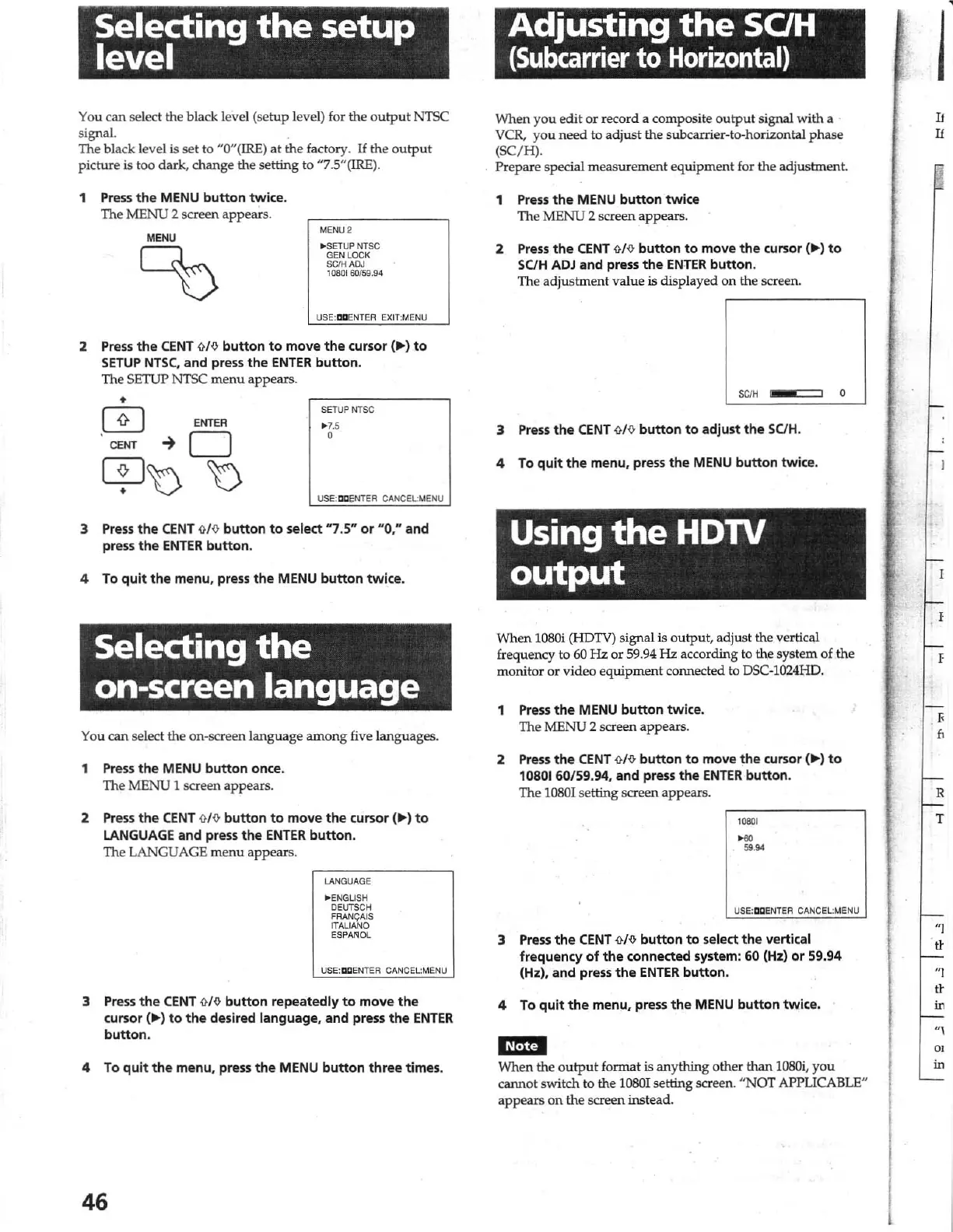
Sony DSC-1024HD - Selecting the Setup Level; Selecting the On-Screen Language; Using the HDTV Output

Sony DSC-1024HD
23 pages
Print Icon
To Next Page IconTo Next Page
To Previous Page IconTo Previous Page
Loading...
Selecting
the
setup
level
You
can
se
lect the black l
eve
l (se
tu
p level) f
or
th
e ou
tp
ut NTSC
signal.
Th
e
bl
ack
l
eve
l is
se
t to
"O"(
IRE)
at
th
e
fa
ctory.
Ii
th
e ou
tp
ut
pi
c
tur
e is t
oo
da
rk,
chan
ge
th
e
se
tting to "7.5"(IRE
).
1
Press
the
MENU
button
twice.
Th
e MENU 2 scr
een
a
pp
e
ar
s.
M
ENU
Do
MENU2
" S
ET
UP NTSC
GEN
LOCK
SClH A
DJ
1
080
180159.94
USE:
IKI
EN
TEA
EXIT:MENU
2
Press
the
CENT
IJ.
/O
button
to
move
the
cursor (
...
)
to
SETUP
NTSC.
and
press
the
ENTER
button
.
The SETUP NTSC
menu
appea
rs.
SETUP
NTSC
.
,.
,
USE:
ImEN
TER CANCEL:MENU
3 Press
the
CENT
Q/(} button
to
select "
7.S
H
or
"O,
H and
press
the
ENTER
button.
4
To
quit
the
menu, press
the
MENU
button
twice
.
Selecting
the
on-screen
language
Yo
u can select the on-screen language among five languag
es.
, Press
the
MENU
button
once
.
Th
e MENU 1 scr
een
ap
pea
rs.
2
Press
the
CENT
O/
f>
button
to
move
the
cursor (
...
)
to
LANGUAGE and press
the
ENTER
button.
Th
e LANGUAGE
men
u
appears
.
lANGUAGE
~
E N GLISH
DEUTSCH
FRANCAIS
ITALIANO
ESPAIll
OL
U
SE
:
aa
ENT
EA
CANCEL:MENU
3
Press
the
CENT
{)/
IJ
button
repeatedly
to
move
the
cursor (
....
)
to
the
desired language, and press
the
ENTER
button
.
4 To
qu
it
the
menu, press
the
MENU
button
three
times.
46
Adjusting
the
SOH
(Subcarrier
to
Horizontal)
When y
ou
ed
it or record a composite ou
tput
signal with a .
V
CR..
y
ou
need to adj
ust
the subcarrier-to-
horiz
ontal phase
(SC/H).
Prepare special m
easur
em
ent
equipment
for
th
e adjus
bn
ent.
1
Press
the
MENU
button
twice
The MENU 2 screen appears.
2
Press
the
CENT
{)/IJ
button
to
move
the
cursor (
....
)
to
SC/H
ADJ
and press
the
ENTER
button
.
The adjus
bnen
t value
is
di
splay
ed
on the scr
ee
n.
SCiH
0
3
Press
the
CENT
fj/
IJ
button
to
adjust
the
Sc/H.
4 To
quit
the
menu, press
the
MENU
button
twice.
Using
the
HDTV
output
When 1080i (HDTV) signal
is
ou
tp
ut
, adjust
th
e vertical
frequency to
60 Hz
or
59.94
Hz
acco
rdin
g to the system
of
the
mo
nit
or
or vi
deo
e
quipm
ent co
nn
ected to DSC-I02
4H
D.
1
Press
the
MENU
button
twice
.
Th
e MENU 2 screen appears.
2
Press
the
CENT
fj/IJ
button
to
move
the
cursor (
....
)
to
10801
60/59
.94, and press
the
ENTER
button.
The 10
80
1 setting screen
appears
.
"""
..,
59
."
USE:DaENTEA CANCEL:MENU
3
Press
the
CENT
fj/
IJ
button
to
select
the
vertical
frequency
of
the
connected system: 60 (Hz)
or
59.
94
(Hz), and press
the
ENTER
button
.
4 To
quit
the
menu, press
the
MENU
button
twice.
.g.,.
When the ou
tp
ut fo
rm
at is
an
ything
other
than
10B0i
,
you
c
annot
switch
to
the 1
0801
setting screen.
"N
OT
AP
PUCABLE"
a
ppear
s
on
th
e screen inst
ea
d.
u
u
I
!
R
T
"J
t
~
"J
It
in
'1

Other manuals for Sony DSC-1024HD

Related product manuals