1
Using
the
generator
lock
(gen-Iock)
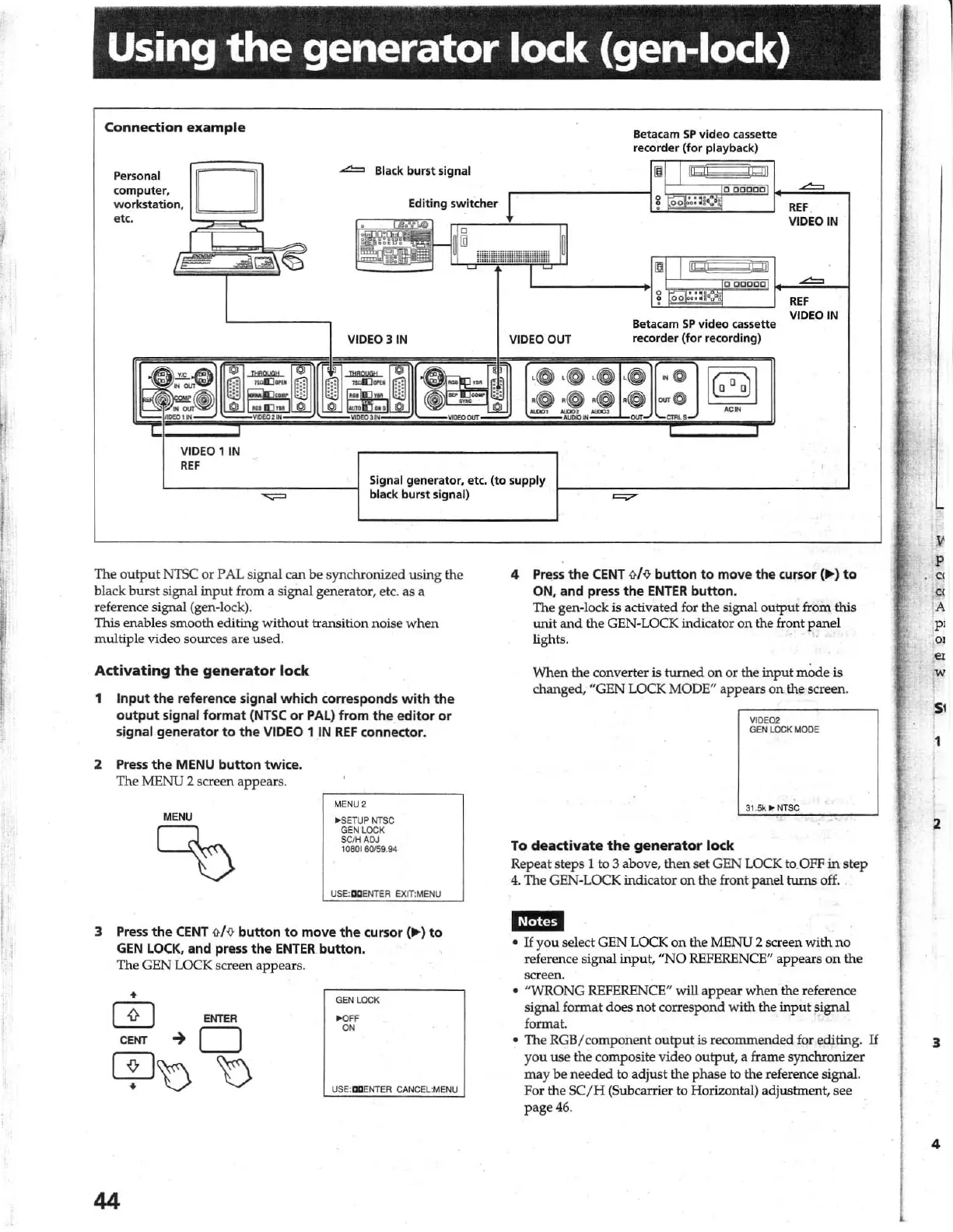
Connection
example
Personal
co
mputer,
workstation.
~~~
~~
etc.
~
VIDEO
1
IN
REF
.....:::!:=
Black
burst
signal
VIDEO
3
IN
VIDEO
OUT
Betacam
SP
video
cassette
recorder
(for
playback)
Betac3m
SP
video cassette
recorder (for recording)
REF
VIDEO
IN
REF
VIDEO
IN
Signal
generator,
etc. (to supply
black
burst
signal)
The ou
tput
NTSC
or
PAL signal can
be
synchronized using the
black
burst
signal
input
from a signal generator, etc. as a
reference signal (gen-lock).
This enables s
mooth
editing
w
ith
ou
t transition noise
when
multiple
video
sources are
used
.
Activating
the
generator
lock
1
Input
the
reference signal
which
corresponds
with
the
output
signal
format
(NTSC
or
PAL)
from
the
editor
or
signal
generator
to
the
VIDEO 1
IN
REF
connector.
2 Press
the
MENU
button
twice.
The
MENU
2 screen
appears.
MENU
00
MENU
2
...
SETUP
NTSC
GEN
LOCK
SCiH
ADJ
1080180159
.
94
USE:
IXIENT
EA
EXlT:M
ENU
3
Press
the
CENT
1J./fJ
button
to
move
the
cursor (
....
)
to
GEN
LOCK.
and press
the
ENTER
button.
The GEN LOCK screen appears.
•
IT]
ENTER
CENT
-+
0
CP
b b
44
GEN
LOCK
>OFF
ON
U
SE
:EII
ENTER
CANCEL
:MENU
4
Press
the
CENT
1J./
{J
button
to
move the cursor (
...
)
to
ON. and press
the
ENTER
button
.
The gen-Iock
is
activated for
the
signal outp
ut
from this
unit
and
the
GEN
-L
OCK
indicator
on
the front
panel
li
ghts.
When
the converter is
turned
on
or
the input mode is
changed,
"GEN
L
OCK
MODE" appears
on
the screen.
YIO
E02
GE
N L
OCK
MOOE
31.
5k
'"
NTSC
To
deadivate
the
generator
lock
Repeat steps 1 to 3 above,
th
en
set
GEN
LOCK to. OFF
in
step
4. The GEN-LOCK indicator
on
the front
panel
turns off.
I~MM
•
If
you
select
GEN
LOCK
on
the
MENU
2 scre
en
with
no
reference signal
input
,
"NO
REFERENCE" appears
on
the
screen.
•
"WRONG
REFERENCE" will
appear
when
the reference
signal format does
not
correspond
with
the
input
~
i
gna1
format.
.
• The
RGB
/ compon
ent
outp
ut
is recommended for editing.
If
y
ou
use the composite v
ideo
o
utpu
t, a frame synclu-onizer
may
be
needed
to adjust the phase to the reference signal.
For the
SC/ H
(S
ubcarri
er
to Horizontal) adjustment, see
page
46
.
w
I
'51
,
"
3
4
1



 To Next Page