Optionalaccessories
This section introduces how to counect and operate popular accessories for this camera.
For details, refer to the operating instructions of each of the accessories.
AC-VQ9OOAM AC Adaptor/charger
When a househohl power outlet (A(." power) is available, using an A(-' Adaptor/ch:Jrger
eliminates the possibility of running out of battery.
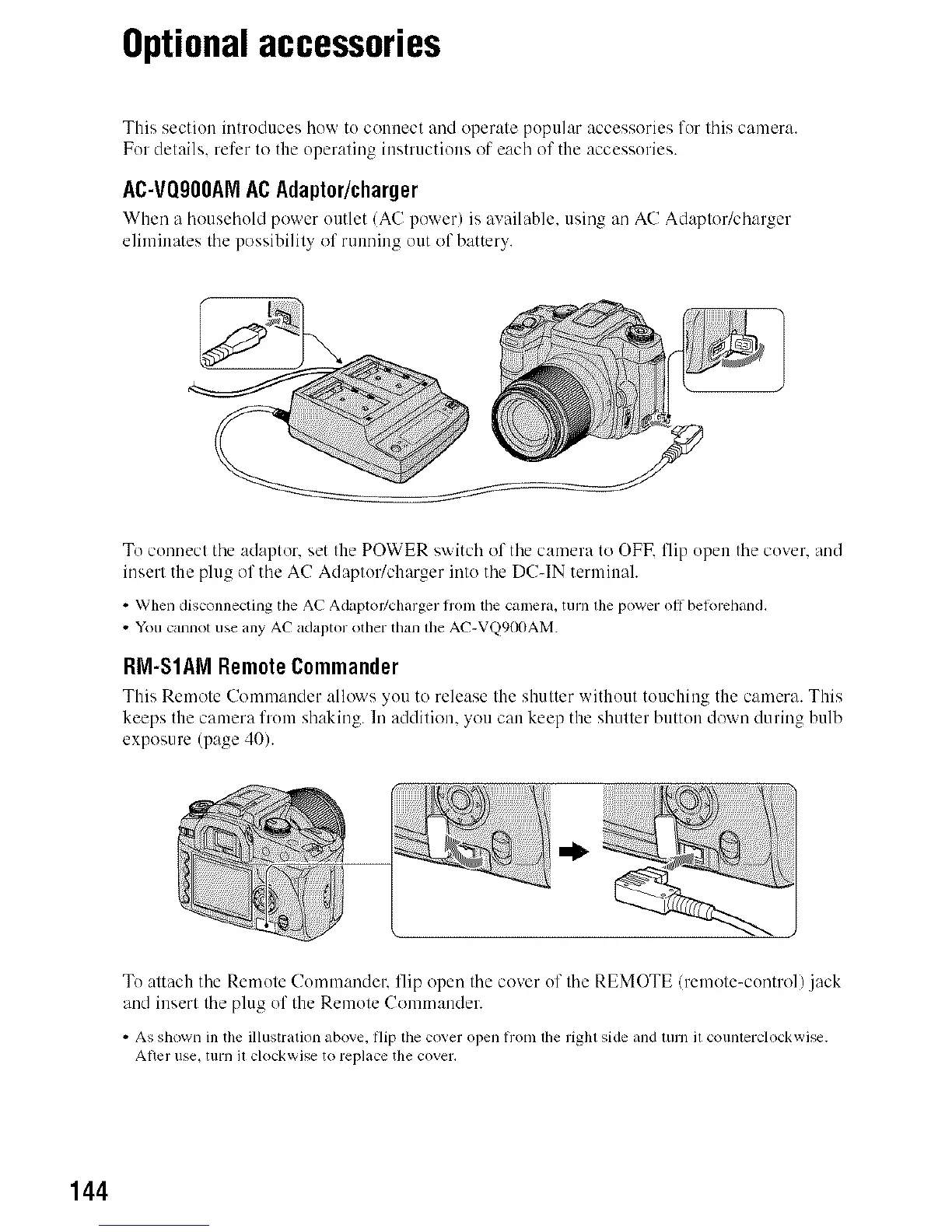
To connect the adaptor, set the POWER switch of the camera to OFK flip open the cover, and
insert the plug of the A(! Adaptor/charger into the D(!-IN terminah
• When disconnecting the AC Adaptor/charger flom the camera, turn lhe power off belorchand.
• You cannot use any AC adaptor other than lhe AC-VQ90OAM.
RM-S1AM RemoteCommander
This Remote C-'omm:mder:,llo'_s you to release the shutter without touchiug the camera. This
keeps thecamera from shaking. In addition, you can keep the shutterbutton down duringbulb
exposure (page 40).
Tu attach the Remote (!ommandel: flip open the cover of the REMOTE/remote-control) .jack
and insert the plug of the Remote Commander.
• As shown in the illustration above, flip the cover open flom lhe righl side and lurn il counlerclockwise.
Ariel use. turn il clockwise to replace the cover.
144



 To Next Page
 Loading...












