EasyManua.ls Logo

Sony EV-C100 - Slow Motion, Tracking & Scene Editing

Sony EV-C100
28 pages
Print Icon
To Next Page IconTo Next Page
To Previous Page IconTo Previous Page
Loading...
General
Setup
Information
fiche
ale
acatsanaaa
lowed)
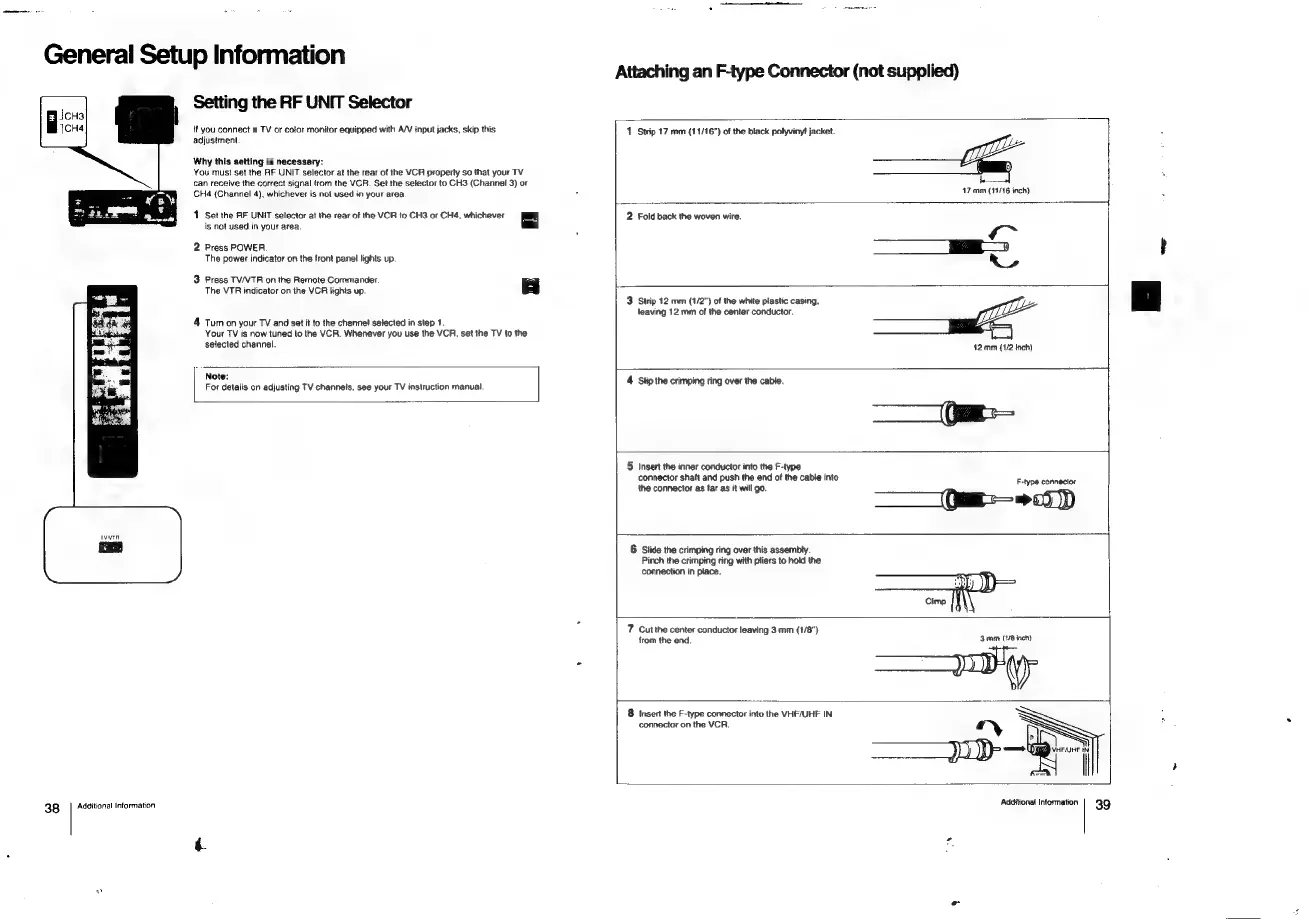
Setting
the
RF
UNIT
Selector
tf
you
connect
a
TV
or
color
monitor
equipped
with
A/V
input
jacks,
skip
this
1
Strip
17
mm
(11/16")
of
the
black
polyvinyl!
jacket.
adjustment
Why
this
setting
is
necessary:
You
must
set
the
RF
UNIT
selector
at
the
rear
of
the
VCR
property
so
that
your
TV
can
receive
the
correct
signal
from
the
VCR.
Set
the
selector
to
CH3
(Channel
3)
or
CH4
(Channel
4),
whichever
is
not
used
in
your
area
we
@
D
17
mm
(19/16
inch)
1
Set
the
AF
UNIT
selector
at
the
rear
of
the
VCR
to
CH3
or
CH4,
whichever
2
Fold
back
the
woven
wire.
is
not
used
in
your
area.
L
2
Pross
POWER,
_—
The
power
indicator
on
the
front
panel
lights
up.
a
3
Press
TV/VTR
on
the
Remote
Commander
The
VTR
indicator
on
the
VCR
lights
up.
|
|
3
Strip
12
mm
(1/2")
of
the
white
plastic
casing,
leaving
12
mm
of
the
center
conductor.
4
Turn
on
your
TV
and
set
it
to
the
channel
selected
in
step
1.
Your
TV
is
now
tuned
to
the
VCR.
Whenever
you
use
the
VCR,
set
the
TV
to
the
selected
channel.
42.
mm
(1/2
Inch)
For
details
on
adjusting
TV
channels,
see
your
TV
instruction
manual
4
Slip
the
eri
9
Ting
over
the
cable.
5
Insert
the
inner
conductor
into
the
F-type
connector
shaft
and
push
the
end
of
the
cable
into
Fetype
connector
the
connector
as
far
as
it
will
go.
—_—
(Oar
0)
6
Slide
the
crimping
ring
over
this
assembly.
Pinch
the
crimping
ring with
pliers
to
hold
the
connection
in
place.
z
a
|
|
Note:
7
Cutthe
center
conductor
leaving
3
mm
(1/8")
from
the
end.
3mm
(1/8
inch)
8
Insert
the
F-type
connector
into
the
VHF/UHF
IN
connector
on
the
VCR.
N
TSS
)
Pp
=,
VHF/UHF
i
38
Additional
Information
Additional
Information
39

Related product manuals