EasyManua.ls Logo

Sony EV-C100 - Page 21

Sony EV-C100
28 pages
Print Icon
To Next Page IconTo Next Page
To Previous Page IconTo Previous Page
Loading...
300
ohm
twin
lead
cable
Screws
300
ohm
twin
lead
cable
VHF/UHF-IN
@
75
ohm
coaxial
cable
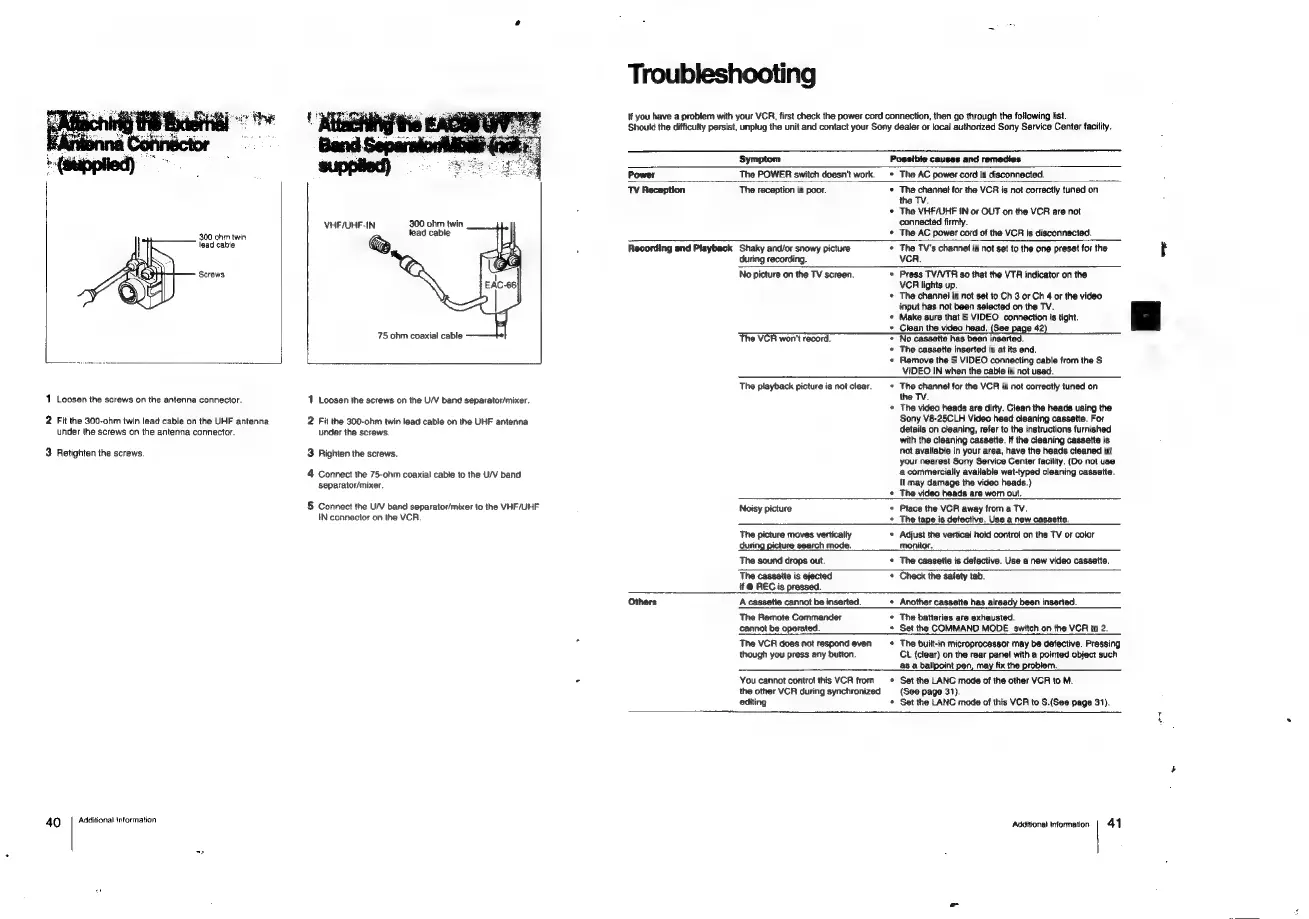
1
Loosen
the
screws
on
the
antenna
connector.
2
Fit
the
300-ohm
twin
lead
cable
on
the
UHF
antenna
under
the
screws
on
the
antenna
connector.
3.
Retighten
the
screws.
4Q
|
Additional
intormation
1
Loosen
the
screws
on
the
U/V
band
separator/mixer.
2
Fit
the
300-ohm
twin
lead
cable
on
the
UHF
antenna
under
the
screws.
3
Righten
the
screws.
4
Connect
the
75-ohm
coaxial
cable
to
the
U/V
band
separator/mixer.
5
Connect
the
U/V
band
separator/mixer
to
the
VHF/UHF
IN
connector
on
the
VCR.
Troubleshooting
If
you
have
a
problem
with
your
VCR,
first
check
the
power
cord
connection,
then
go
through
the
following
list.
Should
the
difficulty
persist,
unplug
the
unit
and
contact
your
Sony
dealer
or
local
authorized
Sony
Service
Center
facility.
Symptom
Possible
causes
and
remedies
The
POWER
switch
doesn’t
work.
*
The
AC
power
cord
is
disconnected.
TV
Reception
The
reception
is
poor.
*
The
channet
for
the
VCR
is
not
correctly
tuned
on
the
TV.
*
The
VHF/UHF
IN
or
OUT
on
the
VCR
are
not
connected
firmly.
¢
The
AC
power
cord
of
the
VCR
is
disconnected,
Recording
and
Playback
Others
Shaky
and/or
snowy
picture
*
The
TV's
channel
is
not
set
to
the
one
preset
for
the
rt
during
recording.
VCR.
No
picture
on
the
TV
screen.
*
Press
TV/VTR
so
that
the
VTR
indicator
on
the
VCR
lights
up.
*
The
channel
is
not
set
to
Ch
3
or
Ch
4
or
the
video
input
has
not
been
selected
on
the
TV.
*
Make
sure
that
S
VIDEO
connection
is
tight.
+
Clean
the
video head,
(See
page
42)
*
No
cassette
has
been
inserted.
*
The
cassette
inserted
is
at
its
end.
«
Remove
the
S
VIDEO
connecting
cable
from
the
S
VIDEO
IN
when
the
cable
is
not
used.
The
VCR
won't
record.
The
playback
picture
is
not
clear.
*
The
channel
for
the
VCR
is
not
correctly
tuned
on
the
TV.
+
The
video
heads
are
dirty.
Clean
the
heads
using
the
Sony
V8-25CLH
Video
head
cleaning
cassette.
For
details
on
cleaning,
refer
to
the
instructions
furnished
with
the
cleaning
cassette.
If
the
cleaning
cassette
is
not
available
in
your
area,
have
the
heads
cleaned
at
your
nearest
Sony
Service
Center
facility.
(Do
not
use
a
commercially
available
wet-typed
cleaning
cassette.
It
may
damage
the
video
heads.)
*
The
video
heads
are
worn
out.
Noisy
picture
*
Place
the
VCR
away
from
a
TV.
+
The
tape
is
detective.
Use
a
new
cassette.
The
picture
moves
vertically
*
Adjust
the
vertical
hold
contro!
on
the
TV
or
color
during
picture
search
mode.
monitor.
The
sound
drops
out.
*
The
cassette
is
defective.
Use
a
new
video
cassette.
The
cassette
is
ejected
¢
Check
the
safety
tab.
if
@
REC
is
pressed.
A
cassette
cannot
be
inserted.
+
Another
cassette
has
already
been
inserted.
The
Remote
Commander
*
The
batteries
are
exhausted.
cannot
be
operated.
*
Set
the
COMMAND
MODE
switch
on
the
VCR
to
2.
The
VCR
does
not
respond
even
¢
The
built-in
microprocessor
may
be
defective.
Pressing
though
you
press
any
button.
CL
(clear)
on
the
rear
panel
with
a
pointed
object
such
as
a
ballpoint
pen,
may
fix
the
problem.
You
cannot
control
this
VCR
from
Set
the
LANC
mode
of
the
other
VCR
to
M.
the
other
VCR
during
synchronized
{See
page
31).
editing
*
Set
the
LANC
mode
of
this
VCR
to
S.(See
page
31).
ot
Additional
Information
|
41

Related product manuals