FMP-X10 14
SECTION 2 - DISASSEMBLY/PART NUMBER INFORMATION
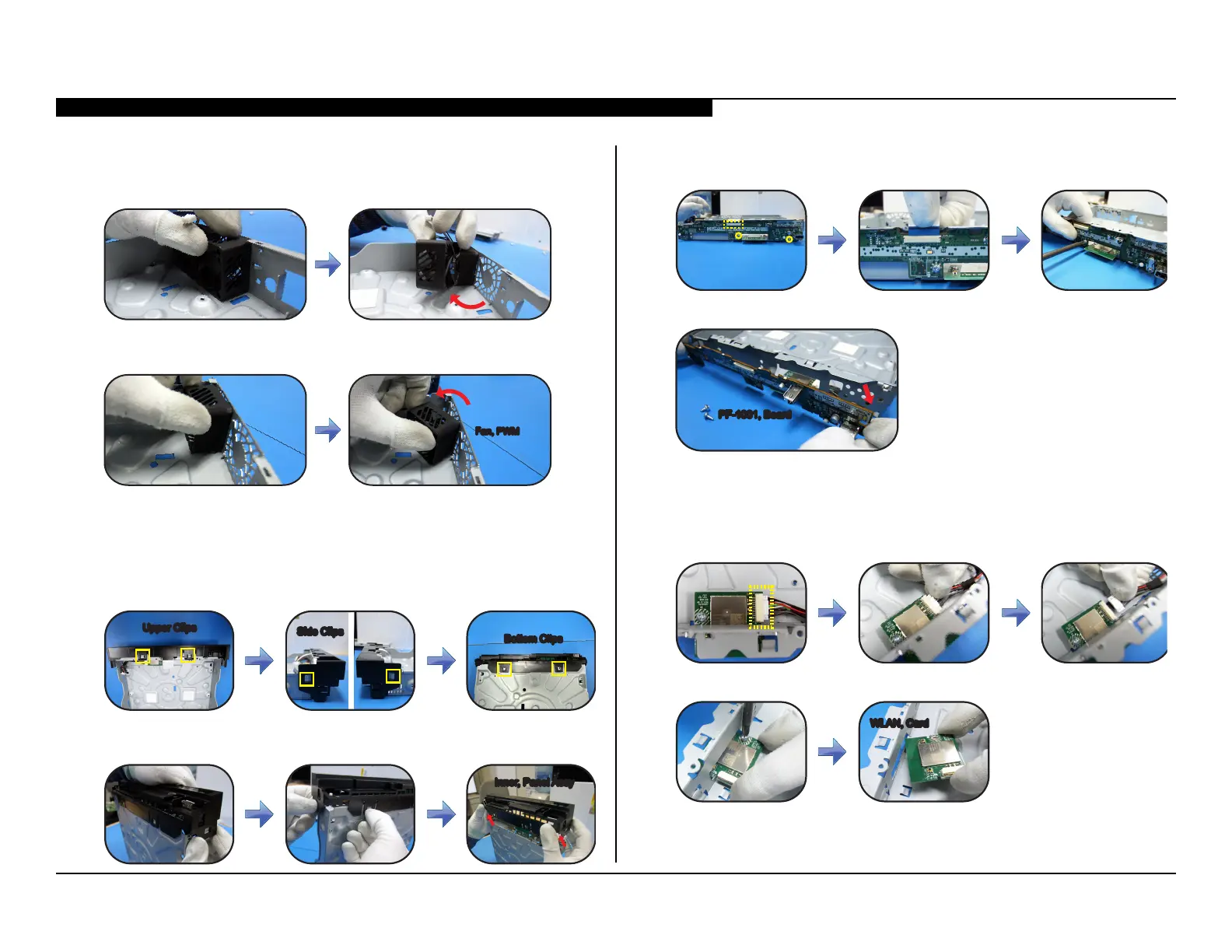
REMOVING THE FANS
1. Locate the rst Fan, PWM and slide it right as shown to detach from
the Main Chassis.
2. Locate the second Fan, PWM and slide it left as shown to detach from
the Main Chassis.
Fan, PWMFan, PWM
REMOVING THE INNER PANEL ASSEMBLY
1. Locate all Upper, Side and Bottom clips from the Inner Panel Assembly.
Upper ClipsUpper Clips
Side ClipsSide Clips
Bottom Clips
Bottom Clips
2. Unclamp all the clips shown above and lift the Inner Panel Assembly
to detach.
Inner, Panel AssyInner, Panel Assy
REMOVING THE PF-1001 BOARD
1. Locate and remove the LVDS Cable and 2 screws.
2. Remove the PF-1001, Board as shown in the illustration.
PF-1001, Board
PF-1001, Board
REMOVING THE WIRELESS LAN CARD
1. Locate and disconnect 1 connector from the Wireless LAN Card.
2. Remove 1 screw and lift the Wireless LAN Card as shown to detach.
WLAN, CardWLAN, Card



 To Next Page