FMP-X10 15
SECTION 2 - DISASSEMBLY/PART NUMBER INFORMATION
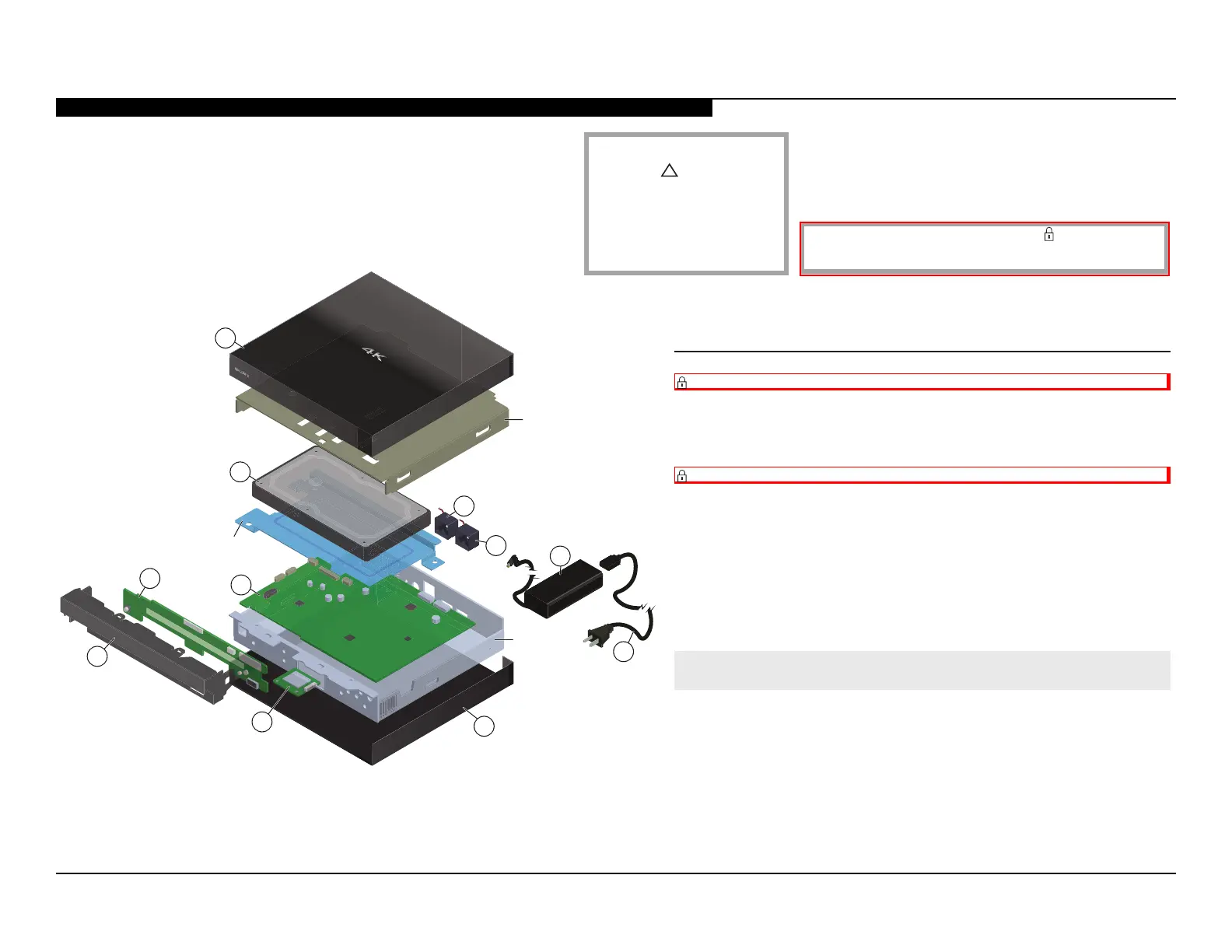
EXPLODED VIEW
1
2
3
4
5
6
7
8
9
10
10
*TOP SHIELD
*HDD
BRACKET
*MAIN
CHASSIS
1 X-2589-881-1 TOP COVER ASSEMBLY
2 A-2058-048-A INSTALLED HDD (X10) (S)
REPLACE THE HDD WHEN REFUBRISHING THE 4K MEDIA PLAYER.
(BECAUSE THE HDD CANNOT BE RESTORED TO
DEFAULT CONDITION).
3 A-2058-049-A SAL-1001 BOARD, COMPLETE
AFTER REPLACING THE SAL-1001 BOARD, YOU MUST UPDATE
THE SOFTWARE TO THE LATEST VERSION.
4 A-2054-780-A PF-1001 BOARD, MOUNTED
5 X-2589-880-1 INNER PANEL ASSEMBLY
6 1-458-723-11 WIRELESS LAN CARD
7 X-2589-879-1 BOTTOM COVER ASSEMBLY
!
8 1-838-955-41 POWER SUPPLY CORD
!
9 1-492-732-14 AC ADAPTOR (85W)
10 1-855-219-11 FAN, PWM
REF. NO. PART NO. DESCRIPTION
Components not identied by a part number or description
are not stocked because they are seldom required for routine
service.
The component parts of an assembly are indicated by the reference numbers in
the far right column of the parts list and within the dotted lines of the diagram.
NOTE: The components identied by
shading and
!
or dotted Line with
mark on the schematic diagrams and in
the part list are critical to safe operation.
Replace these components with SONY parts
whose part numbers appear as shown in
this manual or in supplements published
by SONY.
* Reinstall the Top Shield, HDD Bracket
and Main Chassis when repairing
the 4K Ultra HD Media Player.
NOTE: The components identied by a red outline and a mark contain condential
information. Specic instructions must be adhered to whenever these components are
repaired and/or replaced. (See Appendix A)



 To Next Page