FMP-X10 18
SECTION 3 - UPDATES AND ADJUSTMENTS
UPDATING THE SOFTWARE
The latest Software version must be installed when a 4K Ultra HD Media
Player is in for service.
1. Download the latest Software update onto the USB memory drive.
2. Insert the USB memory drive with the Software update into the
USB input slot on the front of the 4K Ultra HD Media Player.
3. Wait until the “Preparing for Software Update” message appear on
the screen.
4. After the Software Update is completed, the message “Do you
want to enable Automatic Software Download?” will appear on
screen. Select “YES” to nish this process.
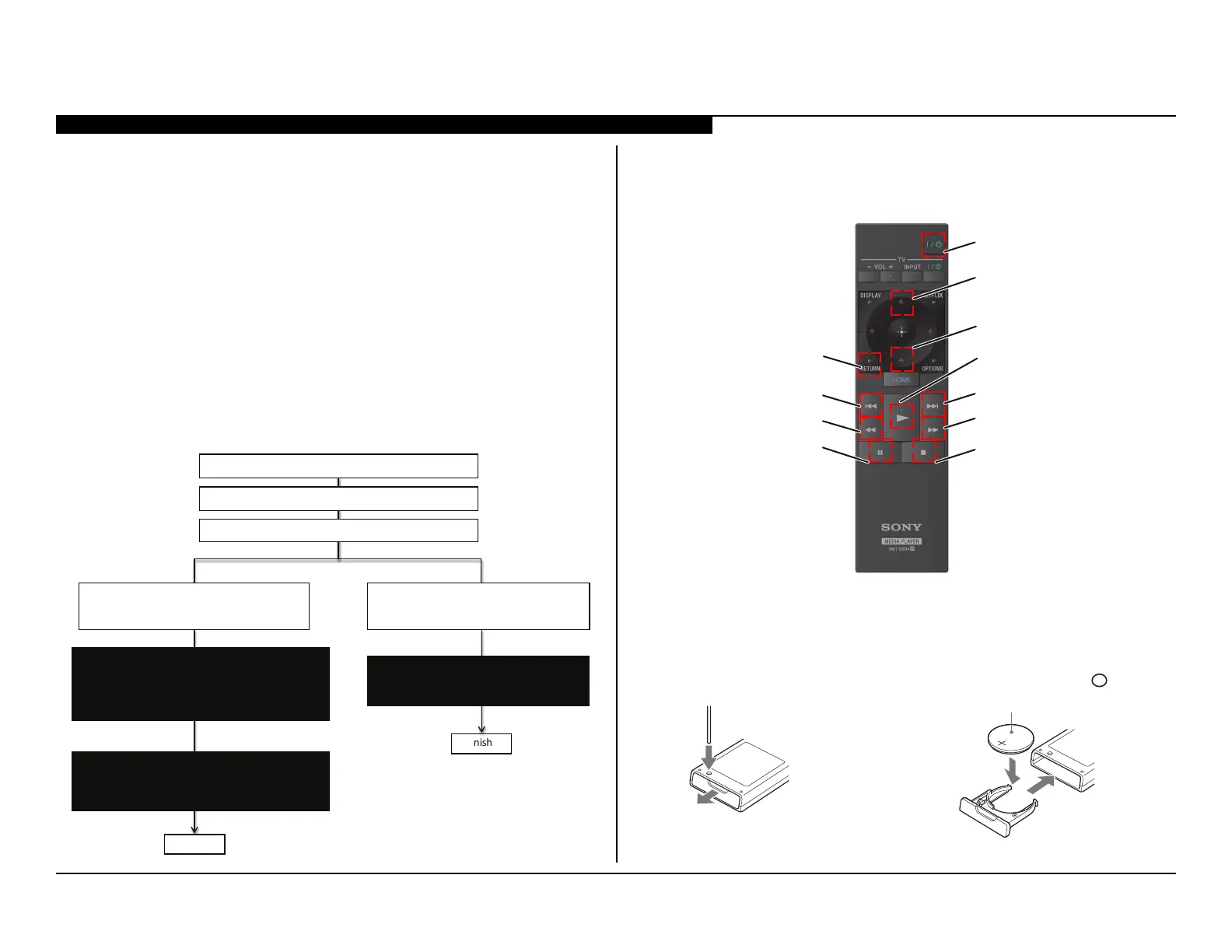
Refer to the following chart for detailed information:
1: Download USB image and unzip file.
2: Copy unzip file to USB memory root folder.
3: Insert USB in the Front USB port.
4: USB image is newer so version.
Automacally show message and start update.
Please follow direcons.
4: USB image is not newer so version.
Automacally show message and start update.
Please follow direcons.
5: finished
5: finished
Preparing for Soware Update.
During the soware update , the player will automacally restart.
Please do not remove the USB device unl a message displays indicang
the update is complete. The update may take up to 5 minutes to complete.
Copying USB update file. Please wait…
The Soware Update is complete.
Some user sengs may have changed during the update.
Do you want to enable Automac Soware Download?
The System Soware is up to date.
Please remove the USB device and select ”OK ”
to exit.
REMOTE COMMANDER FUNCTIONS
Please refer to the following illustrations for detailed functions
of the Remote Commander.
“POWER”
“UP”
“DOWN”
“RETURN”
“STOP”
“PAUSE”
“NEXT”
“BACK”
“PLAY”
“CUE”
“REW”
REPLACING THE REMOTE COMMANDER BATTERY
Follow the steps shown below to Replace the Remote Commander battery.
Press the battery compartment using a thing,
sharp object such as the point of a pen
to pull out the compartment.
Replace the old battery with a new one.
Insert the new battery with the side
+
facing up.
CR2032 battery manufactured by Sony.
3
Close the battery compartment.



 To Next Page