EasyManua.ls Logo

Sony HCD-CP11 - 5 Electrical Confirmations; ADJUSTMENTS. -1-Sss-Ssssssseesssssseesscssssesscsssseesecsssseesesssssens

Sony HCD-CP11
57 pages
Print Icon
To Next Page IconTo Next Page
To Previous Page IconTo Previous Page
Loading...
SECTION
5
ELECTRICAL
CONFIRMATIONS
AND
ADJUSTMENTS
DECK
SECTION
Note:
Confirm
each
contents
of
this
section
first
of
all.
If
the
results
are
not
satisfied,
do
the
adjustment.
1.
Demagnetize
the
record/playback
head
with
a
head
demagnetizer.
2.
Do
not
use
a
magnetized
screwdriver
for
the
adjustments.
3.
After
the
adjustments,
apply
suitable
locking
compound
to
the
parts
adjust.
4.
The
adjustments
should
be
performed
with
the
rated
power
supply
voltage
unless
otherwise
noted.
5.
The
adjustments
should
be
performed
in
the
order
given
in
this
service
manual.
(As
a
general
rule,
playback
circuit
adjustment
should
be
completed
before
performing
recording
circuit
adjustment.)
6.
The
adjustments
should
be
performed
for
both
L-CH
and
R-
CH.
7.
Switches
and
controls
should
be
set
as
follows
unless
otherwise
specified.
¢
Test
Tape
Tape
P-4-A100
|
10
kHz,
-10
dB
Azimuth
Adjustment
WS-48B
|
3kHz,0dB
P-4-L300
315
Hz,
0
dB
|
Tape
Speed
Adjustment
Level
Adjustment
Record/Playback
Head
Azimuth
Adjustment
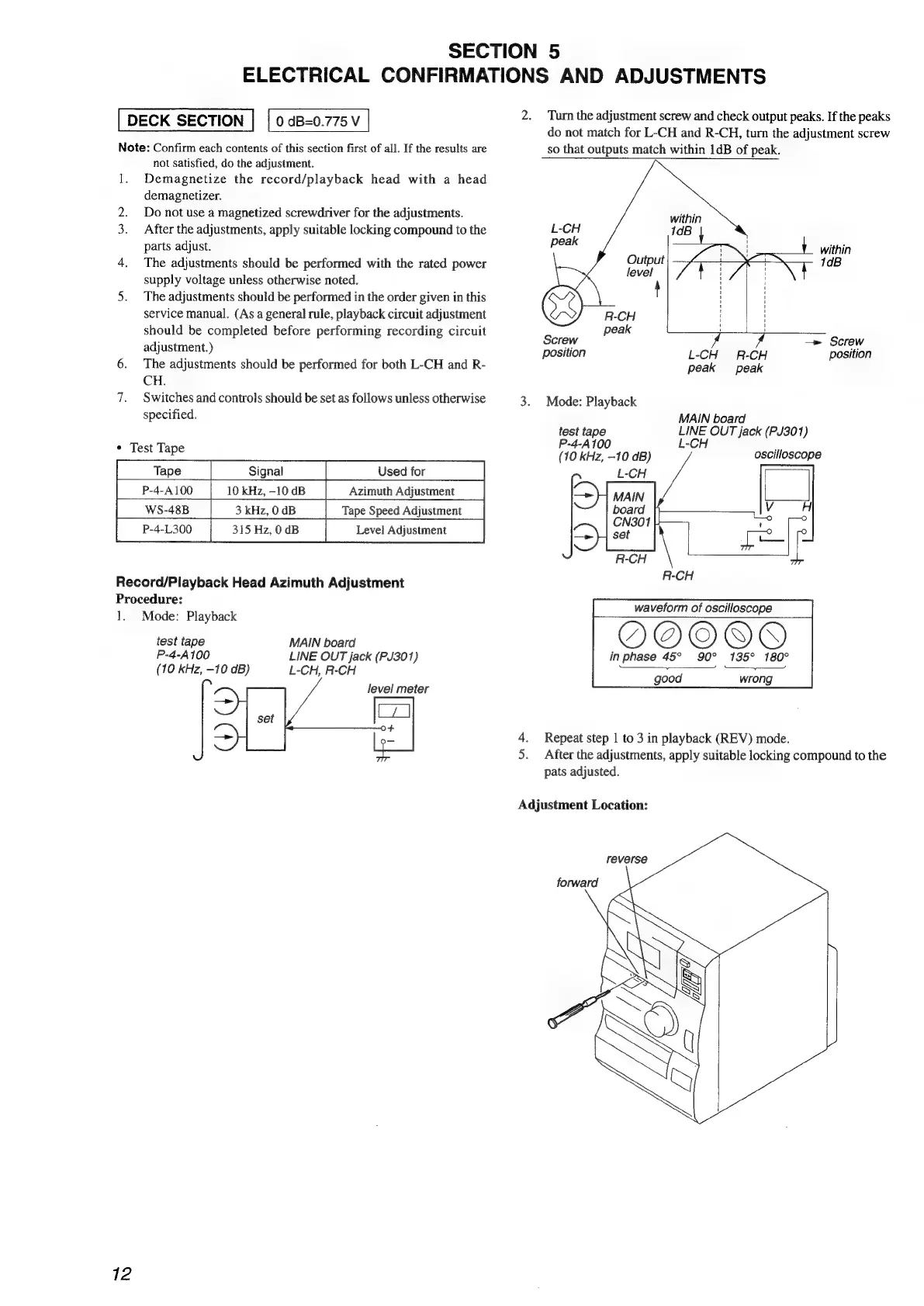
Procedure:
1.
Mode:
Playback
test
tape
MAIN
board
P-4-A100
LINE
OUT
jack
(PJ301)
(10
kHz,
-10
dB)
L-CH,
R-CH
level
meter
—_
ia
Cy)
Oo+
—_
12
2.
Turn
the
adjustment
screw
and
check
output
peaks.
If
the
peaks
do
not
match
for
L-CH
and
R-CH,
turn
the
adjustment
screw
so
that
outputs
match
within
1dB
of
peak.
within
n
10B
R-CH
peak
1
Screw
—»
Screw
position
L-CH
R-CH
position
peak
peak
3.
Mode:
Playback
MAIN
board
test
tape
LINE
OUT
jack
(PJ301)
P-4-A100
L-CH
;
oscilloscope
(10
kHz,
-10
dB)
7
waveform
of
oscilloscope
in
phase
45° 90°
135° 180°
good
wrong
=
Repeat
step
1
to
3
in
playback
(REV)
mode.
After
the
adjustments,
apply
suitable
locking
compound
to
the
pats
adjusted.
uM
Adjustment
Location:
reverse