EasyManua.ls Logo

Sony HCD-CP11 - MODE -.1-:-S+V-Sssssesssosessossesessseessssseccssteesenssenee

Sony HCD-CP11
57 pages
Print Icon
To Next Page IconTo Next Page
To Previous Page IconTo Previous Page
Loading...
SECTION
4
SERVICE
MODE
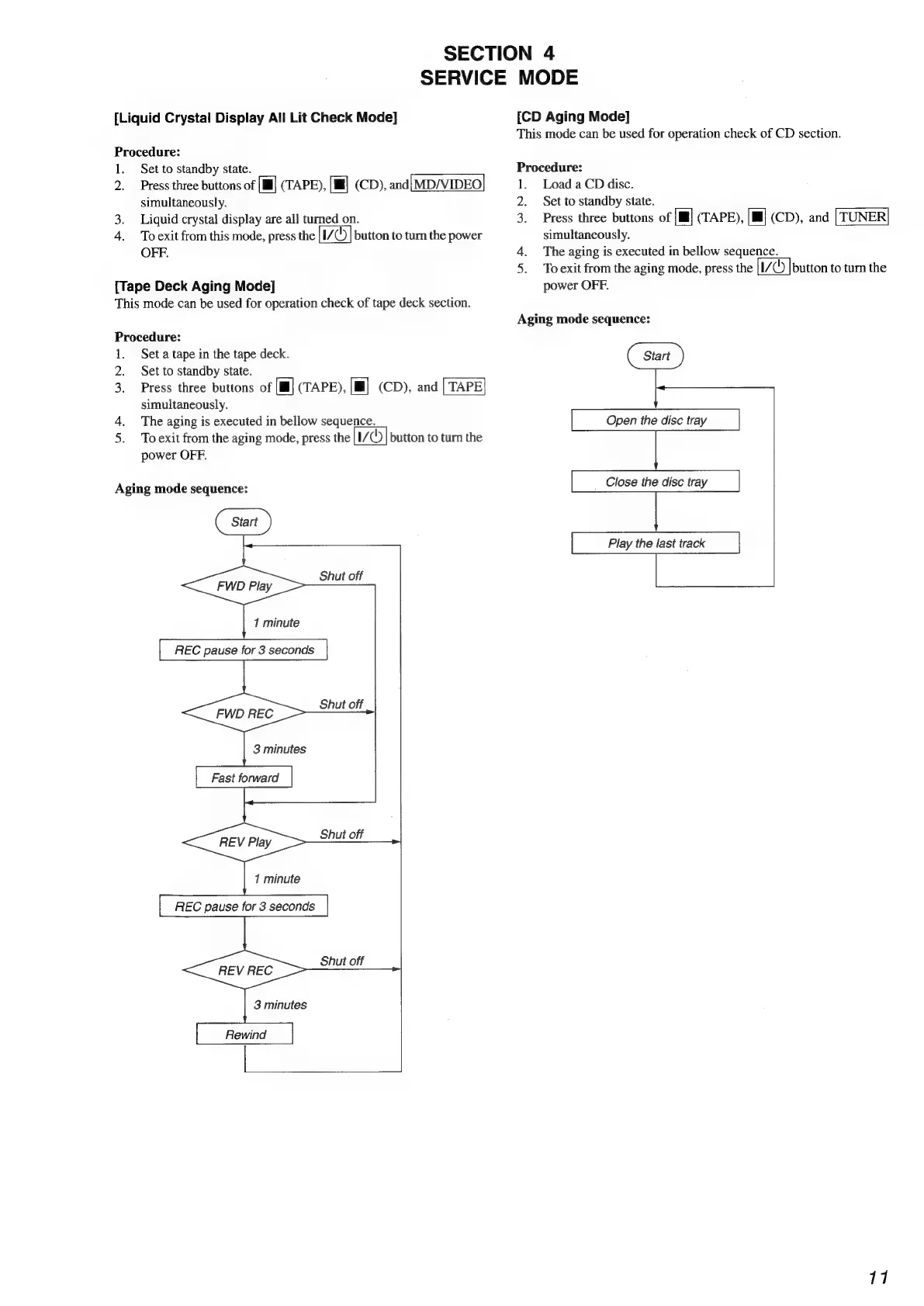
[Liquid Crystal
Display
All
Lit
Check
Mode]
Procedure:
1.
2
3.
4.
Set
to
standby
state.
Press
three
buttons
of
[Ill]
(TAPE),
[ill]
(CD),
and[MD/VIDEO]
simultaneously.
Liquid
crystal
display
are
all
turned
on.
To
exit
from
this
mode,
press
the
button
to
turn
the
power
OFF.
[Tape
Deck
Aging
Mode]
This
mode
can
be
used
for
operation
check
of
tape
deck
section.
Procedure:
1.
Set
a
tape
in
the
tape
deck.
2.
Set
to
standby
state.
3.
Press
three
buttons
of
[Il]
(TAPE),
[Ml]
(CD),
and
simultaneously.
4.
The
aging
is
executed
in
bellow
sequence.
5.
Toexit
from
the
aging
mode,
press
the
|I/
©)
|
button
to
turn
the
power
OFF.
Aging
mode
sequence:
Shut
off
1
minute
REC
pause
for
3
seconds
3
minutes
Fast
forward
Shut
off
1
minute
[
REC
pause
for
3
seconds
|
Shut
off
3
minutes
[CD
Aging
Mode]
This
mode
can
be
used
for
operation
check
of
CD
section.
Procedure:
1.
Load
aCD
disc.
2.
Set
to
standby
state.
3.
Press
three
buttons
of
{il]
(TAPE),
[Ill]
(CD),
and
simultaneously.
4.
The
aging
is
executed
in
bellow
sequence.
5.
Toexit
from
the
aging
mode,
press
the
[1/7
|button
to
turn
the
power
OFF.
Aging
mode
sequence:
Open
the
disc
tray
Close
the
disc
tray
Play
the
last
track
17