6
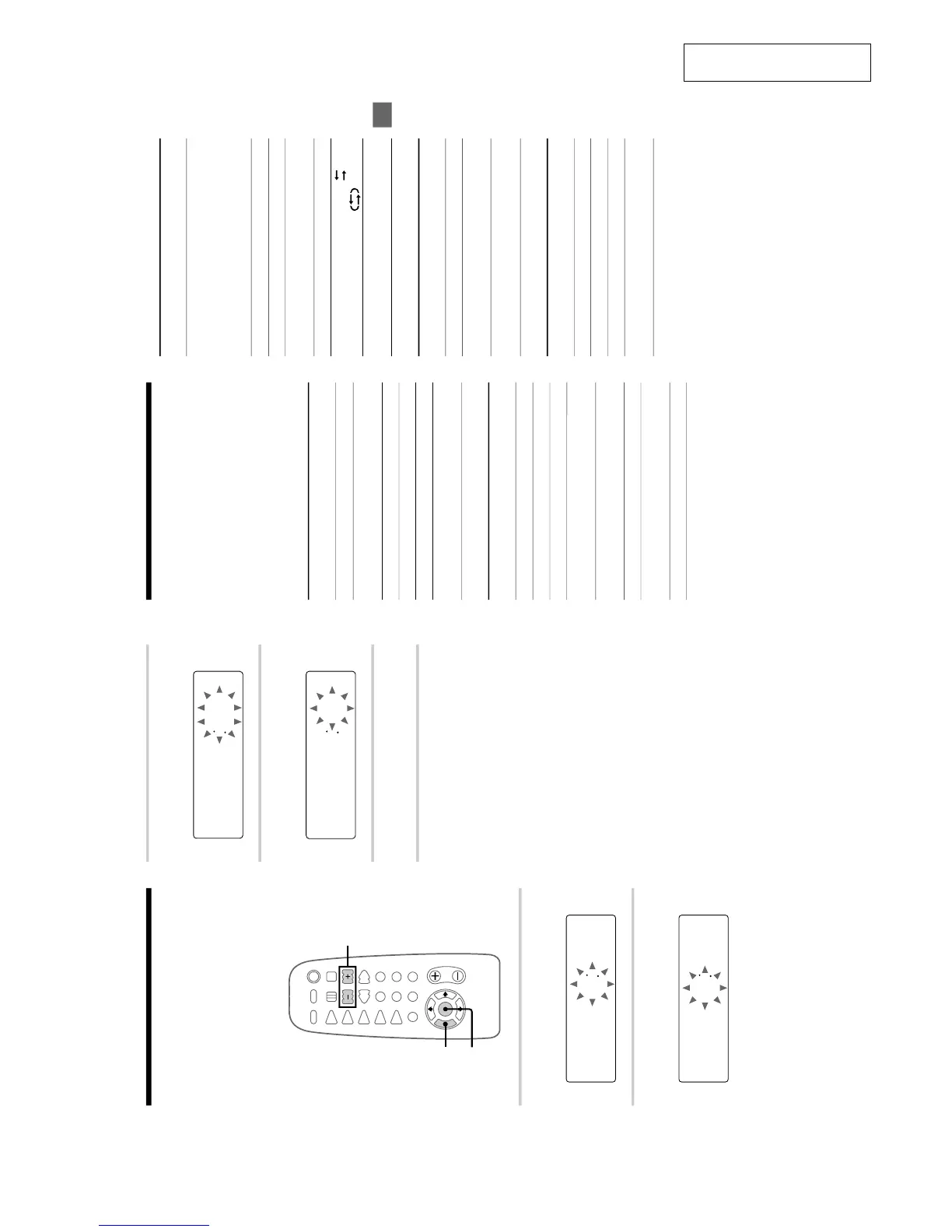
Step 2: Setting the time
Before you can use the system’s timer functions,
set the internal clock.
The clock uses a 24-hour system on the European
model, and a 12-hour system on other models.
The 24-hour system is used here for illustration
purposes.
3,5
1
2,4
1
Press TIMER SET.
The hour indication flashes.
000
2
Press l/L repeatedly to set the
hour.
1300
3
Press ENTER.
The minute indication flashes.
1300
4
Press l/L repeatedly to set the
minute.
1310
5
Press ENTER.
The clock starts working.
To reset the system clock
You can reset the system clock when the system is
on.
1 Press TIMER SET.
2 Press l/L repeatedly until
“SET CLOCK” appears, then press ENTER.
3 Repeat step 2 to 5 in “Step 2: Setting the time”.
Tip
If you make a mistake, start over from step 1.
33
Additional Information
Parts identification for
the remote
You can also operate the system with the supplied
remote.
Buttons marked with
“*” are provided only on the
remote.
TUNER
Remote
Button(s)
Function
TUNER/BAND
Selects FM or AM.
CD
Remote
Button(s)
Function
CD H
s Stops playback.
S Pauses playback.
l/L Selects a track (AMS: Automatic
Music Sensor).
j/J Locates a desired point in a
track.
CD REPEAT Repeats playback.
TAPE
Remote
Button(s)
For operating
the
Function
TAPE A (or B)
nN
Deck A or B Starts playback.
Each time you
press this button,
the tape reverses
direction.
s Deck A or B Stops playback.
S Deck A or B Pauses playback.
j/J Deck A or B Fast-forwards or
rewinds.
z REC Deck B Records to tapes.
Remote
Button(s)
Function
?/1 Turns on or off the system.
VOL +/– Adjusts the volume.
FUNCTION Selects the source.
TUNING MODE Selects “AUTO”, “PRESET” or
“MANUAL”.
MEMORY* Presets a station.
STEREO/MONO* Selects “STEREO” or “MONO”.
l/L Selects a preset number.
j/J Scans for a station or selects a
preset station.
Starts playback.
PLAY MODE Selects Shuffle, Program or
Normal Play.
DISPLAY* Changes the front panel display.
DIR MODE* Deck A or B Selects “
”,
“
” or “R”.
DOLBY NR* Deck A or B Turns on or off the
Dolby NR system.
TIMER
Remote
Button(s)
Function
SLEEP* Selects a sleep time.
TIMER SET* Sets the time, Daily Timer or
REC Timer.
TIMER SELECT* Checks the settings and turns on
or off the timer.
OTHERS
DSG Generates a more dynamic
sound.


 To Next Page