10
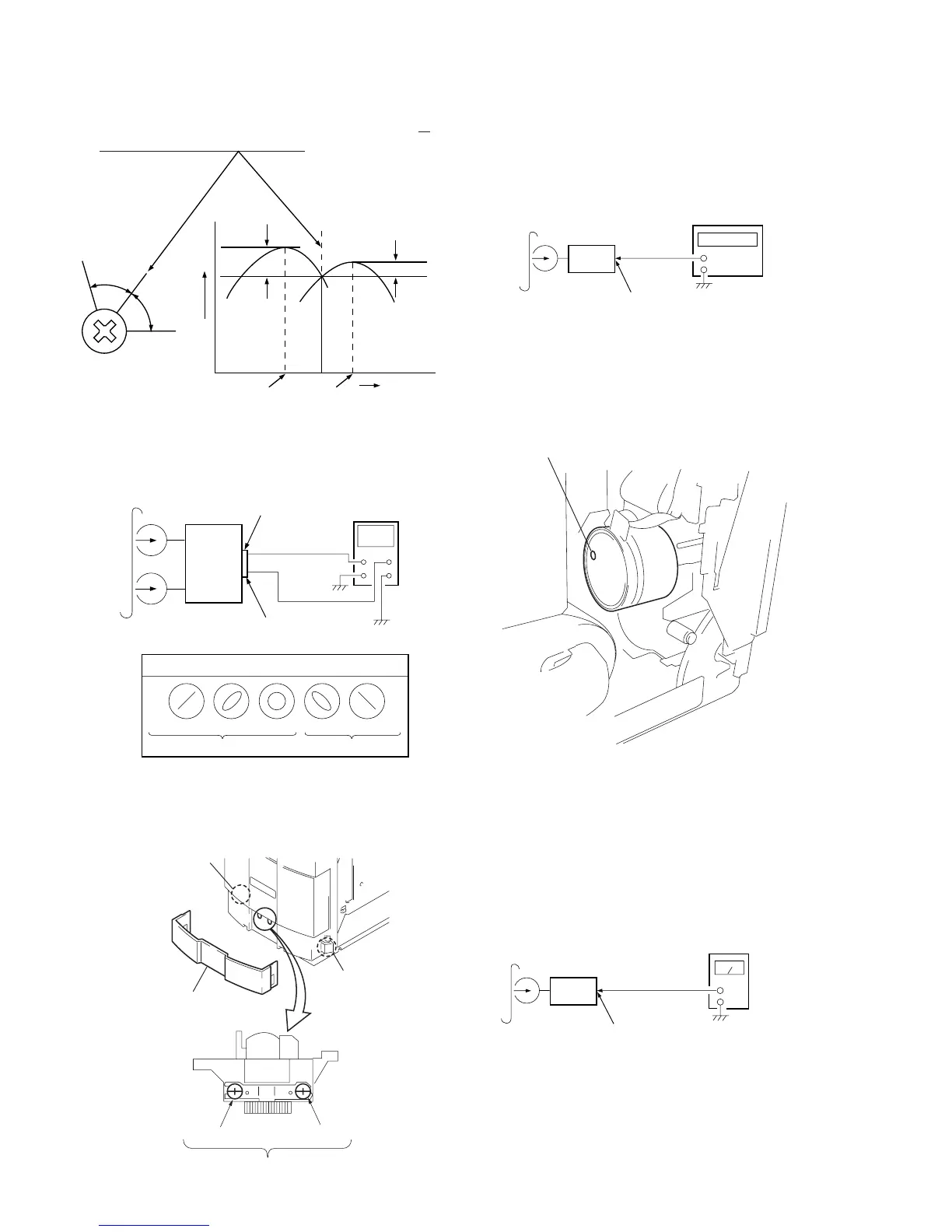
2. Turn the adjustment screw and check output peaks. If the peaks
do not match for L-CH and R-CH, turn the adjustment screw so
that outputs match within 1 dB of peak.
4. After the adjustments, apply suitable locking compound to the
parts adjusted.
Adjustment Location :
Tape Speed Adjustment
Procedure :
Mode : Playback
3. Mode : Playback
1. Insert the WS-48B into the deck, and playback.
2. Adjust the Control at the bottom hole of the motor (M901) so
that the frequency counter reading becomes 3000 ± 90 Hz.
Adjustment Location : MOTOR (M901)
oscilloscope
MD OUT (JK301)
set
MD OUT (JK301)
test tape
P-4-A100
(10kHz, –10dB)
L
R
Waveform of oscilloscope
good
wrong
in phase
45
°
90
°
135
°
180
°
L-CH
peak
R-CH
peak
screw
position
output
level
within
1dB
L-CH
peak
R-CH
peak
screw
position
within 1dB
MD OUT (JK301)
set
test tape
P-4-L300
(315Hz, 0dB)
Deck is VR703 (L-CH) and VR704 (R-CH)
so that adjustment within the following adjustment level.
Adjustment level :
Playback level: 301.5 to 338.3 mV (–8.2 to –7.2 dB) level dif-
ference between the channels: within ±0.5 dB
Adjustment Location : TAPE PREAMP board
Sample Value of Wow and flutter
W.RMS (JIS) less than 0.3%
(test tape: WS-48B)
Playback Level Adjustment
Procedure :
Mode : Playback
Adjusting hole


 To Next Page