HCD-SHAKE5/SHAKE6D
14
[MODEL & DEST WRITE MODE]
This mode is used to set software model & destination.
This mode is only available when no permanent model &
destination is stored.
Procedure:
1. Press [OPTIONS] (SHAKE5) / [X] (SHAKE6D) button and
[FOOTBALL] button simultaneously and hold for 5 seconds.
2. Fluorescent indicator tube display will show “M XXXXX”.
3. Press [+ / ] (SHAKE5) / [+/PRESET+] (SHAKE6D) /
[‒ / ] (SHAKE5) / [‒/PRESET‒] (SHAKE6D) button to
select the model based on the set’s model.
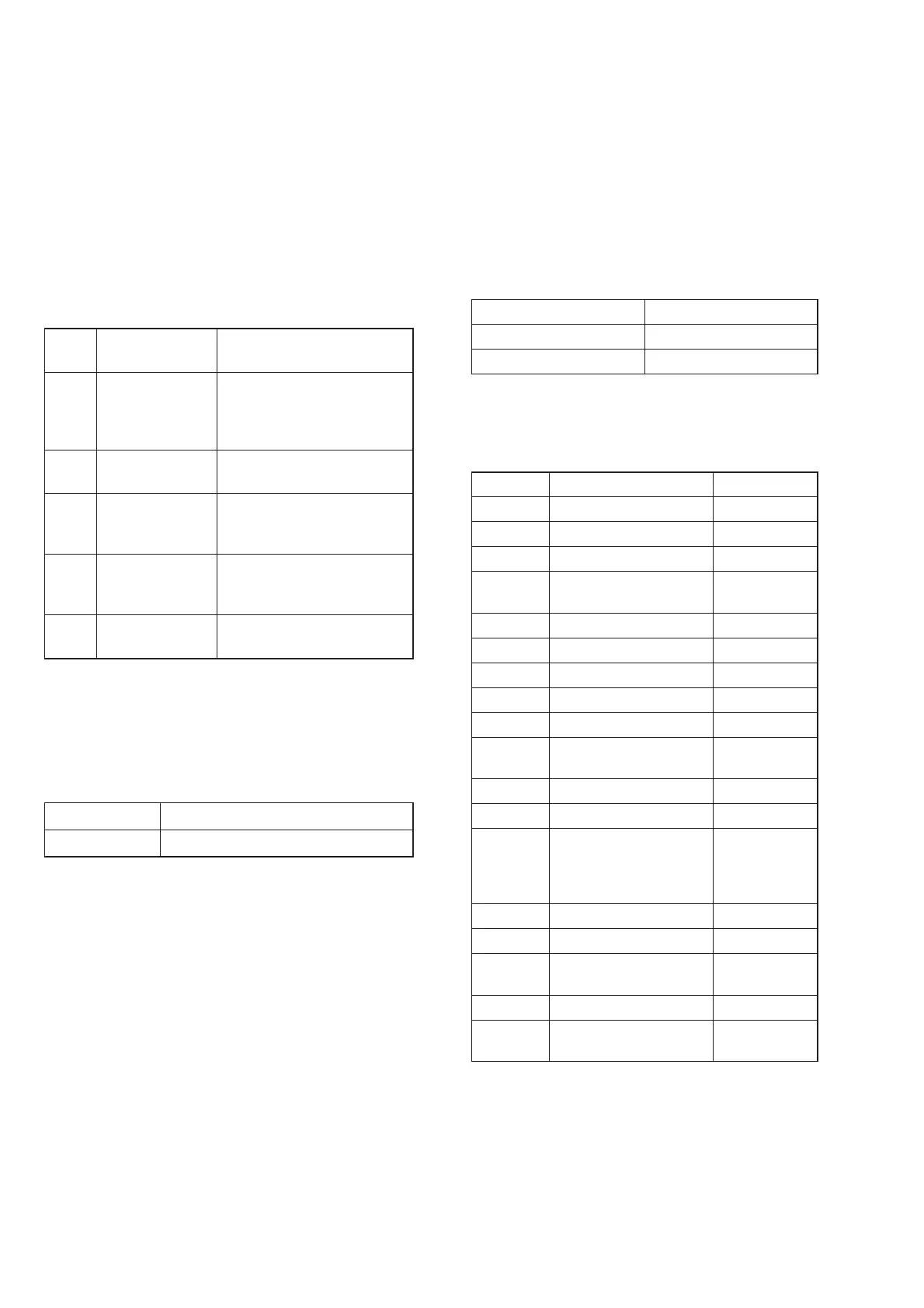
Product Code F. Tube display
STORM-JR-CD “M STORM-JR”
STORM-JR-DVD “M STORM-JRD”
4. Press [ENTER] button.
5. Fluorescent indicator tube display will show “D XXXXX”.
6. Press [+ / ] (SHAKE5) / [+/PRESET+] (SHAKE6D) /
[‒ / ] (SHAKE5) / [‒/PRESET‒] (SHAKE6D) button to
select the destination based on the set’s country.
Area Code Country F. Tube display
J1 Japan “D J”
JE1 Tourist “D JE”
U2/CA2 America, Canada “D NA”
CEL/CE1/
CE2
Europe (general) “D CE2”
CEK U.K. “D CEK”
RU1/RU3 Russia “D RU”
AU1 Australia “D AU”
CN1 China “D CN”
E12 India, Pakistan, Morocco “D E12”
E3/E93/
SA2/E15
Middle East, Africa
(South Africa), Iran
“D E3”
E4 Africa “D E12”
EA3 Saudi Arabia “D EA3”
HK1/
HK2/PL1/
SP1/SP2/
SP6/TH1
Hong Kong, Philippines,
Singapore, Malaysia,
Thailand
“D ASIA”
KR2 Korea “D KR”
TW2 Taiwan “D TW”
E2, E32,
E51, AR2
Latin America (general),
Chile, Peru, Argentina
“D LATIN”
BR1 Brazil “D BR”
MX2,
MX4
Mexico “D MX”
7. Press [ENTER] button to confi rm the selection.
8. “RESET” appears on the fl uorescent indicator tube. After that,
the fl uorescent indicator tube becomes blank for a while, and
the system is reset.
9. Mode in [PANEL TEST MODE] again to confi rm on the
model & destination.
[PROTECT KIND CHECK TEST MODE]
This mode is used to check types of protect occurred during
protector on.
Procedure:
1. During protection on, fl uorescent indicator tube shows blinking
message “PROTECT EXX” where “EXX” represent the error
code.
2. Press [] button and [‒ / ] (SHAKE5) / [‒/PRESET‒]
(SHAKE6D) button simultaneously.
3. Fluorescent indicator tube display will toggle between
“PROTECT” message and protector kind message display.
Below table explains on protector kind.
Error
Code
Protector
Message
Description
E01 “AMP OCP” The over current condition to
MOSFET occurs by defect of
MOSFET or defect of PS output
line.
E03 “POWER
SUPPLY”
Defect of power supply circuit
to AMP
E04 “DC DETECT” DC appears in SP terminal by
defect of AMP IC and MOS-
FET.
E05 “THERMISTOR” Unusual heat up of MOSFET by
improper assembly of heat sink,
destruction of MOSFET etc.
E06 “FAN BLOCK” Defect of DC FAN and DC FAN
driver circuit
To release from this mode:
Press [] button and [‒ / ] (SHAKE5) / [‒/PRESET‒]
(SHAKE6D) button simultaneously again or unplug & re-plug in
the power cord.
If speaker does not have output even if the set status is not in
PROTECT mode, the following defect might be possible:
Defects Possible cause
RESET defect Reset signal status from micom is not ‘H’.
If the PROTECT mode is “POWER SUPPLY”, there is possibility
of unusual power supply of any of the AMP IC or Pre-amplifi er.









 To Next Page