20
6 Service Mode
1. Indication method of the service menu
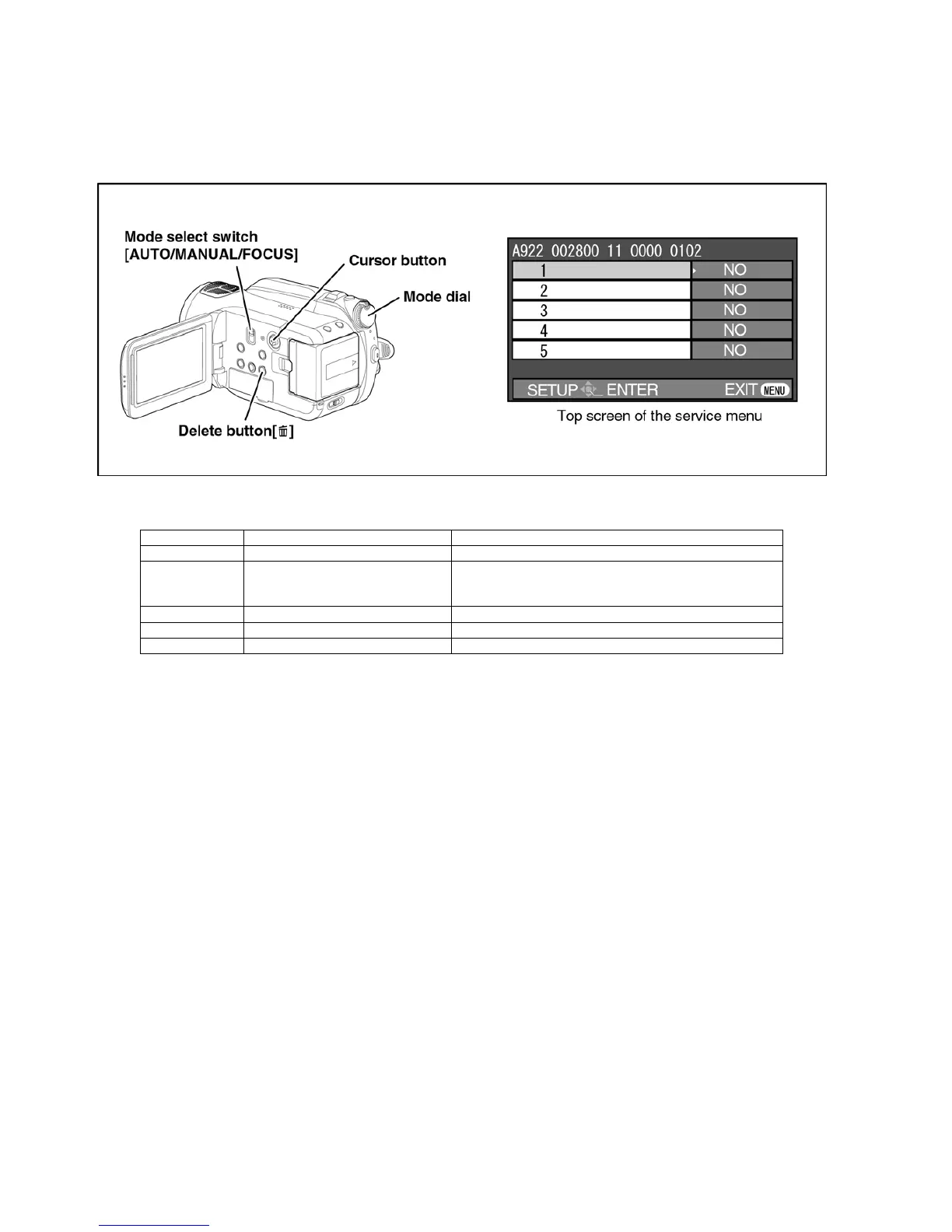
Set the mode dial “HDD Recording” mode.
2. While keep pressing the “[LEFT<] of cursor” button and “delete” button, hold down the Mode Select Switch towards to
“[FOCUS]” position for more than 3 seconds until the top screen of the Service Menu being displayed.
Service mode menu
NOTE:
Do not using service mode except above table of Service Menu.
3. End method of the top screen of the service menu
Push the menu button to end the service mode, and then POWER OFF.
Screen display Contents Function
1 Factory settings Function to throw a product up in a factory shipment state
2 Drive information display Fall detection frequency of HDD, Frequency that exceeds high-
est/lowest operation guarantee temperature and serial number
display
4 Lock search history indication Display an error cord for three histories saved in EEPROM
10 Self check execution Function to check self as for the state of HDD
14 HDD hardware test Function to confirm state of HDD hardware


 To Next Page