22
6.2. Lock Search History Indication
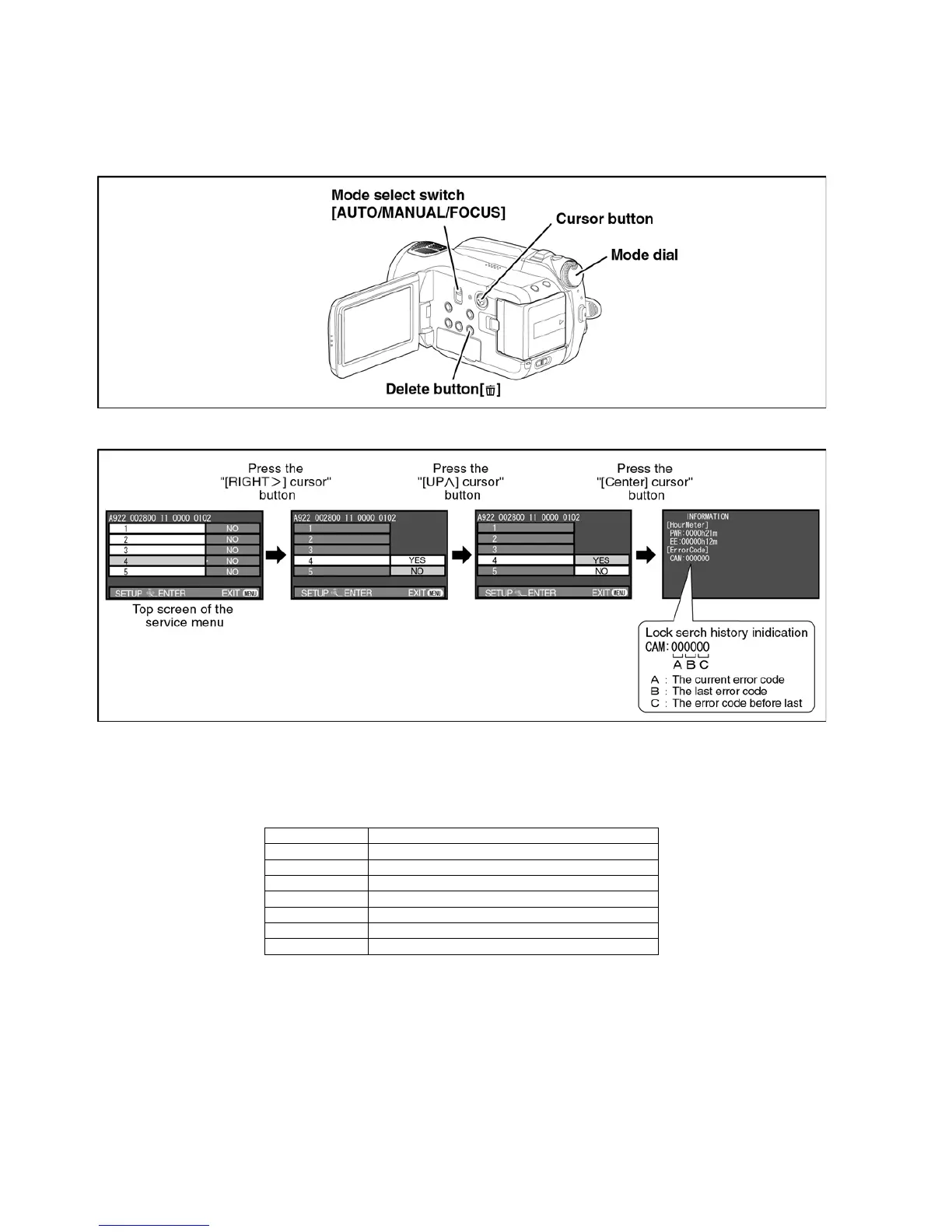
1. Set the mode dial “HDD Recording” mode.
2. While keep pressing the “[LEFT<] of cursor” button and “delete” button, hold down the Mode Select Switch towards to
“[FOCUS]” position for more than 3 seconds until the top screen of the Service Menu being displayed.
3. Select [ 4 ] Lock search history indication.
Operation specifications
Indication contents
• Lock search history indication
Display the camera system error cord for three histories saved in EEPROM.
• The error cord contents which are displayed
Lock search history indication is finished by POWER OFF.
Error code Function
51 Focus control is abnormal
52 Zoom control is abnormal
53 OIS lens control is abnormal
71 Lens cover open/close is abnormal
72 Cooling fan is abnormal
73 High temperature is abnormal
33 Communication between camera to ARM is abnormal


 To Next Page