45
10 Factory Setting
10.1. HOW TO TURN ON THE FACTORY SETTINGS?
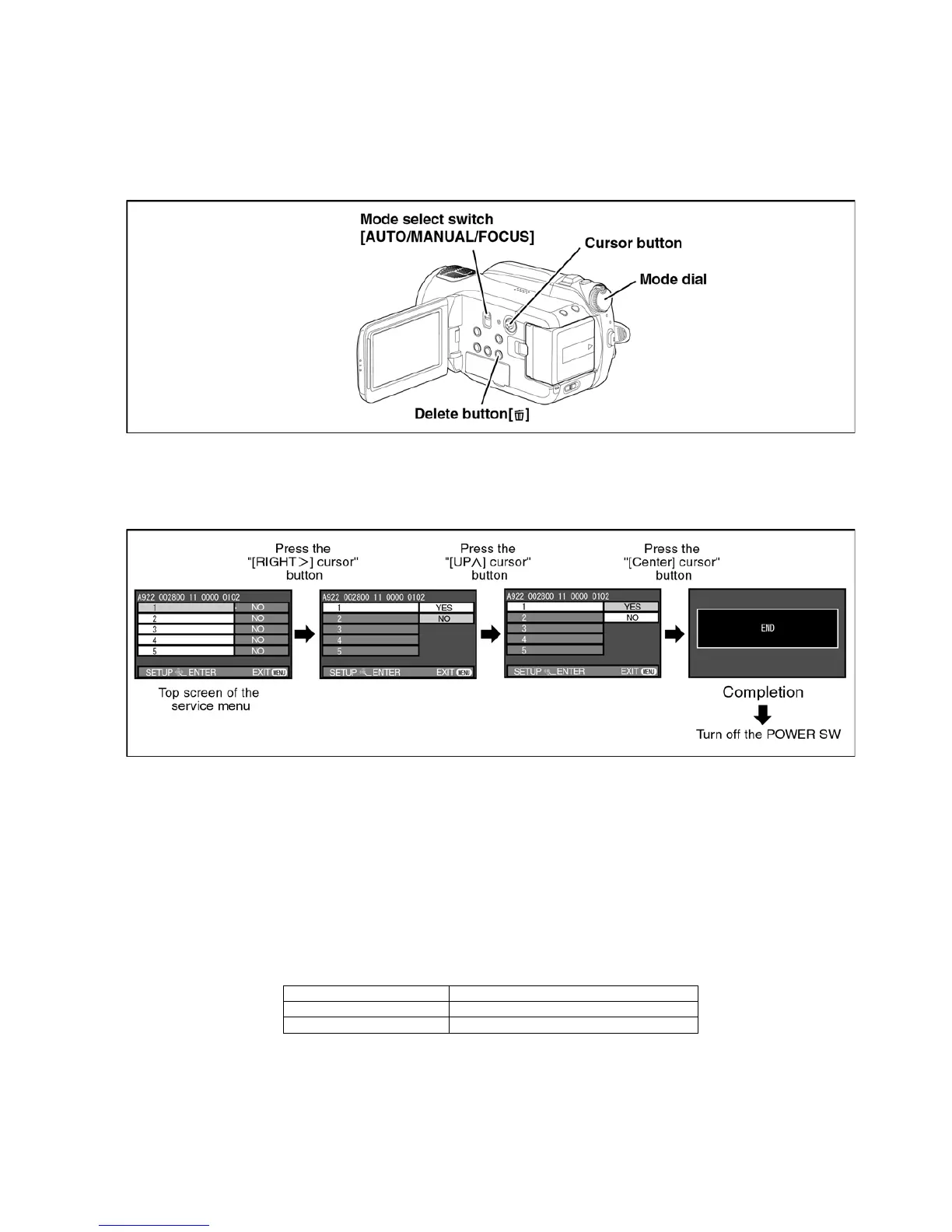
1. Set the mode dial “HDD Recording” mode.
2. While keep pressing the “[LEFT<] of cursor” button and “delete” button, hold down the Mode Select Switch towards to
“[FOCUS]” position for more than 3 seconds until the top screen of the Service Menu being displayed.
3. Under the condition of the Item No.”1” is yellow high lighted, press the “[RIGHT>] of cursor“ button.
4. By pressing the “[UP ^] of cursor” button, then press the “[center] of cursor” button.
5. After few seconds “END” is displayed on LCD monitor. Cutting of battery connection or AC power supply connection as a
completion of the “FACTORY SETTINGS”.
10.2. WHAT IS THE FACTORY SETTINGS?
The factory settings clean up and/or refresh the following settings.
1. The OSD MENU setting data.
2. Deletion only for all scene files in a card and format of the MPEG2 file system area.
3. Reset the folder number and file number of still pictures.
(Setting the folder number is 100, and file number is 0.)
4. Clear the mechanism lock information.
5. Clear the service mode information contents.
The setting position of factory settings:
Name Setting position
Mode select switch AUTO
Mode dial OFF



 To Next Page